Guide · WooCommerce, PrestaShop, Wix, Square, Squarespace, BigCommerce & Webflow
How to Use Your Google Shopping Feed for a Pinterest Catalog
If your products are already in Google Shopping, you've done most of the work a Pinterest catalog needs. Pinterest catalogs read the same kind of product feed Google does, with nearly the same field names, so the feed your store or plugin makes for Google can often become your Pinterest data source too.
This guide covers what carries over, the few things Pinterest does differently, how to add the feed in Pinterest, and what to do when your Google setup has no feed file to share.
Can Pinterest read a Google Shopping feed?
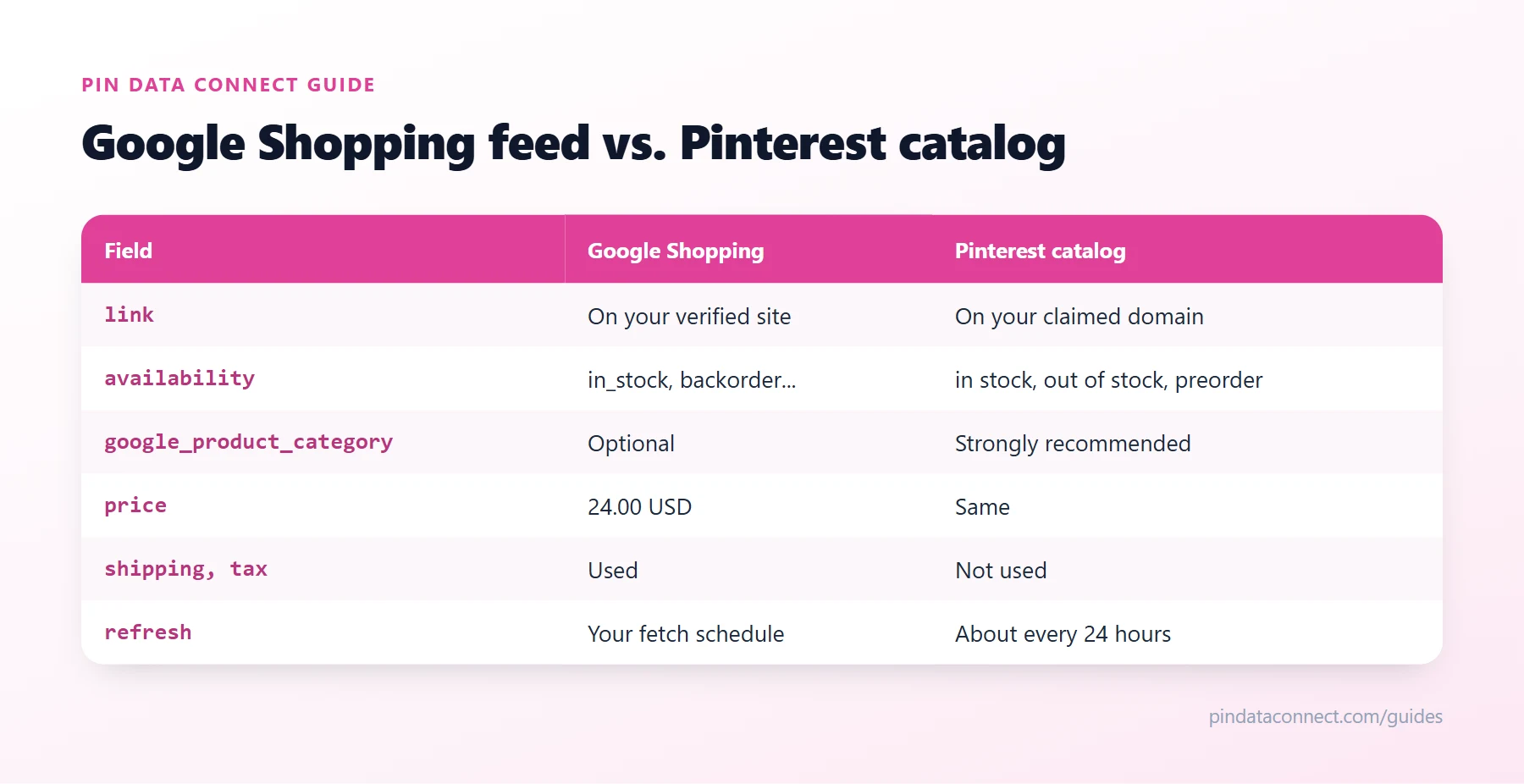
Usually, yes. Pinterest catalogs take CSV, TSV, and XML data sources, and Pinterest's field names - id, title, description, link, image_link, price, availability, google_product_category, item_group_id - are Google's. A Google feed file hosted at a URL can often be added to Pinterest as it is. When it fails, it's rarely the format; it's one of the details below.
What to check first
- A feed file at a URL. Pinterest needs a file it can download. Many store apps send products to Google through Google's API instead, with no file anywhere - if that's your setup, there's nothing to point Pinterest at (see below).
- Your claimed website. Verifying your site in Merchant Center doesn't carry over. Claim the same domain in your Pinterest business account - every product
linkmust be on it. - Availability values. Pinterest uses
in stock,out of stock, andpreorder. If your feed sends Google'sbackorder, map it to one of those. - Prices with a currency.
24.00 USD, not$24. Google feeds almost always do this already. - A Google product category. Google can assign one itself, so many Google feeds leave it out, but Pinterest uses it to group and target your products. Add it if yours is missing.
- Google-only fields. Shipping, tax, and similar fields mean nothing to Pinterest. Check the data source's report after the first import for anything it flags.
Add it to Pinterest
- In your Pinterest business account, open Catalogs and add a data source.
- Paste the feed's URL, with its username and password if it's protected, and set its format, currency, and country.
- Pinterest checks the feed, creates your Product Pins, and then re-reads it about once every 24 hours - every change you make for Google reaches Pinterest the next day.
When your Google feed isn't enough
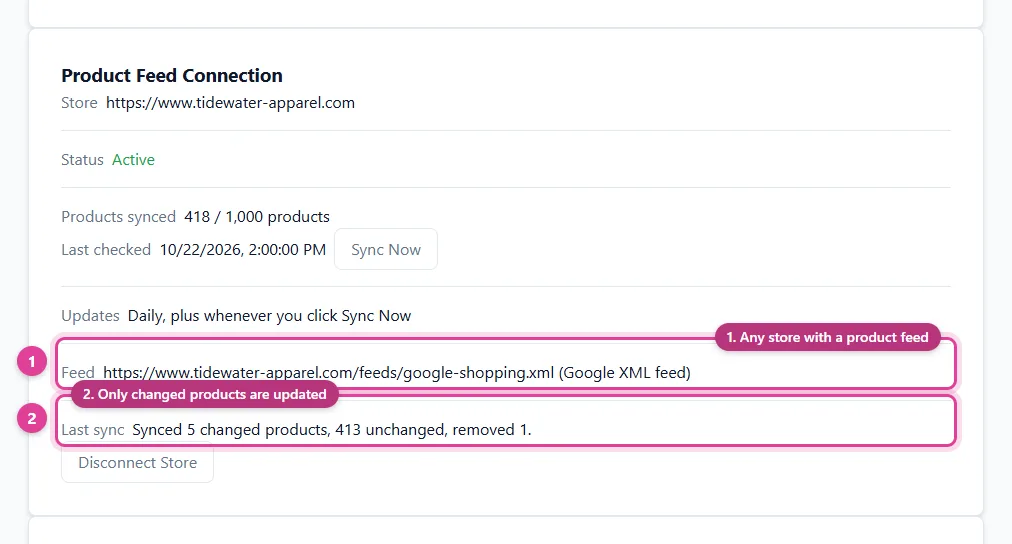
Two situations need more than a shared URL. If your products reach Google through an app with no feed file, you need a feed of your own for Pinterest - a feed tool or connector can build one, or you can start from our free Pinterest Catalog CSV Template Generator. And if Pinterest rejects products Google accepts, fixing the file for one platform can break it for the other. A connector that reads your feed and serves Pinterest its own copy - with categories and availability shaped for Pinterest - keeps your Google feed untouched.
Common problems
- "Domain not claimed." Claim the exact domain your links use, including whether it has www.
- Products missing after an import. Open the data source's errors in Pinterest; How to Fix Pinterest Catalog Errors covers each one.
- Duplicates. Use one data source per product list - adding both your Google feed and another feed of the same products creates two Pins for each.
New to catalogs? Start with What Is a Pinterest Catalog?
Frequently asked questions
Can I use my Google Merchant Center feed for Pinterest?
Often, yes. Pinterest catalogs accept XML, CSV, and TSV data sources with the same field names Google uses, so a Google feed file hosted at a URL can usually be added as a Pinterest data source, after you claim your website on Pinterest.
What if my products go to Google through an app, with no feed file?
Then there is no file to share with Pinterest. You need a separate feed for Pinterest, from a feed tool, a connector, or a CSV you build yourself.
Do I need to claim my website on Pinterest if it is verified in Merchant Center?
Yes. Pinterest has its own claim, separate from Google's verification, and every product link in your catalog must be on the claimed domain.
How often does Pinterest update a catalog from a feed URL?
Pinterest re-reads a hosted data source about once every 24 hours, so changes to your feed appear the next day.
Already have a product feed? Use it everywhere
Pin Data Connect's Store Product Catalog Connector reads the product feed your store already makes - Google XML, CSV, JSON, or a Google Sheet - every day, and builds your Pinterest, Facebook, Google, and Bing catalogs from it, with category mapping and clothing details filled in. One subscription covers all four.
See the Store Product Catalog Connector →
Save this guide for later
Pin it to one of your Pinterest boards so it's easy to find when you're ready to set things up.
Save to Pinterest