Guide · WooCommerce, PrestaShop & Wix
How to Connect Wix to Facebook
A Facebook product catalog powers shopping on Facebook and Instagram and Meta's catalog ads. Shops built from the Wix dashboard stopped working in 2024, so today your Wix catalog reaches Meta as a data feed - from Wix itself, an app, or a connector.
This guide covers the ways to get your Wix catalog onto Facebook, what Facebook needs from every product, how your Wix fields map to Facebook's, and the problems Wix stores run into most.
Three ways to connect Wix to Facebook
1. Wix's built-in sales channel
Meta stopped supporting Facebook and Instagram shops created through the Wix dashboard in April 2024. Wix now gives you a Meta catalog link - a data feed you add to a catalog in Commerce Manager - or you can use a third-party app such as Facebook Shops by GoDataFeed. Either way it covers Facebook and Instagram only.
2. Export a file yourself
Wix Stores can export your products to a CSV (Products > More Actions > Export, physical products only), but the file uses Wix's own columns and layout, not the field names and formats Facebook expects - and it's a snapshot, so it's out of date the next time a price or stock level changes. If you go this way, start from our free Facebook Catalog CSV Template Generator so at least the columns are right.
3. A store catalog connector
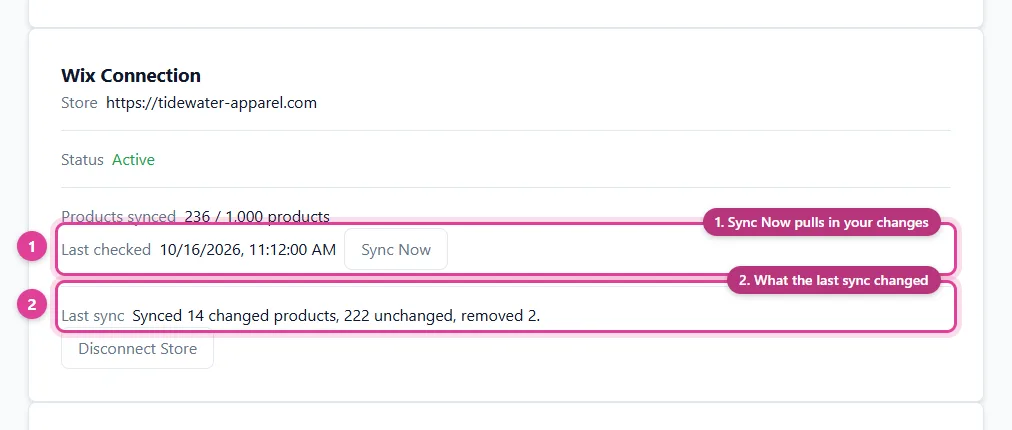
A connector reads your Wix catalog through Wix's REST API, using an API key you create in your Wix account, and builds the Facebook feed for you. Wix doesn't send product webhooks to an API-key connection, so a connector refreshes when it checks your store or when you click to sync. The connector hosts the feed at a URL that Facebook reads on a schedule, and one connection can usually feed several platforms at once.
What Facebook needs
- A Meta business portfolio with access to Commerce Manager, where your catalog lives.
- Nine fields per product:
id,title,description,availability(in stockorout of stock),condition,price,link,image_link, andbrand. - Images in JPEG or PNG, at least 500 x 500 pixels and up to 8 MB.
- A data feed - a file you upload, or a URL that Commerce Manager fetches hourly, daily, or weekly.
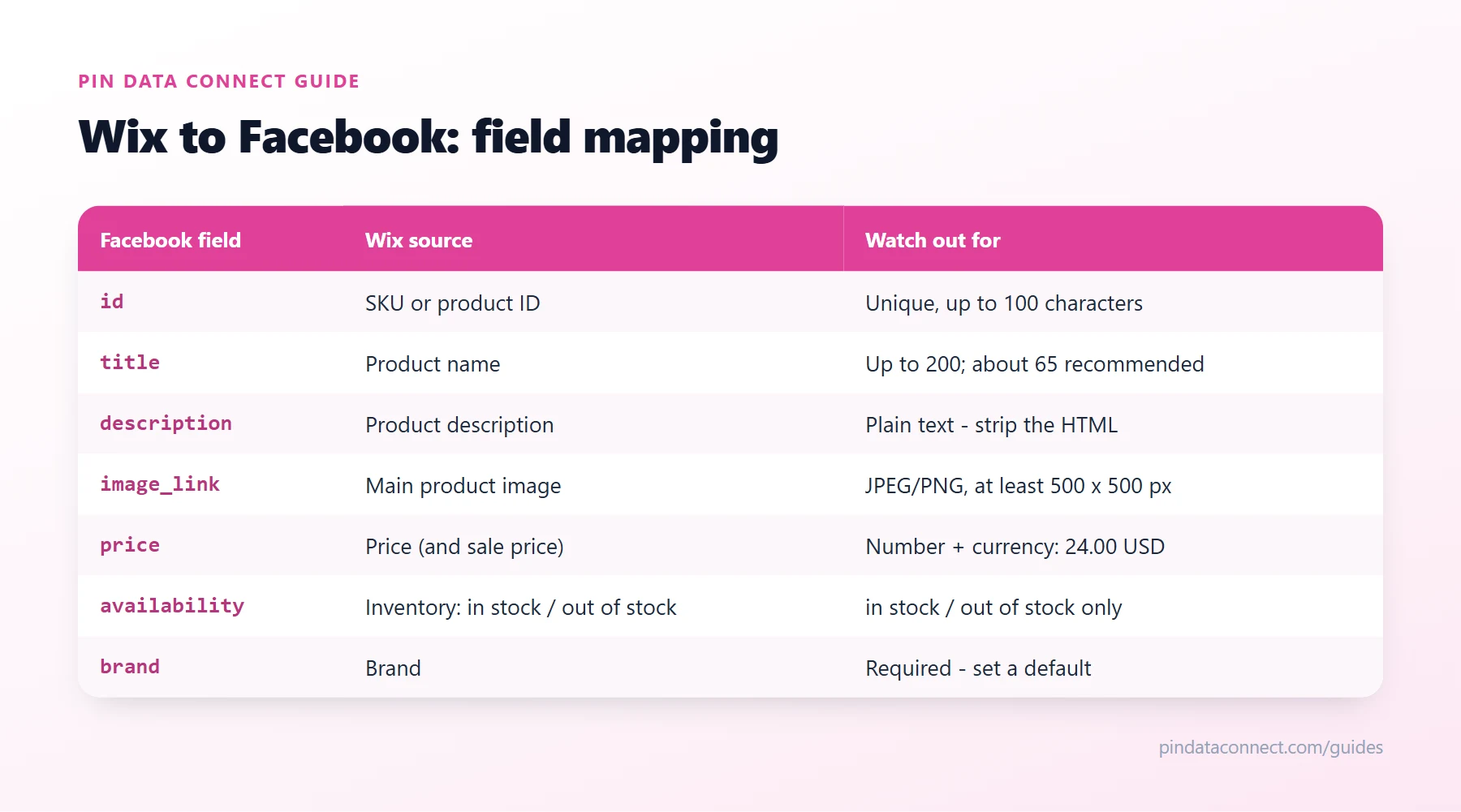
How your Wix fields map to Facebook
The table above shows where each Facebook field comes from in your Wix catalog. A few Wix details need extra care:
- Product options: each combination of options (Black / M, Black / L...) should become its own listing with its own price, stock, and image, grouped under the product with a shared
item_group_id. Name your options Color and Size so they're read as color and size. - Product type: Wix categories (collections, on older Wix stores) are the only per-product grouping Wix has, so they're what you map to a Google product category. Skip shopping groups like "Sale" or "New" and map the ones that say what the product is.
- Clothing details: Wix has no gender or age group fields, and Google and Facebook require them - with a color and a size - on clothing and shoes. Fill them in by product name (every "Women's" product is female and adult, for example) if your tool supports it.
- Brand and barcodes: use Wix's Brand field if you have it, or a default brand - usually your store's name. Newer Wix stores also have a Barcode field for GTINs.
Step by step
- Get your Facebook account ready - see "What Facebook needs" above.
- Create a Wix API key. Go to manage.wix.com/account/api-keys, generate a key with read access to Wix Stores and Categories, and choose your store's site under site access. Note your Site ID too - the long ID right after
/dashboard/in your site dashboard's address bar. - Map your product types to Google product categories. Facebook needs to know what each product is. Map each of your Wix categories (or collections, on older Wix stores) to one category from the Google product category list once, and every product with that value is categorized from then on.
- Add the data feed in Commerce Manager. Open your catalog, go to Data sources, add items with a data feed, choose a URL, and paste your feed URL with its login. Pick a daily schedule.
- Check the first import. Review the errors Facebook reports and fix them in Wix, not in the feed - your store stays the single source of truth.
Common Wix to Facebook problems
- Hidden products and digital products. Only visible products with a live product page belong in the feed - hide a product in Wix and it should drop out. Digital and subscription products aren't sold through shopping catalogs.
- Items rejected for a missing brand. Facebook requires
brandon every item - set a default if your store doesn't record one. - Backorders. Facebook has no "preorder" value, so backordered items need to be sent as
in stockorout of stock. Facebook Catalog Feed Errors, Fixed covers the rest.
Related guides
For more on Facebook itself, see How to Create a Facebook Catalog Without Shopify. On a different store platform? WooCommerce to Facebook and PrestaShop to Facebook cover the same setup for those stores.
Frequently asked questions
Can I connect Wix to Facebook without a plugin?
Yes. Facebook reads a product feed, so you can build one from your Wix products yourself or use a connector that reads your store through its API and hosts the feed at a URL Facebook fetches on a schedule - nothing to install on your site.
Can I still create a Facebook shop from Wix?
Not the old way. Meta stopped supporting Facebook and Instagram shops created through the Wix dashboard in April 2024. Wix now offers a Meta catalog data feed link, and third-party apps can connect your products too; a connector is an alternative when you also sell on Pinterest, Google, or Bing.
Do Wix product options sync to Facebook?
They should, when your tool supports them: each combination of options becomes its own Facebook listing with its own price, availability, and image, grouped under the product with a shared item_group_id. Pin Data Connect's connector does this for every visible combination.
How often does Facebook update my Wix products?
It depends on both sides: a Wix connector refreshes when you click Sync Now, and only products that actually changed are rewritten, and Commerce Manager fetches a scheduled data feed hourly, daily, or weekly. A hosted feed URL means you never re-upload anything.
Is brand required in a Facebook catalog?
Yes. Every product in a Facebook catalog needs a brand, up to 100 characters. If you make your own products, use your store or brand name as the default.
Connect Wix to Facebook - and three more platforms
Pin Data Connect's Store Product Catalog Connector reads your Wix catalog with an API key and builds your Facebook catalog for you - product options as grouped variants, clothing details set by product name, refreshed with one click of Sync Now - with Pinterest, Facebook, Google, and Bing all in one subscription.
See the Store Product Catalog Connector →
Save this guide for later
Pin it to one of your Pinterest boards so it's easy to find when you're ready to set things up.
Save to Pinterest