Store Product Catalog Connector
Already selling on WooCommerce or PrestaShop? Connect your store once and skip manual product entry entirely - your products flow into your Pinterest, Facebook, Google, and Bing product catalogs automatically, and new, updated, and deleted products keep them up to date.
All four platforms are included in one subscription, as Enhanced product catalogs - product identifiers, extra images, and (with WooCommerce) variants and sale prices come straight from your store. Plans are priced by how many products you sync, from 1,000 to 25,000.
Try it free for 7 days. A valid payment method is required to start your trial - you won't be charged until the trial ends, and you can cancel anytime before then to avoid being billed.
Connect Once, Sync Automatically
WooCommerce connects in one click and syncs in real time - new, updated, and deleted products show up in your catalogs on their own. PrestaShop syncs with one click of Sync Now.
All Four Platforms Included
Pinterest, Facebook, Google, and Bing Enhanced product catalogs, all from one connection and one subscription - nothing to buy separately per platform.
Your Store's Full Product Detail
Title, description, price, availability, images, GTIN, and SKU come across from your store. WooCommerce also brings sale prices and brand, and syncs each variation as its own grouped listing.
Map Product Types Once
Pick the store attribute that says what each product is (like "Type"), then match each of its values to a Google Product Category one time - every product with that value is categorized correctly from then on.
Works With Your Store
WooCommerce PrestaShop Shopify - coming soon Squarespace - coming soon
You'll need admin access to a live store to connect it. Selling somewhere else? Our individual platform plans let you add products by hand, by file, or with our Chrome extension from any website.
Screenshots From the App
Real Pin Data Connect screens, shown with sample products. The numbers point out what to look at - click any screenshot to see it full size.
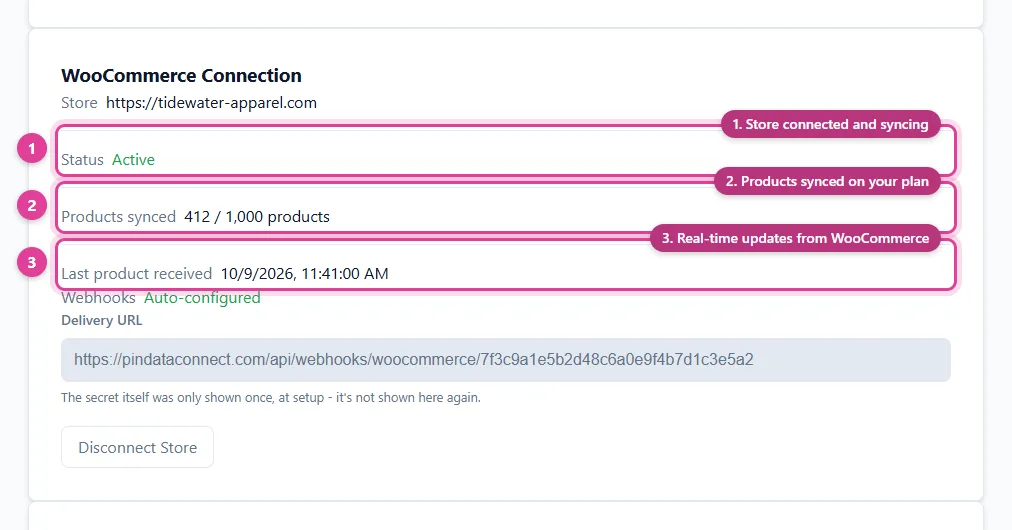
Your store connection at a glance: active, how many products have synced, and when the last real-time update arrived.
- Store connected and syncing
- Products synced on your plan
- Real-time updates from WooCommerce
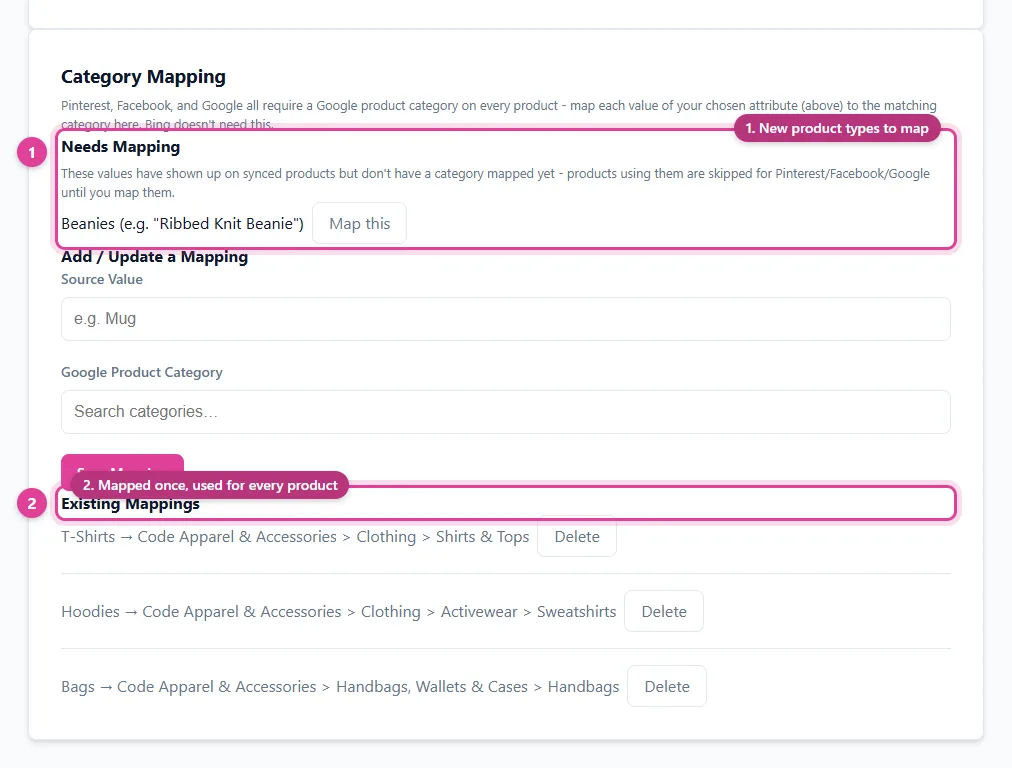
Map each of your store's product types to a Google Product Category once - every product with that type is categorized from then on.
- New product types to map
- Mapped once, used for every product
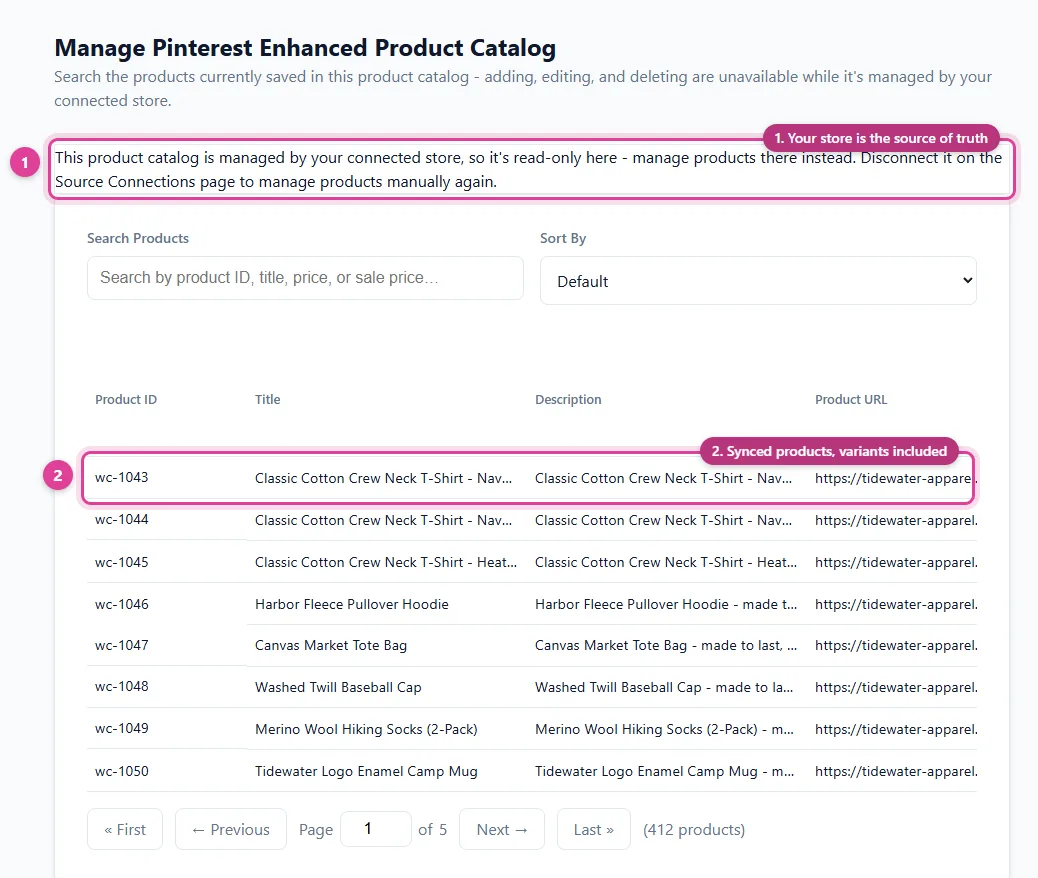
Every synced product, viewable from Manage Feed - make changes on your store and they flow through.
- Your store is the source of truth
- Synced products, variants included
See How It Works
Connect your store, map your product types, then connect each platform - after that, your catalogs keep themselves up to date.
Step 1: Connect Your Store
On the Source Connections page, choose your store platform and enter your store's address. With WooCommerce you're sent to your own store to approve access, and we take care of the rest - API credentials and real-time sync included, nothing to copy or paste.
PrestaShop works the same way, except you paste in a read-only Webservice key from your PrestaShop admin, then click Sync Now whenever you want your catalogs refreshed.
Step 2: Map Your Product Types
Pinterest, Facebook, and Google require a Google Product Category on every product. Choose the store attribute that says what each product is (like "Type"), and as its values show up on synced products, match each one to its Google Product Category - a one-time step per value. Products with a value that isn't mapped yet wait for Pinterest, Facebook, and Google until you map it; Bing doesn't need this.
| Your Store's Value (e.g. "Type") | Google Product Category |
|---|---|
| T-Shirts | Apparel & Accessories > Clothing > Shirts & Tops |
| Hoodies | Apparel & Accessories > Clothing > Activewear > Sweatshirts |
| Tote Bags | Apparel & Accessories > Handbags, Wallets & Cases > Handbags |
Step 3: Your Products Sync In
Every product syncs into your Pinterest, Facebook, Google, and Bing Enhanced product catalogs. A WooCommerce variable product becomes one listing per variation, grouped under its parent. View everything that synced from Manage Feed:
| Product ID | Title | Price | Availability |
|---|---|---|---|
| wc-1043 | Classic Crew Neck T-Shirt - Navy / M | 24.00 USD | In Stock |
| wc-1044 | Classic Crew Neck T-Shirt - Navy / L | 24.00 USD | In Stock |
| wc-1077 | Canvas Market Tote | 32.00 USD | Out of Stock |
Your store is the source of truth: change a price, stock level, or description there and it flows through - automatically with WooCommerce, or on your next Sync Now with PrestaShop. Delete a product from your store and it's removed from your catalogs too.
Step 4: Connect Each Platform
Connect your Pinterest, Facebook, and Google accounts directly from the Connections page - each one registers your catalog and pulls it on its own schedule. Or use each catalog's private URL, complete with a generated username and password, as its data source - the way Bing/Microsoft Merchant Center connects. Here's an example of what one looks like:
https://pindataconnect.com/api/feed/5f2e9a0c7b14d3e86a91c0f2b7d4e1a39c6b8f05d2a7e4c1b9f3d6a0e8c2b57f
7c41e0b29d8a5f63e1b07d94c2a8f516
e3a9c17f05b2d84e6f1a90c3b7d52e8a4f06c9b1d3e7a25f8c40b6e9d1a7f3c2
Plans
Every plan includes all four platforms and every feature above - they differ only in how many products you sync. Switch anytime from the Source Connections page; your connection and synced products stay as they are.
| Plan | Price | Synced Products |
|---|---|---|
| Store Product Catalog Connect | $29/month | Up to 1,000 |
| Store Product Catalog Connect Plus | $39/month | Up to 5,000 |
| Store Product Catalog Connect Pro | $49/month | Up to 25,000 |
Free WooCommerce & PrestaShop Guides
Step-by-step guides to getting your WooCommerce catalog or Presta catalog onto each platform - field mapping, setup, and common errors.
- How to Connect WooCommerce to Pinterest
- How to Connect WooCommerce to Facebook
- How to Connect WooCommerce to Google Shopping
- How to Connect WooCommerce to Bing Shopping
- How to Connect PrestaShop to Pinterest
- How to Connect PrestaShop to Facebook
- How to Connect PrestaShop to Google Shopping
- How to Connect PrestaShop to Bing Shopping
Frequently Asked Questions
Which stores can I connect?
WooCommerce and PrestaShop today, with Shopify and Squarespace coming soon. WooCommerce connects in one click - you approve access on your own store and Pin Data Connect sets up the API credentials and real-time sync for you. PrestaShop connects with a read-only Webservice key you create in your PrestaShop admin, and syncs whenever you click Sync Now.
Which platforms do my products sync to?
Pinterest, Facebook, Google, and Bing - all four, as Enhanced product catalogs, included in one subscription. Connect your Pinterest, Facebook, and Google accounts directly, or use each catalog's private data source URL (Bing/Microsoft Merchant Center uses the data source URL).
Can I still add or edit products by hand?
No - once your store is connected, it's the source of truth for the platforms it manages, so manual adding and editing on Pin Data Connect is turned off for them. Make changes on your store instead; with WooCommerce they sync in automatically, and with PrestaShop the next time you click Sync Now. You can always view every synced product from Manage Feed.
What happens when I reach my plan's product limit?
New products stop syncing until you upgrade, and the products already synced keep updating normally. You can switch plans anytime from the Source Connections page - your store connection and synced products stay exactly as they are, only the limit changes.
Do variable products (different sizes or colors) sync?
Yes, with WooCommerce - each variation syncs as its own listing, grouped under its parent product, with its own price, availability, image, color, and size. PrestaShop currently syncs each product as a single listing; combinations are on the roadmap.
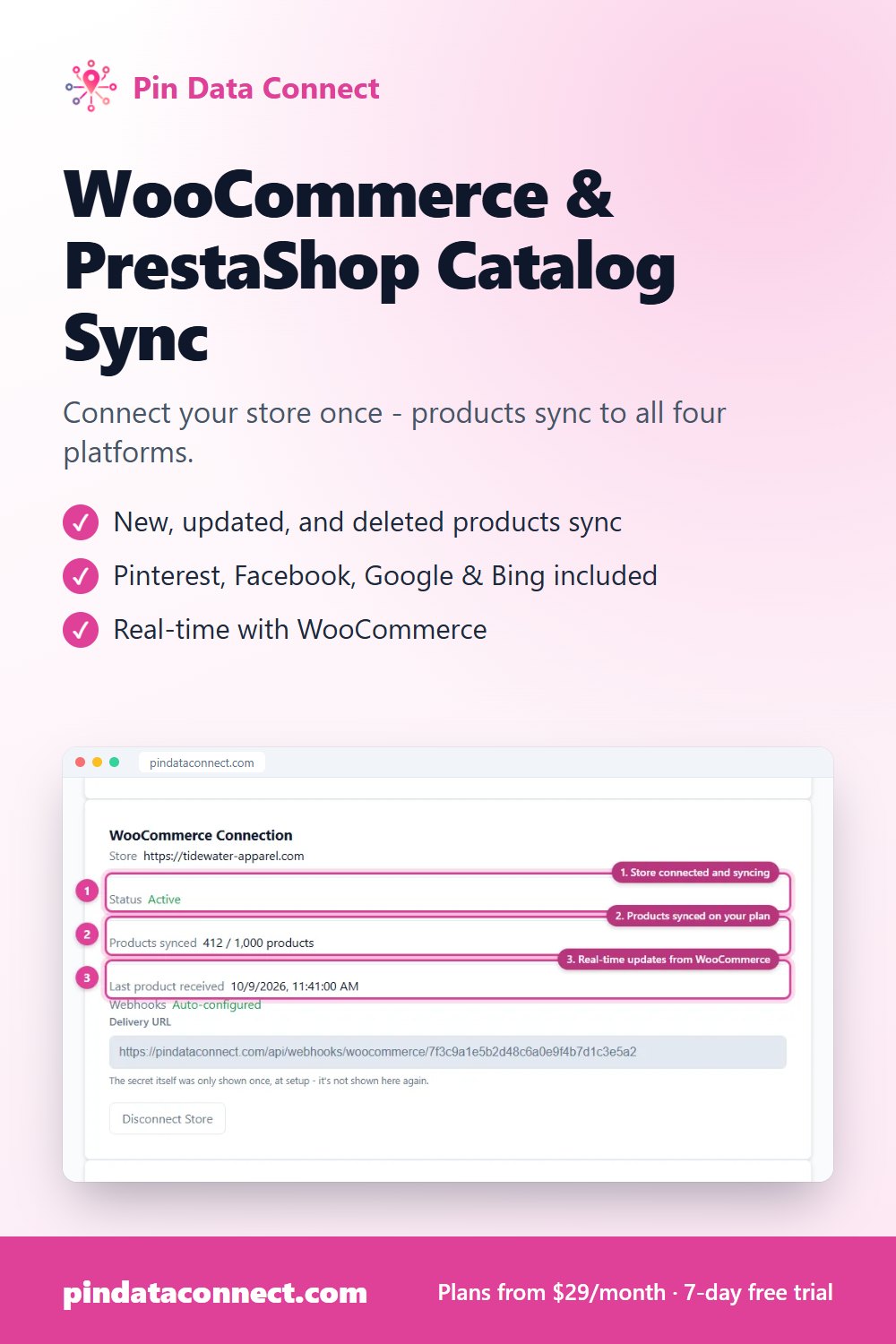
Save This for Later
Planning your product catalog? Pin this to one of your Pinterest boards so it's easy to find again when you're ready.
Save to Pinterest