Guide · Pinterest catalogs
How to Fix Pinterest Catalog Errors
Pinterest checks every product in your Pinterest product catalog before it becomes a Product Pin, and it reports problems as numbered error codes. Most of them come down to a handful of causes: a missing field, a value in the wrong format, an image Pinterest can't reach, or a link on a website you haven't claimed.
Here's what the common Pinterest catalog errors mean and how to fix each one.
Where to find your errors
Open Catalogs in your Pinterest business account and check catalog diagnostics: it shows how many products uploaded, how many failed, and which have warnings, with the error for each. You can also test a few rows before adding them: paste the header row and some products into Pinterest's data source test box and validate them.
Missing required fields
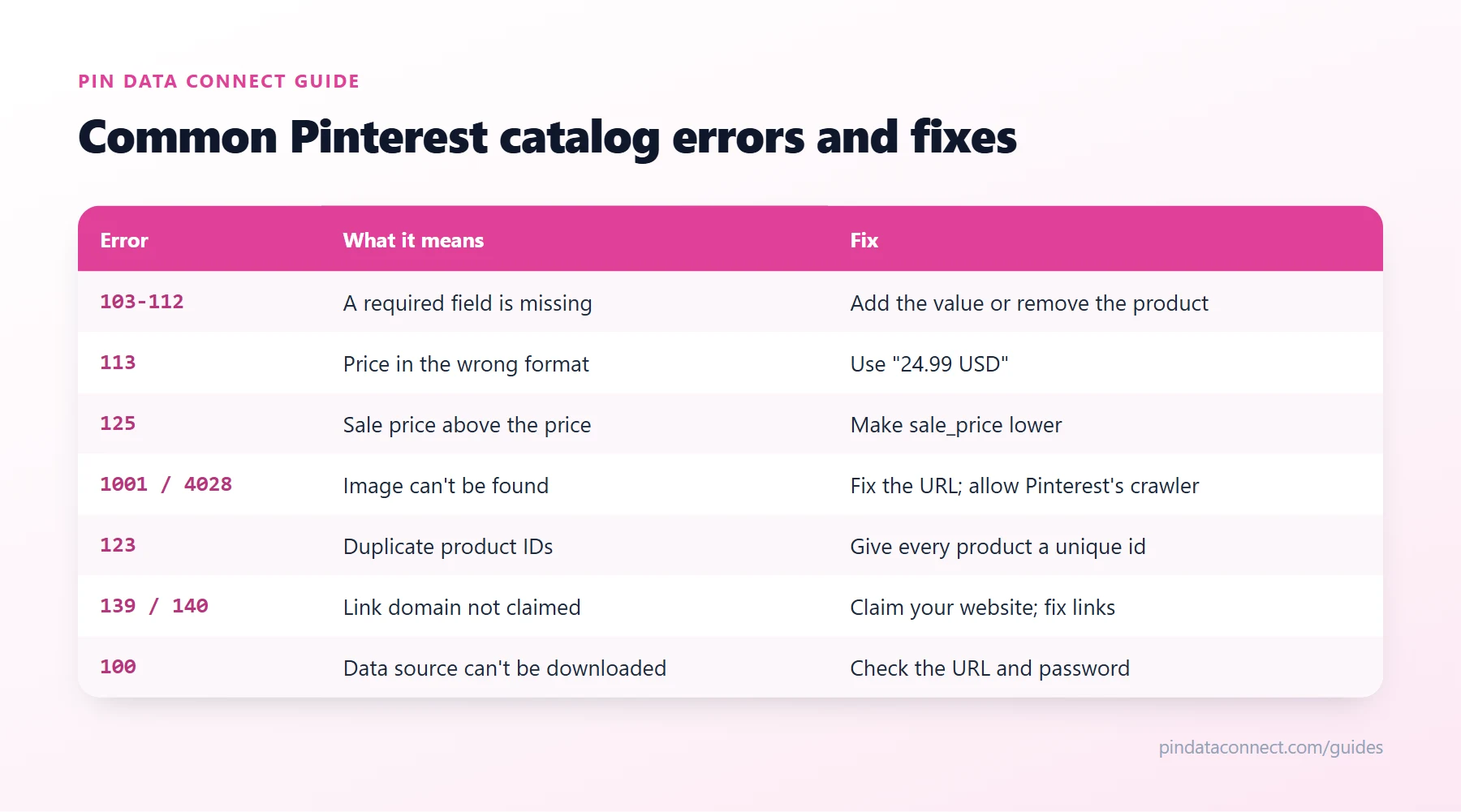
Errors 103, 105, 106, 107, 110, 111, and 112 mean a required column or value is missing: the header row, a title, an ID, a description, a product link, an image link, or availability. Add the missing values, or remove those products before the next update. Our Pinterest catalog CSV template lists every required column.
Price errors
- Error 151 - no price. Add one to every product.
- Error 113 - price in the wrong format. Use a number and an ISO 4217 currency code, such as
24.99 USD. - Error 125 - sale price higher than the regular price. Make sure
sale_priceis lower thanprice.
Image errors
- Error 104 - malformed image URL. Every
image_linkmust be a full URL starting with http:// or https://. - Error 1001 - images not found at that URL. Open the URL in a browser; fix broken links or re-upload the image.
- Error 1007 - invalid or unsupported image file. Replace it with a standard JPG or PNG.
- Error 155 - too many additional images. Keep
additional_image_linkto 10 or fewer. - Error 4028 - some main images can't be found, often because your website blocks Pinterest's crawler. Make sure your site, firewall, or CDN allows it.
Link, domain, and ID errors
- Error 123 - duplicate IDs. Every product needs its own unique
id. - Error 139 - product links don't match your verified domain. Every
linkmust point to the website claimed on your Pinterest account. - Error 140 - your domain isn't claimed. Claim your website in your Pinterest business settings, then update again.
Pinterest data source and file errors
- Error 100 - Pinterest couldn't download your data source. Check the URL, and if it's password-protected, the username and password saved in Pinterest.
- Error 143 - the XML is malformed: missing end tags or invalid characters.
- Error 152 - not enough data. The file needs a header row plus at least one product, and Pinterest's crawler must be able to reach it.
How to prevent errors in the first place
- Start from a correct header row - our free Pinterest Catalog CSV Template Generator gets every column name right.
- Validate your file before uploading - our free Product Catalog CSV Validator checks for missing and invalid fields.
- Generate your catalog from your real product data rather than retyping it, so prices, links, and stock stay consistent.
- Use a hosted Pinterest data source URL so fixes reach Pinterest on its next daily read, instead of waiting for a manual re-upload.
New to catalogs? Start with What Is a Pinterest Catalog?
Frequently asked questions
Why is my Pinterest catalog not uploading?
Usually one of four things: Pinterest cannot download the data source (check the URL and password), required fields or headers are missing, values are in the wrong format, or product links are not on a website you have claimed. Catalog diagnostics in your business account show the exact errors.
What does Pinterest catalog error 139 mean?
The product links in your catalog do not match the domain verified on your Pinterest account. Every link must point to the website you have claimed.
How do I fix "some main images can't be found" on Pinterest?
Check that each image_link opens in a browser and that your website, firewall, or CDN is not blocking Pinterest's crawler. Fix or replace broken image URLs before the next update.
How long does it take for Pinterest catalog fixes to show up?
Pinterest re-reads a hosted data source about once every 24 hours, so fixes appear after the next ingestion. For a manually uploaded file, re-upload it after fixing.
How do I format the price in a Pinterest catalog?
Use a number and an ISO 4217 currency code, such as 24.99 USD.
A Pinterest catalog that passes the first time
Pin Data Connect builds your Pinterest product catalog with the right formats for every field - prices with currency codes, valid availability, Google Product Categories - and serves it from an always-current Pinterest data source URL.
See the Pinterest Product Catalog Builder →
Save this guide for later
Pin it to one of your Pinterest boards so it's easy to find when you're ready to set things up.
Save to Pinterest