Guide · Pinterest catalogs
Pinterest Product Groups and Shopping Ads
Once your Pinterest catalog is live, every product is a Product Pin. Product groups are how you organize those products - by collection, price, season, or margin - and shopping ads are how you put money behind the groups you want to sell more of.
The secret to useful product groups is planning them in your Pinterest product catalog before you need them.
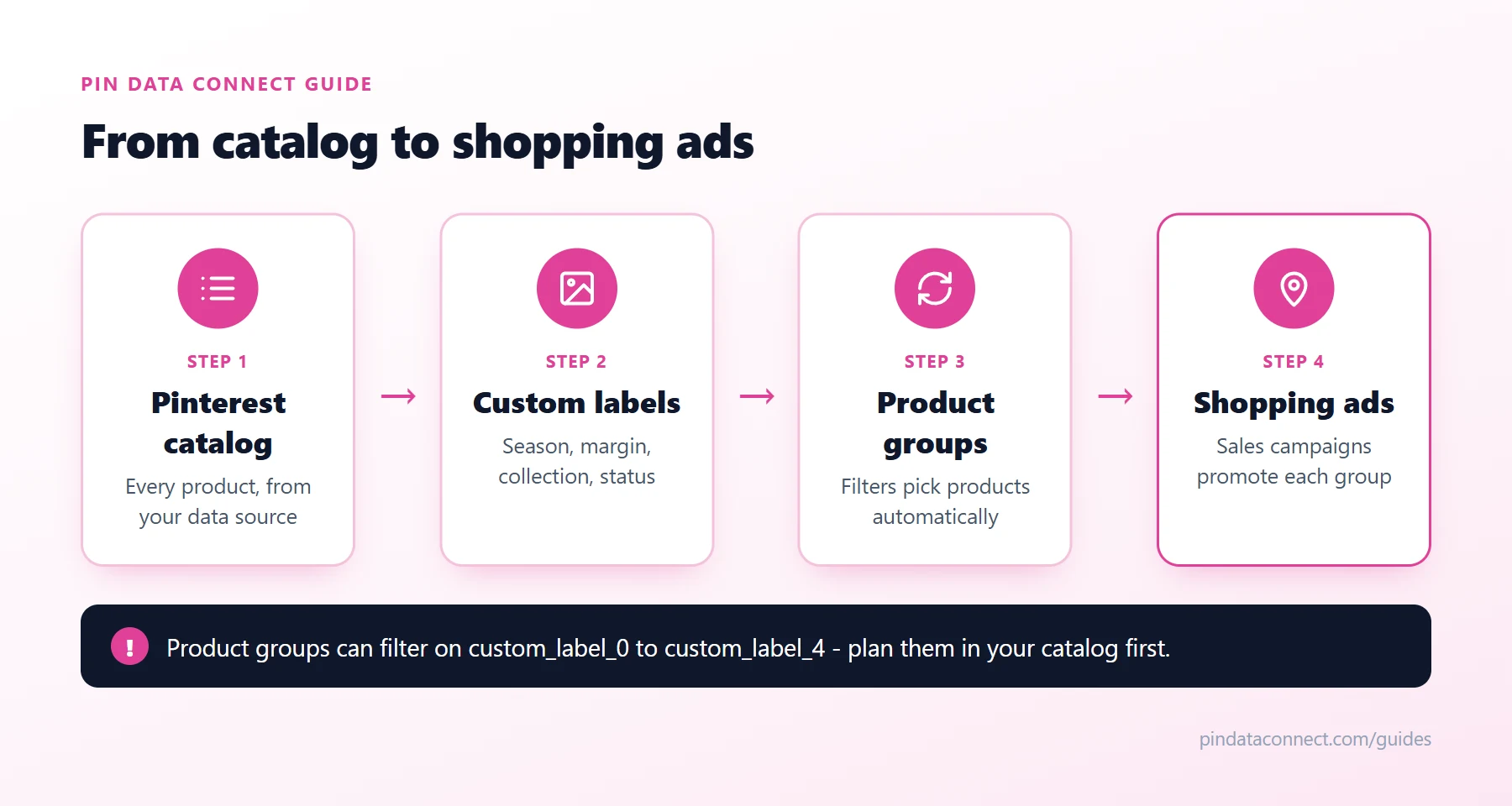
What product groups are
A product group is a set of products from your catalog that you can promote with shopping ads. Pinterest creates some automatically - All Products, plus groups like Top Sellers, New Arrivals, and Best Deals (limited to 1,000 products each) - and you can create your own.
How to build a product group
In Catalogs, choose to create a product group. You can:
- Use filters - product type, availability, brand, category, price, product title, item ID, and custom labels 0 to 4, with operators like "is", "contains", "less than", and "greater than".
- Pick from suggestions Pinterest updates daily.
- Select products manually.
Filters are the most useful option, because new products that match join the group automatically.
Plan your custom labels first
Filters can only use what's in your catalog. Custom labels - custom_label_0 through custom_label_4 in your Pinterest data source - are free-form fields that exist exactly for this. Decide what each one means and use it consistently:
custom_label_0- season or campaign: "Summer Sale", "Holiday"custom_label_1- margin: "high", "standard"custom_label_2- collection: "Coastal", "Botanical"custom_label_3- status: "bestseller", "new arrival", "clearance"custom_label_4- anything else you want to segment by
Our Pinterest catalog CSV template shows where these columns go.
Creating shopping ads
Shopping ads promote the products in your product groups. To run them you need a business account, your catalog uploaded, and at least one product group. Then:
- In Ads Manager, create a campaign with the Sales objective.
- Choose your catalog and the product group to promote.
- Set your budget and schedule, and launch.
Pinterest uses your product data to show your products to people browsing similar Product Pins, so shopping ads don't need extra targeting setup. A sensible start is one campaign on the All Products group, then separate campaigns or ad groups for your best performers once you see results.
Tips for better shopping ads
- Keep your catalog accurate. Ads for out-of-stock products waste budget - a hosted data source that Pinterest re-reads daily keeps stock current.
- Separate by margin. Put high-margin products in their own group and give them more budget.
- Use strong images and titles. The same things that make a Product Pin get saved make an ad get clicked.
New to catalogs? Start with What Is a Pinterest Catalog?
Frequently asked questions
What is a product group on Pinterest?
A product group is a set of products from your Pinterest catalog that you can promote with shopping ads. You can build one with filters, choose from Pinterest's suggestions, or select products manually.
What can I filter Pinterest product groups by?
Product type, availability, brand, category, price, product title, item ID, and custom labels 0 to 4.
What do I need to run Pinterest shopping ads?
A Pinterest business account, a catalog uploaded through Catalogs, and at least one product group. Shopping ads use the Sales campaign objective.
What are custom labels in a Pinterest catalog?
Custom labels, custom_label_0 to custom_label_4, are free-form fields in your catalog that you define yourself, such as season, margin, or collection. They are mainly used to build product groups.
Do I need product groups to run shopping ads?
Yes, but Pinterest creates an All Products group automatically, so you can start a shopping ads campaign with it and add more specific groups later.
A catalog that's ready for product groups and ads
Pin Data Connect's Pinterest Enhanced catalog builder includes every custom label, custom numbers, sale prices, and shopping ad fields - so your product groups and shopping ads have the data they need.
See the Pinterest Enhanced Catalog Builder →
Save this guide for later
Pin it to one of your Pinterest boards so it's easy to find when you're ready to set things up.
Save to Pinterest