Guide · Pinterest catalogs
Pinterest Catalog CSV Template and Field Guide
The fastest way to start a Pinterest catalog is a CSV file - a spreadsheet saved as comma-separated text, with one column per field and one row per product. This Pinterest catalog CSV template covers every column, what goes in it, and the exact formats Pinterest checks for.
Get these details right and your Pinterest product catalog sails through processing. Get them wrong and products are rejected one error code at a time.
The Pinterest catalog CSV template
Want the file ready-made? Our free Pinterest Catalog CSV Template Generator builds it with just the columns you choose, plus example rows.
Copy this header row exactly - Pinterest matches columns by name - and add one row per product underneath:
id,title,description,link,image_link,price,availability,condition,brand,google_product_category,product_type,item_group_id,color,size,custom_label_0
SHIRT-77-NVY-M,"Classic Crew Neck T-Shirt - Navy, M","Soft 100% cotton crew neck t-shirt with a relaxed fit.",https://yourstore.com/products/classic-crew-tee,https://yourstore.com/images/classic-crew-tee-navy.jpg,24.00 USD,in stock,new,Tidewater Apparel,212,Apparel > Shirts,SHIRT-77,Navy,M,Summer Sale
Values that contain commas - like the title and description above - must be wrapped in double quotes. Save the file as UTF-8 so accented characters and symbols come through correctly.
Required fields
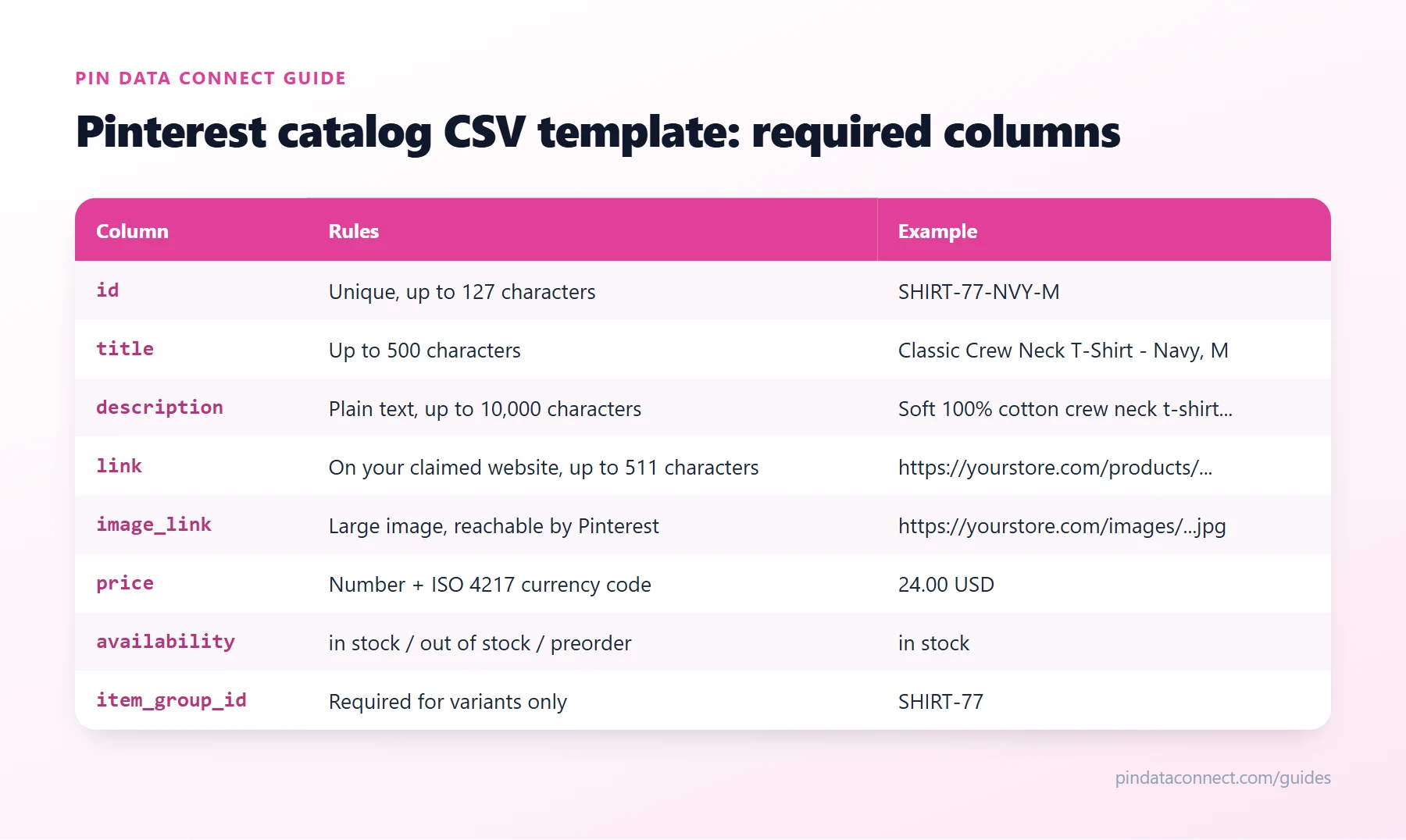
The diagram at the top of this guide summarizes them. Every row needs:
id- a unique ID for the product, up to 127 characters. Never reuse an ID for a different product.title- up to 500 characters. Include variant details such as color and size so each variant's title is distinct.description- up to 10,000 characters, plain text (no HTML).link- the product page URL, up to 511 characters, starting with http:// or https://. It must be on a website you've claimed on Pinterest.image_link- the main product image URL. Pinterest recommends large images (at least 1000 x 1500 pixels), and the image must be reachable by Pinterest's crawler - no placeholders.price- a number and an ISO 4217 currency code, such as24.99 USD.availability- exactlyin stock,out of stock, orpreorder.item_group_id- required only for products with variants. Every variant of the same product shares one value.
Optional fields worth filling in
condition-new,used, orrefurbished.brand- your brand or the manufacturer's.google_product_category- a category from Google's product taxonomy, as its numeric ID or full path. Our free Google Product Category Lookup tool finds both.product_type- your own category path, such asApparel > Shirts.sale_price- must be lower thanprice.additional_image_link- up to 10 extra image URLs.color,size,gender,age_group- especially useful for apparel.custom_label_0tocustom_label_4- your own labels (up to 511 characters each), used later to build product groups for shopping ads. See Product Groups and Shopping Ads.
How to list variants
Give every color and size its own row with its own id, put the shared parent value in item_group_id, and fill in color and size. A t-shirt in two colors and three sizes is six rows, all with the same item_group_id.
Before you upload
- Check that every row has all seven required fields and that IDs are unique.
- Make sure prices include the currency code and availability uses the exact wording.
- Open a few links and image URLs to confirm they load.
- Run the file through our free Product Catalog CSV Validator to catch missing or invalid fields before Pinterest does.
Then add it to Pinterest as your Pinterest data source - by uploading it, or hosting it at a URL Pinterest re-reads about once a day. If Pinterest still reports problems, How to Fix Pinterest Catalog Errors covers each error code. New to catalogs? Start with What Is a Pinterest Catalog?
Frequently asked questions
What columns does a Pinterest catalog CSV need?
Seven required columns: id, title, description, link, image_link, price, and availability. Products with variants also need item_group_id. Optional columns include condition, brand, google_product_category, product_type, sale_price, additional_image_link, color, size, and custom_label_0 to custom_label_4.
How should price be formatted in a Pinterest catalog?
As a number followed by an ISO 4217 currency code, for example 24.99 USD.
What availability values does Pinterest accept?
Exactly in stock, out of stock, or preorder.
Can I use Excel or Google Sheets for a Pinterest catalog?
Yes. Build it in a spreadsheet, then save it as a UTF-8 CSV or TSV file, or connect a Google Sheet directly, since Pinterest accepts Google Sheets as a data source.
How do I list product variants in a Pinterest catalog CSV?
Give each variant its own row and unique id, put the same item_group_id on every variant of the same product, and fill in color and size.
Skip the spreadsheet entirely
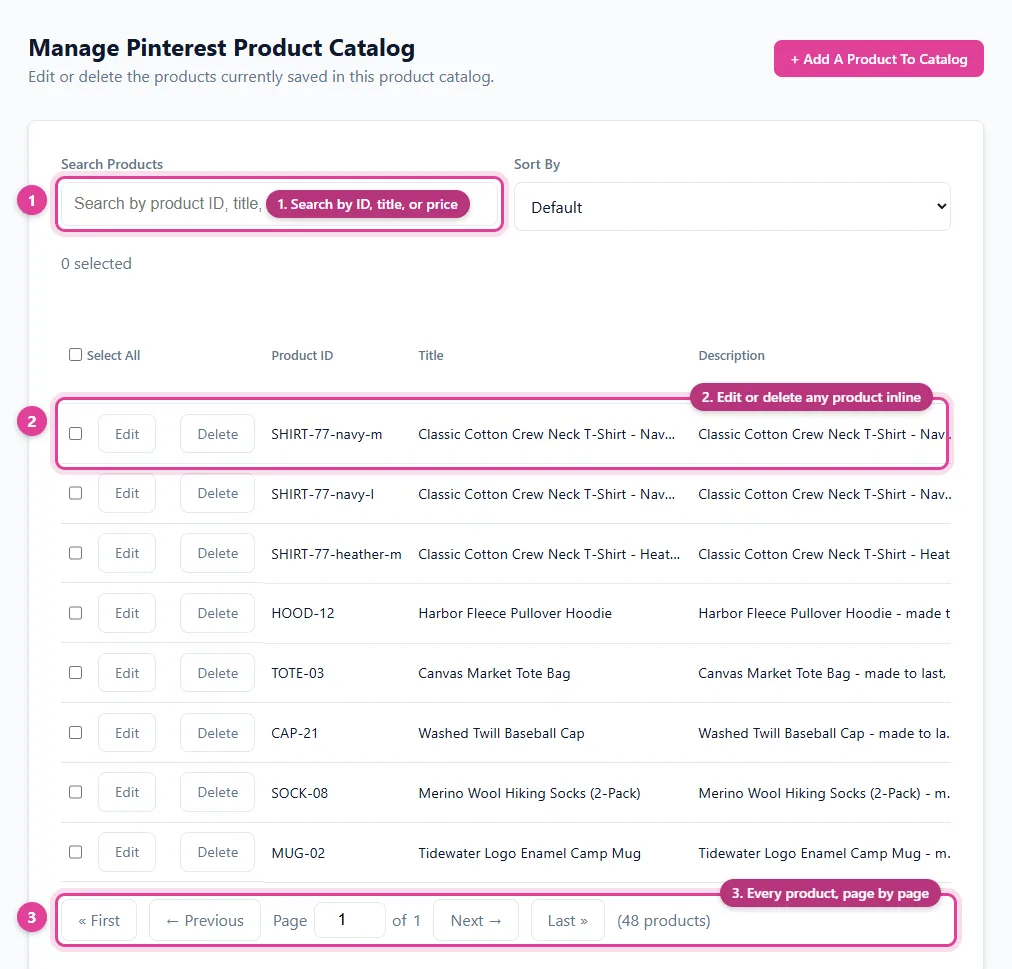
Pin Data Connect's Pinterest Enhanced catalog builder fills in every column for you - variants with item_group_id, identifiers, extra images, and custom labels - and keeps it live at a Pinterest data source URL.
See the Pinterest Enhanced Catalog Builder →
Save this guide for later
Pin it to one of your Pinterest boards so it's easy to find when you're ready to set things up.
Save to Pinterest