Complete guide · Pinterest catalogs
What Is a Pinterest Catalog? A Complete Guide
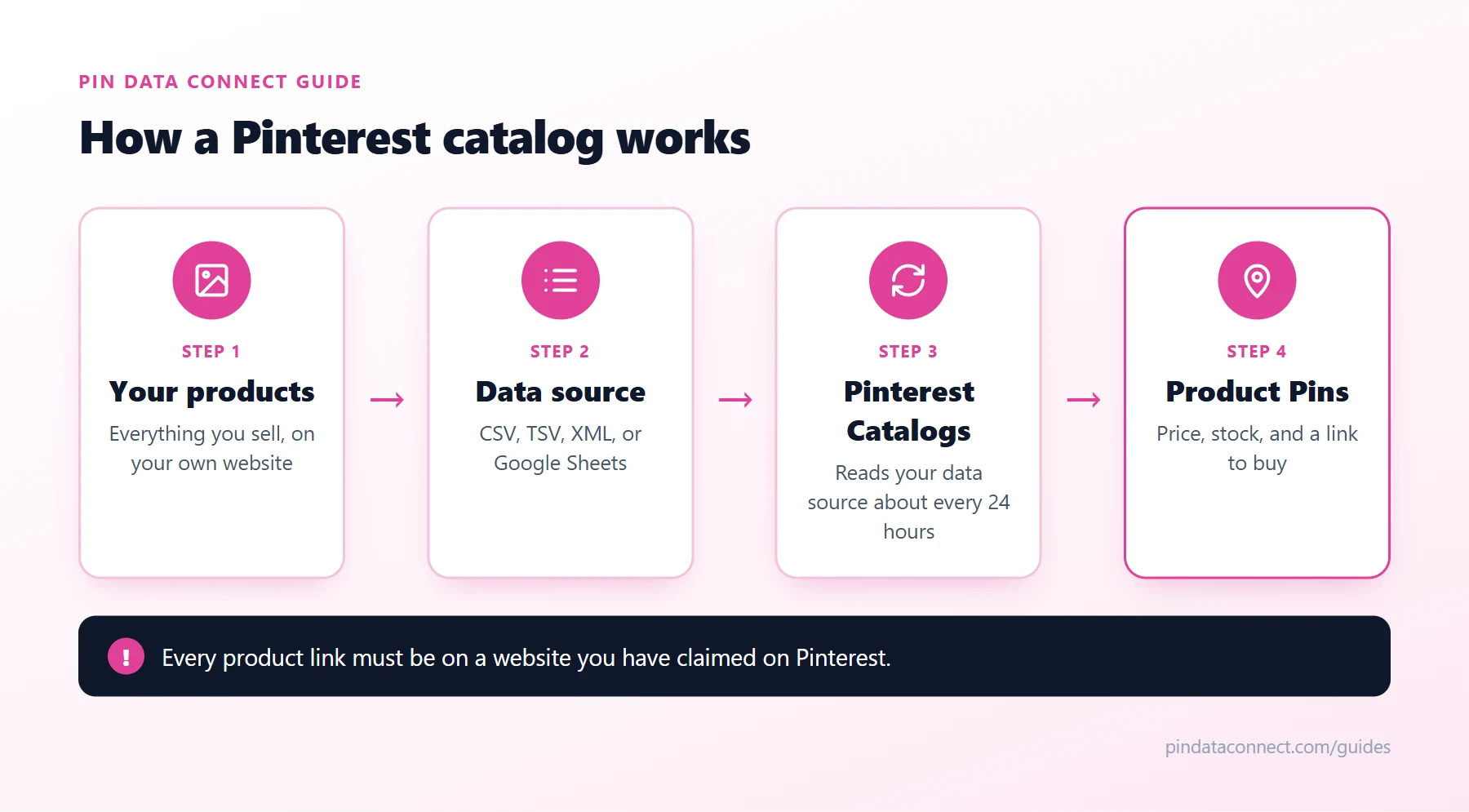
A Pinterest catalog is how a business tells Pinterest about everything it sells. Instead of pinning products one at a time, you give Pinterest a list of your products - a Pinterest product catalog - and Pinterest turns every item into a shoppable Product Pin with its price, availability, and a link to buy.
This guide explains how a Pinterest catalog works, what a Pinterest data source is, what you need before you start, and how to keep it accurate once it's live.
What a Pinterest catalog actually is
At its core, a Pinterest catalog is a structured list of products. Each product is one row with the same set of fields: an ID, a title, a description, a product page link, an image, a price, and whether it's in stock. Pinterest reads that list and creates a Product Pin for each row.
Product Pins look like regular pins, but they carry product details. Pinterest shows the price and stock status on the pin, keeps them updated from your catalog, and makes your products eligible for shopping surfaces and shopping ads.
What is a Pinterest data source?
The file or feed that holds your products is called a Pinterest data source. Pinterest accepts:
- CSV or TSV files - a spreadsheet saved as comma- or tab-separated text
- XML feeds - RSS 2.0 or Atom 1.0
- Google Sheets
You can upload a file by hand, or give Pinterest a URL where the file lives (http, https, ftp, or sftp - and it can be password-protected). With a hosted URL, Pinterest re-reads your data source about once every 24 hours, so price and stock changes flow through automatically. Manually uploaded files need to be refreshed at least every 30 days or your products stop being shown organically.
If you're building the file yourself, our Pinterest catalog CSV template and field guide lists every column and the exact formats Pinterest expects - or generate a ready-to-fill file in seconds with our free Pinterest Catalog CSV Template Generator.
What you need before you start
- A Pinterest business account. Free - you can convert a personal account.
- A claimed website. Every product link in your catalog must be on a website you've claimed on Pinterest.
- The Pinterest tag installed on your website.
- A website that meets Pinterest's merchant guidelines, with easy-to-find contact details, a shipping policy, and a refund policy.
The fields every product needs
Every row in a Pinterest product catalog needs seven fields: id, title, description, link, image_link, price, and availability. Products that come in variants (sizes, colors) also need item_group_id so Pinterest groups them together. Optional fields such as google_product_category, brand, product_type, and the custom labels help Pinterest show your products to the right people and let you organize them for ads.
How to set up a Pinterest catalog
- Get your account ready - business account, claimed website, Pinterest tag.
- Build your Pinterest data source - one row per product, in a format Pinterest accepts.
- Add it in Pinterest. In your business account, open Catalogs and add a data source: paste the URL (with a username and password if it's protected) or upload the file.
- Wait for processing. Pinterest checks every product and emails you when it's done. Fix any errors it reports - see How to Fix Pinterest Catalog Errors.
- Organize and promote. Group products into product groups and, if you like, promote them with shopping ads. Product Groups and Shopping Ads covers how.
Keeping your catalog accurate
The catalog is only as good as the data in it. A product that's sold out on your website but "in stock" on Pinterest frustrates buyers. The simplest way to stay accurate is a hosted data source URL that's generated from your live product data, so Pinterest picks up every change on its next daily read. Pinterest's catalog diagnostics show which products uploaded, which failed, and which have warnings.
Don't use Shopify?
You don't need any particular store platform - a Pinterest catalog works with any website you own. Pinterest Catalog Without Shopify walks through the options.
Frequently asked questions
What is a Pinterest catalog?
A Pinterest catalog is a list of the products a business sells, in a format Pinterest can read. Pinterest turns every product in it into a shoppable Product Pin that shows the price and availability and links to the product page.
What is a Pinterest data source?
The data source is the file or feed that holds your catalog: a CSV, TSV, XML (RSS 2.0 or Atom 1.0), or Google Sheets file. You can upload it manually or host it at a URL that Pinterest reads about once every 24 hours.
Is a Pinterest catalog free?
Yes. Creating a catalog and having Pinterest turn your products into Product Pins is free. Promoting those products with shopping ads is optional and paid.
How many products can a Pinterest catalog have?
Pinterest can process up to 20 million products per catalog. If a data source has more, only the first 20 million rows are processed.
Do I need a business account for a Pinterest catalog?
Yes. You need a Pinterest business account, a claimed website, the Pinterest tag installed, and a website that meets Pinterest's merchant guidelines.
Build your Pinterest catalog without spreadsheets
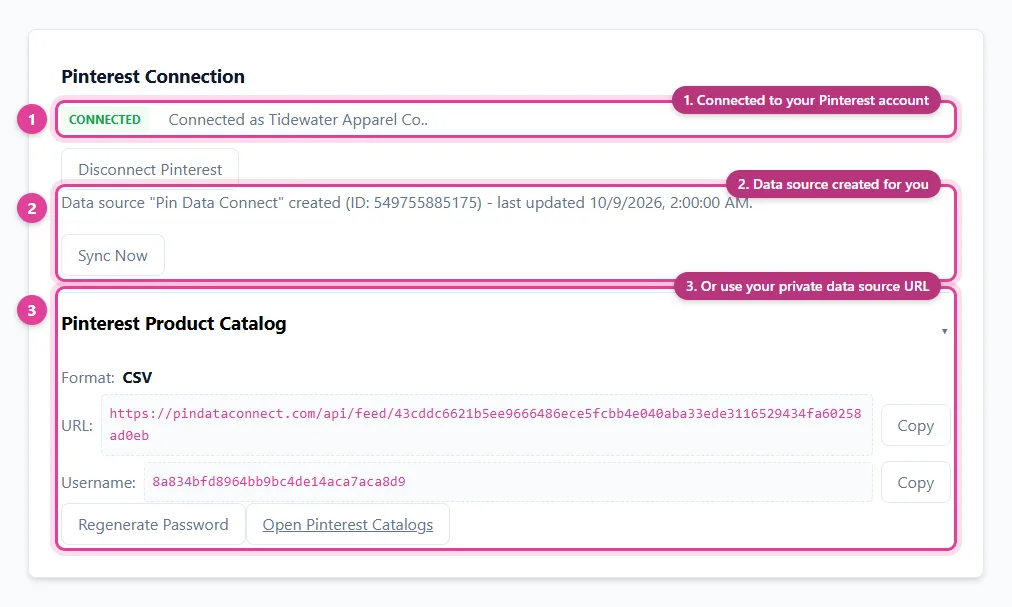
Pin Data Connect builds your Pinterest product catalog in your browser and gives you a private, always-current Pinterest data source URL - or connects to your Pinterest account directly.
See the Pinterest Product Catalog Builder →
Save this guide for later
Pin it to one of your Pinterest boards so it's easy to find when you're ready to set things up.
Save to Pinterest