Guide · Pinterest catalogs
How to Set Up a Pinterest Catalog Without Shopify
Pinterest offers ready-made apps for a few e-commerce platforms, Shopify being the best known. That leaves a lot of sellers wondering whether a Pinterest catalog is even possible on their website. It is - Pinterest catalogs work with any website you own, because Pinterest only needs one thing from you: a Pinterest data source listing your products.
Here's what you need and the three ways to build it.
What Pinterest actually requires
None of Pinterest's requirements are tied to a store platform:
- a Pinterest business account,
- a website you've claimed on Pinterest, with the Pinterest tag installed,
- a website that meets Pinterest's merchant guidelines - contact details, a shipping policy, and a refund policy,
- and a data source: a CSV, TSV, XML, or Google Sheets file listing your products.
The one limit that matters: product links must be on a website you've claimed. Listings that only live on a marketplace's website can't go in your Pinterest product catalog, because you can't claim the marketplace's domain. You need your products on your own domain.
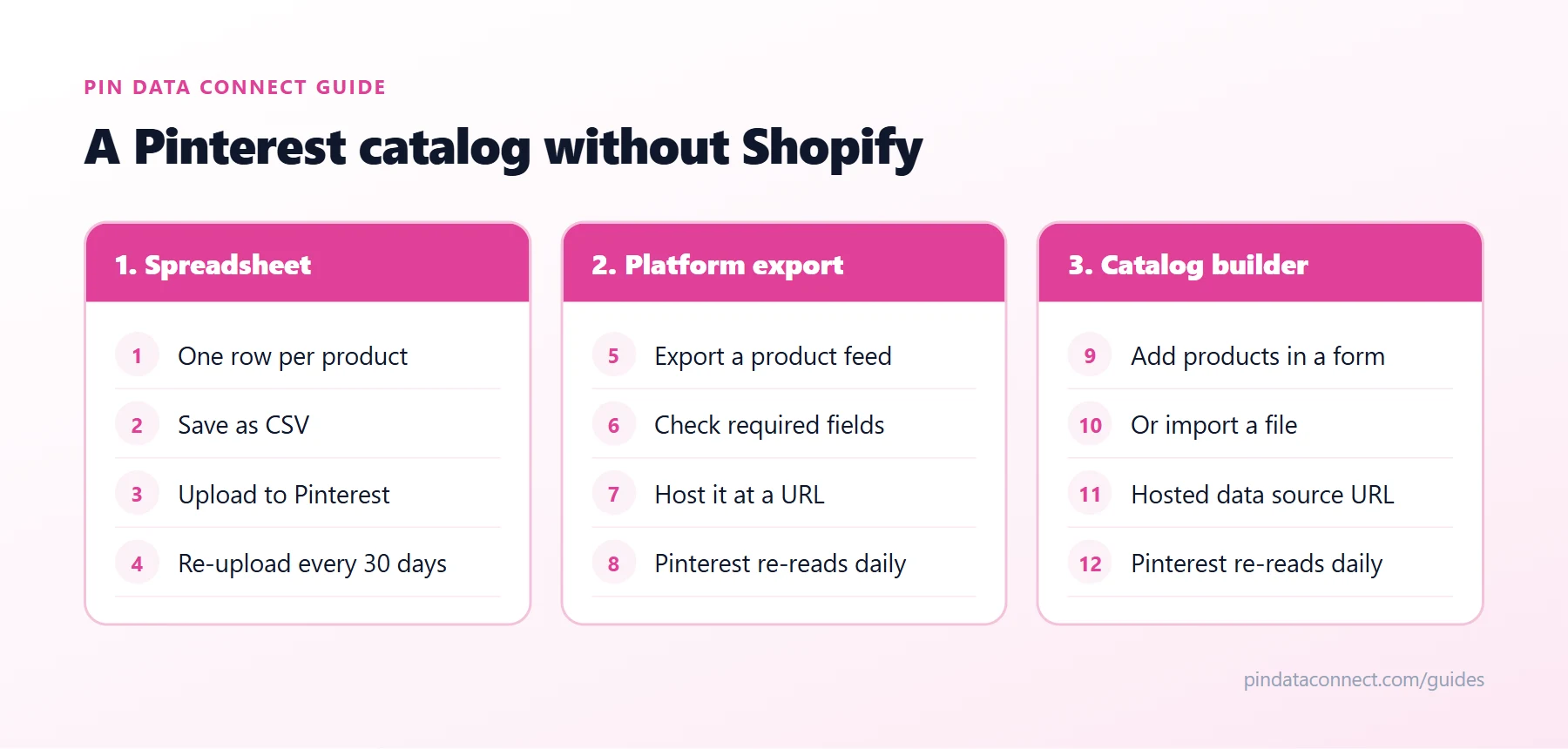
Option 1: Build the file yourself
For a small shop, a spreadsheet works: one row per product, the required columns, saved as a CSV and uploaded to Pinterest. Use our Pinterest catalog CSV template so the columns and formats are right the first time, or download a ready-to-fill file from our free Pinterest Catalog CSV Template Generator.
The catch is upkeep. A manually uploaded file has to be refreshed at least every 30 days, and every price or stock change means editing and re-uploading it.
Option 2: Use your platform's export or plugin
Many store platforms can export a product feed, and some have Pinterest plugins - WooCommerce, for example. Check that the export includes every required Pinterest field in the right format, and whether it can be hosted at a URL so Pinterest can re-read it automatically.
Option 3: Use a catalog builder
A catalog builder gives you a form to add products in your browser - or imports them from a file - and hosts the result as a Pinterest data source URL that Pinterest re-reads about every 24 hours. It works the same whatever your website runs on, and changes you make reach Pinterest automatically.
Connect it to Pinterest
- Claim your website on Pinterest and install the Pinterest tag.
- In Catalogs, add a data source: paste your hosted URL (and its username and password if it's protected), or upload your file.
- Wait for processing, then check catalog diagnostics. If anything fails, How to Fix Pinterest Catalog Errors explains each code.
For the full picture of how catalogs work, see the pillar guide, What Is a Pinterest Catalog?
Frequently asked questions
Can I create a Pinterest catalog without Shopify?
Yes. Pinterest catalogs work with any website you own. You need a business account, a claimed website with the Pinterest tag, and a data source file listing your products.
Can I use a Pinterest catalog with WooCommerce, Squarespace, or Wix?
Yes. Any platform works as long as the product links are on a website you have claimed on Pinterest and you can provide a data source in a format Pinterest accepts: CSV, TSV, XML, or Google Sheets.
Can I add marketplace listings to my Pinterest catalog?
Only if the product links are on a website you have claimed. You cannot claim a marketplace's domain, so products need to be listed on your own website.
Do I need a developer to set up a Pinterest catalog?
No. A CSV built from a template, or a catalog builder that hosts your data source, works without any code.
How often does Pinterest update my catalog?
Pinterest re-reads a hosted data source about once every 24 hours. Manually uploaded files need to be refreshed at least every 30 days.
A Pinterest catalog for any website
Pin Data Connect builds your Pinterest product catalog in your browser - no Shopify, no plugins, no spreadsheets - and hosts it as a private Pinterest data source URL that Pinterest reads automatically.
See the Pinterest Product Catalog Builder →
Save this guide for later
Pin it to one of your Pinterest boards so it's easy to find when you're ready to set things up.
Save to Pinterest