Guide · WooCommerce, PrestaShop, Wix, Square, Squarespace, BigCommerce & Webflow
How to Use a CSV or Plugin Product Feed for Google Shopping
Most store platforms and plugins can export your products - a CSV download, a JSON file, an XML feed for some other marketplace. Google Merchant Center can read files like these, but only when the columns and values are in Google's own format, and exports rarely are.
This guide shows what has to change, three ways to change it, and the export columns that most often map to Google's fields.
Why Google rejects most exports as they are
- Column names. Google needs
id,title,link,image_link,price,availability. Exports say Product Code, Name, URL, Image, Cost, Stock. - Prices without a currency.
$24or24,00needs to become24.00 USD. - Stock counts instead of availability. A quantity of
0has to becomeout_of_stock. - Relative links and images.
/products/mugmust be a full address on your verified domain. - HTML descriptions and long IDs. Descriptions should be plain text, and IDs can be at most 50 characters.
- Variants as separate, unrelated rows. Rows for the same product in different colors or sizes need a shared
item_group_id.
Three ways to make it work
1. Rename and fix it in a spreadsheet
Paste the export into Google Sheets, rename the columns, fix prices and availability with formulas, and add the sheet in Merchant Center as a product source. It works, but you redo it every time the export changes - and a sheet goes stale the moment a price or stock level does. Starting fresh? Our free Google Catalog TSV Template Generator gives you the right columns.
2. Fix it with Merchant Center's rules
If the export is hosted at a URL, Merchant Center can fetch it on a schedule, and its data source rules can map some columns and values to Google's. Rules help Google only, though - you'd set up the same fixes again for every other platform.
3. A connector that reads the export for you
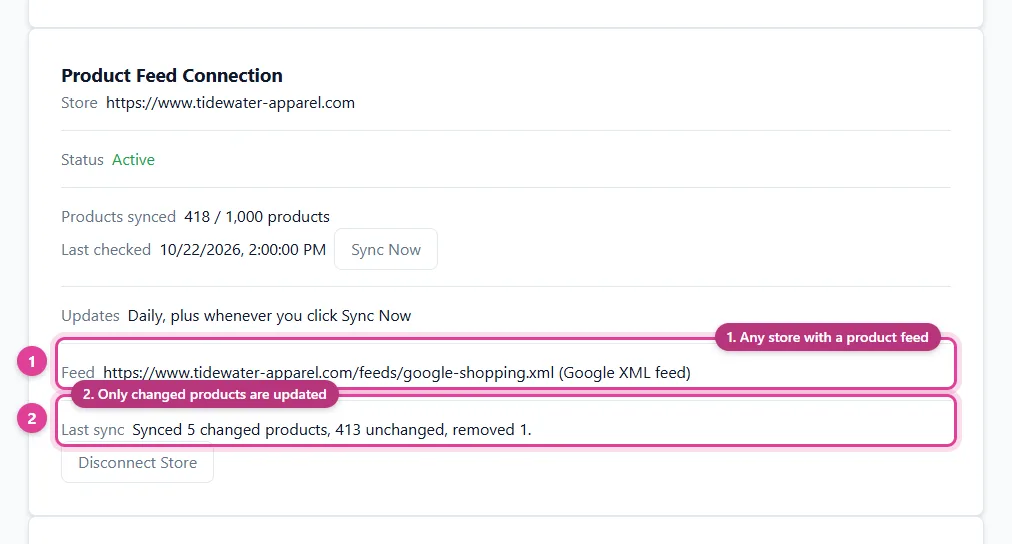
A connector reads your feed or export from its URL every day, matches its columns to Google's once (most match on their own), converts prices, stock, and links, and hosts a Merchant Center-ready feed - and the same data can feed Pinterest, Facebook, and Bing too.
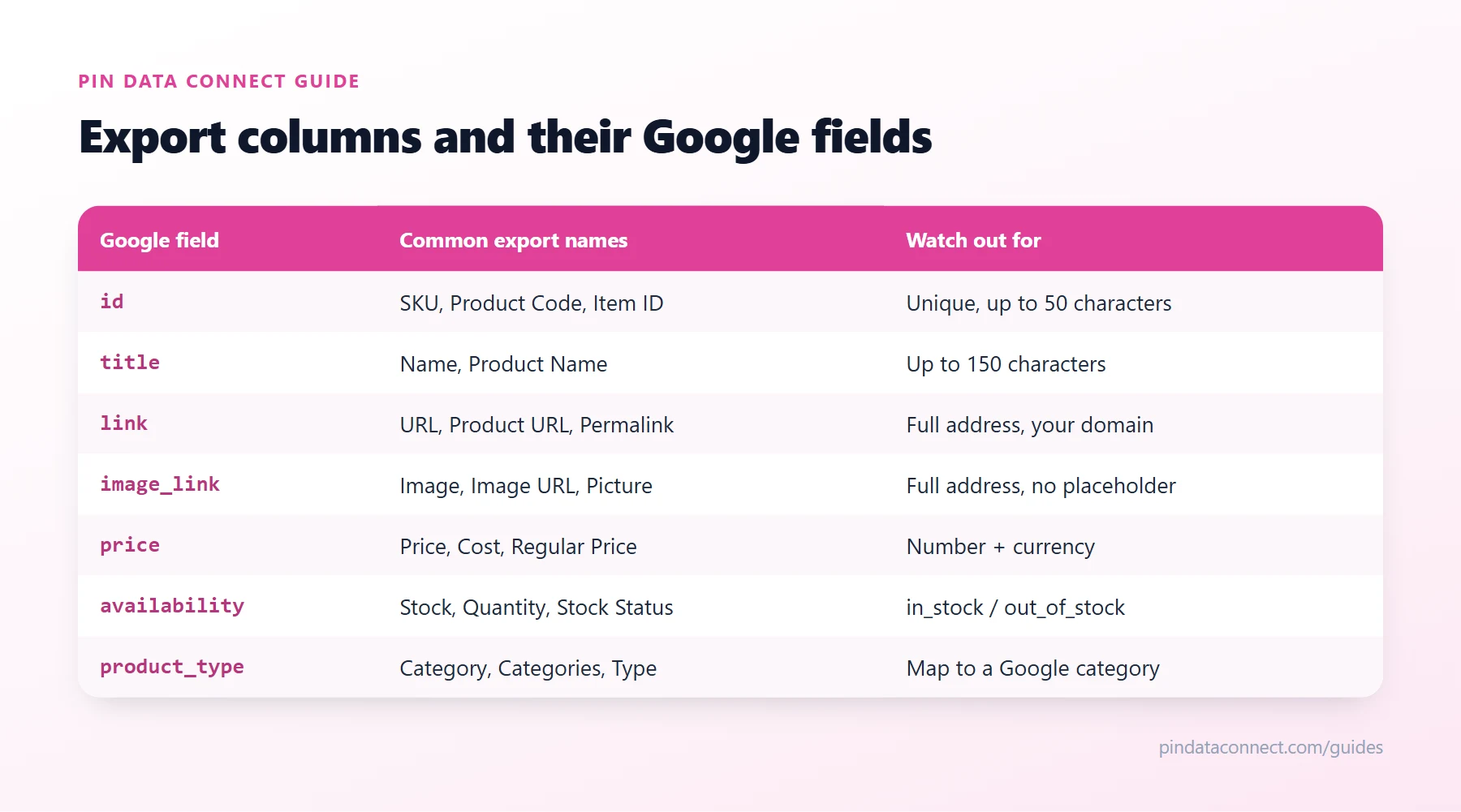
Export columns and their Google names
The table above shows the names exports most often use for each Google field. Whatever you use, keep your store as the one place you edit products - fix a product there, not in the feed, so the next export doesn't undo it.
After the first fetch
- Check the diagnostics. Merchant Center lists every rejected item and why.
- Add identifiers. Products with barcodes need a
gtin; your own handmade products can setidentifier_existstono. - Categories. Map your export's category or product type to a Google product category - see Google Product Category: How to Pick the Right One.
Setting up Merchant Center for the first time? Start with How to Set Up a Google Merchant Center Feed for a Small Store.
Frequently asked questions
Can I upload a CSV export from my store to Google Merchant Center?
Only if its columns and values follow Google's format: Google's field names, prices with a currency, availability values like in_stock, and full product links. Most exports need their columns renamed and some values converted first.
Can Google Merchant Center use a Google Sheet as a product feed?
Yes. You can add a Google Sheet as a product source in Merchant Center, as long as its columns use Google's field names and formats.
How do I keep an exported product feed up to date?
Use a feed URL that your store or plugin regenerates on its own, and have Merchant Center or a connector fetch it on a schedule. A one-time upload goes stale as soon as a price or stock level changes.
What is item_group_id?
A value shared by every variant of one product, such as each size and color of a shirt, so Google shows them as one product with options.
Already have a product feed? Use it everywhere
Pin Data Connect's Store Product Catalog Connector reads the product feed your store already makes - Google XML, CSV, JSON, or a Google Sheet - every day, and builds your Pinterest, Facebook, Google, and Bing catalogs from it, with category mapping and clothing details filled in. One subscription covers all four.
See the Store Product Catalog Connector →
Save this guide for later
Pin it to one of your Pinterest boards so it's easy to find when you're ready to set things up.
Save to Pinterest