Complete guide · Google & Bing shopping feeds
How to Set Up a Google Merchant Center Feed for a Small Store
A Google Merchant Center feed is the product file Google uses to show your products in free listings on Google and in Shopping ads. Big retailers run them from feed-management platforms, but a small store can do it with a single, well-built file.
This guide covers what Merchant Center needs from every product, the ways to get products in, and how to keep your feed current without editing spreadsheets every week.
Before you start
- A Merchant Center account with your business information, shipping, and return policy filled in.
- A verified and claimed website. Every product
linkhas to be on that domain. - A product page for each item showing the same price and availability as your feed.
Four ways to add products
In Merchant Center, go to Settings > Data sources and add a product source. The options are:
- From your website. Google reads structured product data on your pages. It's easy, but you're limited to what your site's markup provides.
- From a file you upload. Quick to start, but every change means uploading again.
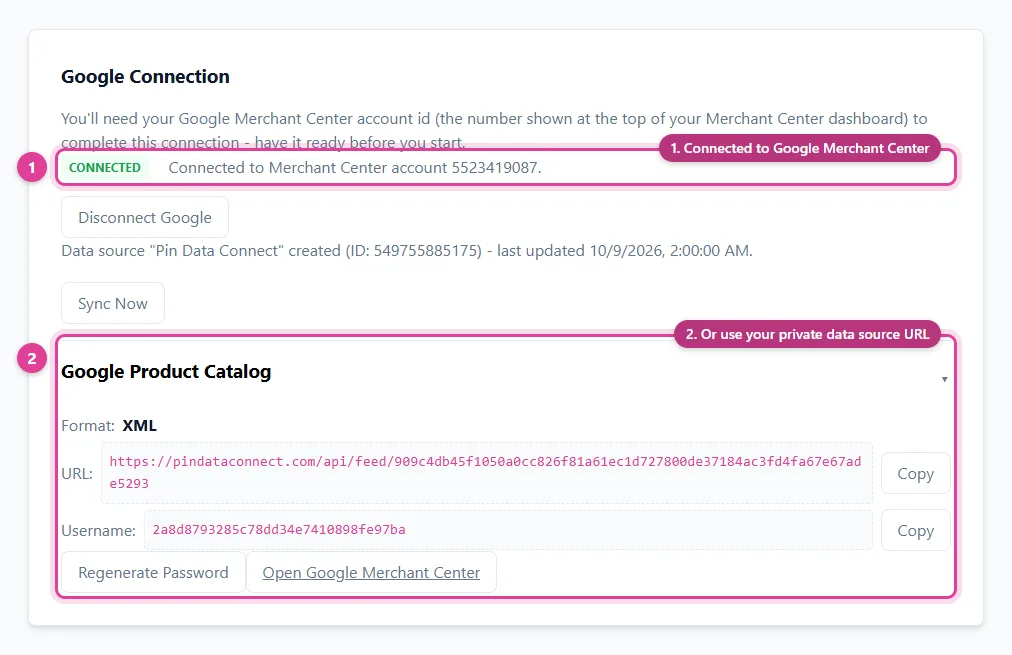
- From a file Google fetches on a schedule. You host the file at a URL, and Google downloads it daily, weekly, or monthly. This is the best fit for most small stores.
- From Google Sheets or an app. Sheets works for a short list, and store platforms and apps can push products through Google's API.
What every product needs
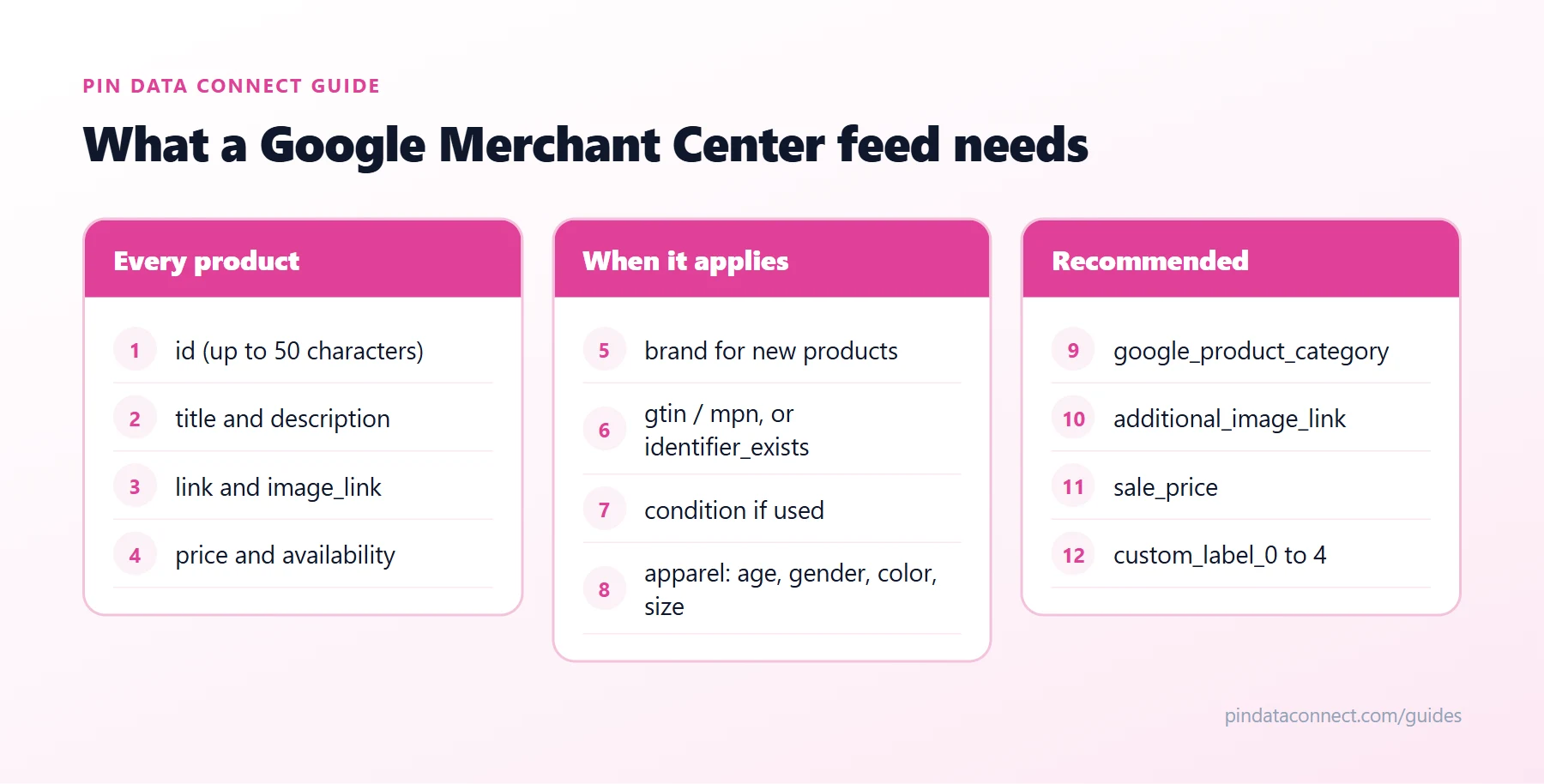
The diagram above sums it up. Every product in a Google Merchant Center feed needs:
id- unique, up to 50 characters (use your SKU)title- up to 150 characters, matching your product pagedescription- plain text, up to 5,000 characterslink- the product page on your verified domainimage_link- the main image with no watermarks or promotional text. Google is raising its minimum to 500 x 500 pixels, so use at least that.availability-in_stock,out_of_stock,preorder, orbackorderprice- a number and an ISO 4217 currency code, such as15.00 USD
Some products need more:
brand- required for new products. If you make the product yourself, use your own brand.gtinandmpn- for products that have manufacturer codes.identifier_exists- set tonofor handmade or custom items that don't have those codes.condition- required if the item is used or refurbished.- Apparel - clothing and accessories also need
age_group,gender,color, andsize.
Pick a category from the Google product category list
Google assigns every product a category automatically. Adding google_product_category from the Google product category list lets you correct a wrong guess, and it's how category-specific requirements like the apparel fields get applied. Google Product Category: How to Pick the Right One covers it step by step.
File formats and scheduled fetches
- Formats: a tab-delimited text file (.txt or .tsv), an XML file (RSS 2.0 or Atom 1.0), or Google Sheets. Compressed .gz, .zip, and .bz2 files are fine too. Our free Google Catalog TSV Template Generator builds a ready-to-fill tab-delimited file.
- Feed URL: it must start with http://, https://, ftp://, or sftp:// and point straight at the file.
- Password-protected feeds: choose Add authentication information to give Google the username and password.
- Size: a scheduled file must be under 4 GB, far more than any small store needs.
Tips for small stores
- Keep one source of truth. When the feed is generated from your real product data, price and stock mismatches can't creep in.
- Choose a daily fetch. Prices and stock stay current without any re-uploading.
- Check before you submit. Our free Product Catalog CSV Validator flags missing and invalid fields.
- Reuse the feed for Bing. Your Microsoft Merchant Center feed can come from the same Google data - see How to Import a Google Merchant Feed Into Bing.
Frequently asked questions
What is a Google Merchant Center feed?
It is the product file Google Merchant Center reads to show your products in free listings and Shopping ads. Each product has fields such as id, title, description, link, image_link, price, and availability.
Do small stores need a Google Merchant Center feed?
Not strictly - Merchant Center can also read products from your website or from Google Sheets. But a feed gives you full control over every field, and a scheduled feed keeps prices and stock current automatically.
What file format does Google Merchant Center accept?
Tab-delimited text (.txt or .tsv), XML (RSS 2.0 or Atom 1.0), and Google Sheets. Compressed .gz, .zip, and .bz2 files are also accepted.
How often does Google fetch a scheduled feed?
You can schedule a fetch daily, weekly, or monthly. Daily suits most stores because prices and availability have to match your product pages.
Do I need a GTIN for handmade products?
No. Products without manufacturer codes, such as handmade or custom items, can set identifier_exists to no. Products that do have a GTIN should include it.
A Google Merchant Center feed without the spreadsheet
Pin Data Connect builds your Google Merchant Center feed in your browser - with every required field, a searchable Google product category list, and apparel fields when you need them - and hosts it at a private URL Google fetches automatically.
See the Google Product Catalog Builder →
Save this guide for later
Pin it to one of your Pinterest boards so it's easy to find when you're ready to set things up.
Save to Pinterest