Guide · Google & Bing shopping feeds
Google Product Category: How to Pick the Right One
The google_product_category field puts each product in one spot in Google's product taxonomy - the Google product category list of more than 5,000 categories, from Apparel & Accessories down to Home & Garden > Kitchen & Dining > Tableware > Drinkware > Mugs.
Here's how to pick the right category and how to format it in your Google Merchant Center feed and anywhere else that uses the same list.
Why the category matters
Google assigns every product a category automatically from its title, description, price, brand, and GTIN. Setting the category yourself lets you:
- Correct a wrong guess, so the product shows for the right searches.
- Trigger category-specific rules. Clothing and shoes, for example, also need age group, gender, color, and size.
- Organize ads. Shopping campaigns can group products by category.
The same list is used well beyond Google. Your Microsoft Merchant Center feed accepts it in its product_category field, and Pinterest and Facebook catalogs use google_product_category too.
How to pick the right one
- Start with what the product is, not what it's for or who buys it. A mug with a cat on it is a mug, not a pet supply.
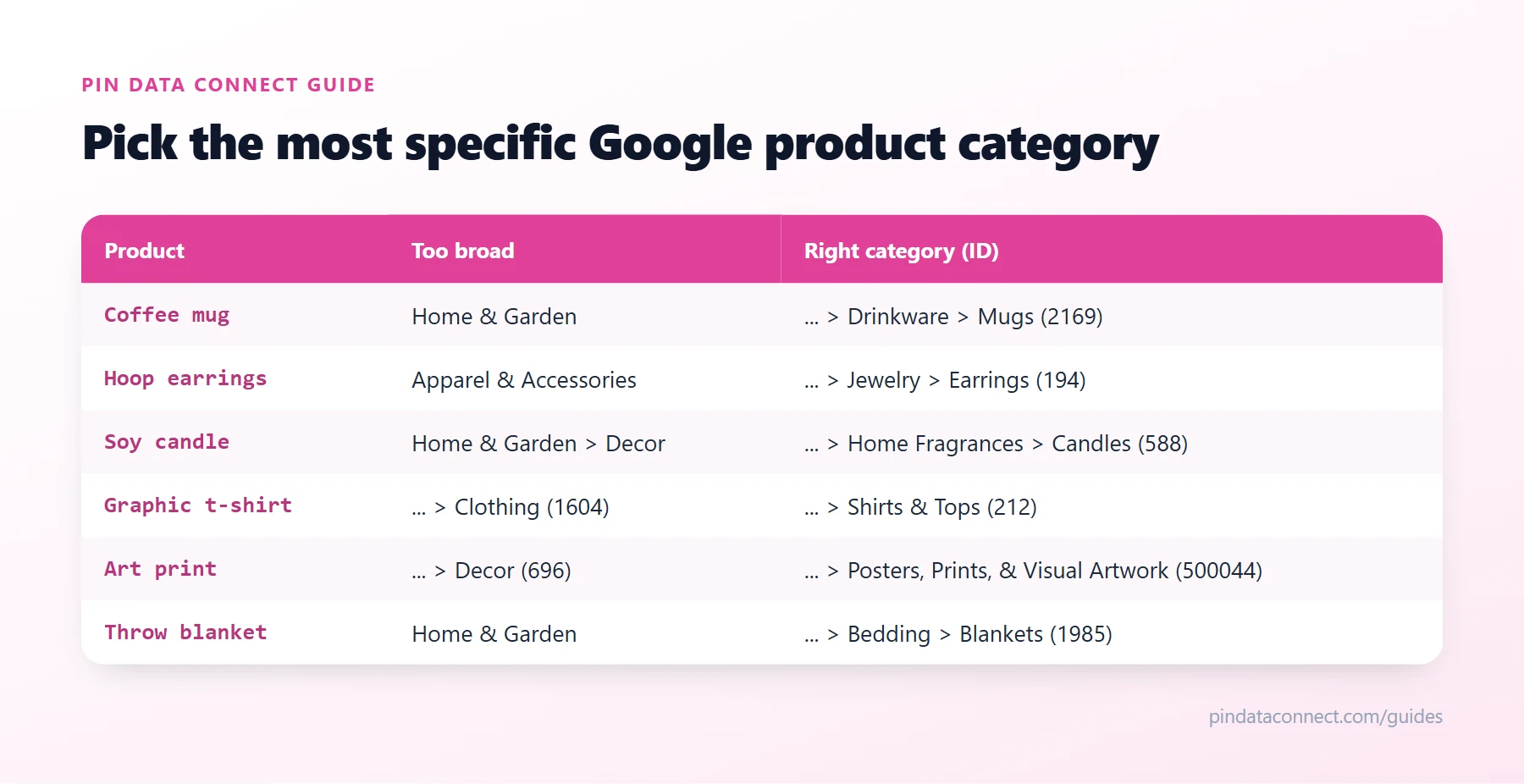
- Go as specific as the list allows. Home & Garden is valid but nearly useless; … > Drinkware > Mugs is right.
- Pick exactly one. If a product fits two categories, choose the one that describes it best.
- Search with general words. The list uses plain category names like "Mugs" or "Earrings", not product descriptions like "sunflower coffee mug".
ID or full path?
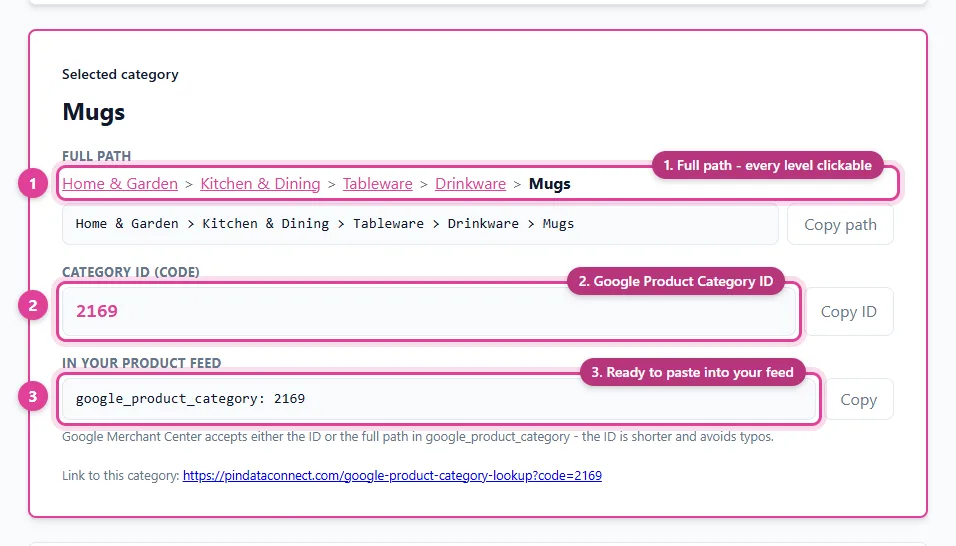
Every category has a numeric ID and a full path. You can submit either one, but not both:
- ID:
2169 - Full path:
Home & Garden > Kitchen & Dining > Tableware > Drinkware > Mugs
The ID is shorter and can't be mistyped into an invalid path, and it works in any language. If you use the path, copy it exactly, with > between levels.
Examples
The diagram above shows common products next to a category that's too broad and the right one. Notice the pattern: each right answer goes to the last level that still describes the product.
Common mistakes
- Stopping at the top level - Apparel & Accessories instead of … > Clothing > Shirts & Tops.
- Using your own store categories. Your own groupings belong in
product_type, notgoogle_product_category. - Mixing formats - an ID and a path in the same field, or a path with different separators.
- Using an old copy of the list. Google updates the taxonomy, so use the current Google product category list.
Find yours in seconds
Our free Google Product Category Lookup tool searches the full list as you type and shows each category's full path and ID, ready to copy into a Google Merchant Center feed or a Microsoft Merchant Center feed. For everything else your feed needs, see the pillar guide, How to Set Up a Google Merchant Center Feed for a Small Store.
Frequently asked questions
What is the Google product category?
It is a category from Google's product taxonomy, a fixed list of more than 5,000 categories, submitted in the google_product_category field to describe what each product is.
Is google_product_category required?
Google assigns a category to every product automatically, so it is optional in most cases. Setting it yourself corrects wrong guesses and makes sure category-specific requirements, such as the apparel fields, are applied correctly.
Should I use the category ID or the full path?
Either works, but not both. The numeric ID, such as 2169, is shorter, harder to mistype, and works in any language. A full path must be copied exactly, with > between levels.
Where can I find the Google product category list?
Google publishes the taxonomy as downloadable text and spreadsheet files in Merchant Center Help. Our free Google Product Category Lookup tool lets you search the whole list and copy any category's path and ID.
Does Bing use Google product categories?
Yes. Microsoft Merchant Center's product_category field is equivalent to google_product_category and accepts the same taxonomy, including the numeric IDs.
The whole Google product category list, built in
Pin Data Connect's Google Product Catalog Builder searches the full Google product category list as you type on every product - then hosts your finished Google Merchant Center feed at a private URL Google fetches automatically.
See the Google Product Catalog Builder →
Save this guide for later
Pin it to one of your Pinterest boards so it's easy to find when you're ready to set things up.
Save to Pinterest