Troubleshooting
See why products were rejected (Catalog Health)
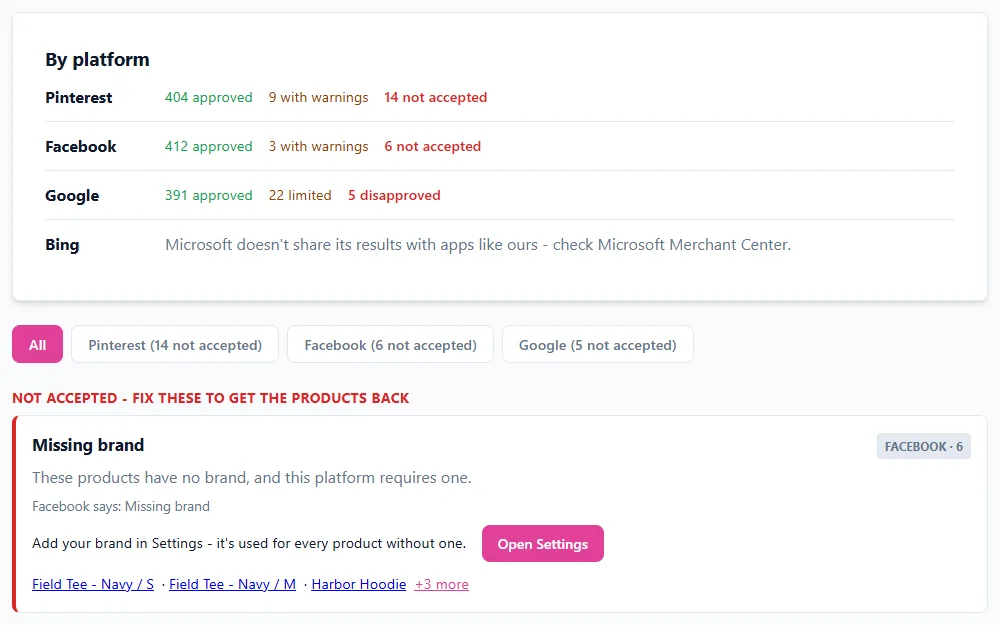
Catalog Health shows what Pinterest, Facebook, and Google said about the products in your catalogs - how many they accepted, which ones they rejected or limited, why, and what to change. Open it from Catalog Health in the menu, or See all issues on your dashboard.
Which platforms it covers
It works for each platform you connected with the Connect button on the Connections page - that connection is what lets us ask the platform about your products. If you added your Data Source URL to a platform by pasting it in, Catalog Health can't see that platform's results; connect it with the button instead. Microsoft doesn't share its results with apps, so for Bing, check Microsoft Merchant Center.
Want to see where each platform lists rejected products itself? See Pinterest, Facebook, and Google.
Reading the page
- By platform shows how many products each platform approved, how many are live with a warning (Google calls these limited), and how many it didn't accept (Google: disapproved).
- Below that, problems are grouped by reason in plain English - Missing brand, Image problem, Price problem, and so on - with the ones that stopped products from showing first. The same problem from several platforms shows as one row, tagged with each platform.
- Each problem has a Fix button that opens the right place: Settings for your brand, your catalog for a product's details, or - for connected stores - Category Mapping and Clothing Details on the Connections page. Click a product's name to open your catalog searched to that product.
- Some problems only the platform can explain, like policy decisions; those link to the platform's own catalog page.
Pinterest shows examples, not every product
Pinterest tells us how many products have each problem, but names at most 20 of them. The page marks those counts with *. If Pinterest read some products but didn't add them without giving a reason, they show as Not added - no reason given; Pinterest's own catalog page may say more.
When it updates
We check every morning. To check right away, click Check again (once every 10 minutes). After you fix something, it shows up as fixed once the platform has read your catalog again - Pinterest about once a day, Facebook and Google on their own schedules.
Email alerts
If a platform suddenly rejects many more of your products - at least 10 more, and at least 10% more than the day before - we email you, at most once a day. Turn this off with the checkbox at the bottom of the Catalog Health page.
Still need help?
Chat with us using the chat button in the corner of this page, or send us a message and we'll reply by email.
Contact Us