Guide · Print on demand & any website
How to Get Products From Any Website on Google Shopping
Google shows products from online stores across Search, the Shopping tab, Images, and more - and the basic free listings cost nothing. To add products to Google Shopping, your website has to pass Google Merchant Center's checks, and your products need to reach Google as a Google Shopping feed.
This guide covers both for any e-commerce website, whatever it's built on.
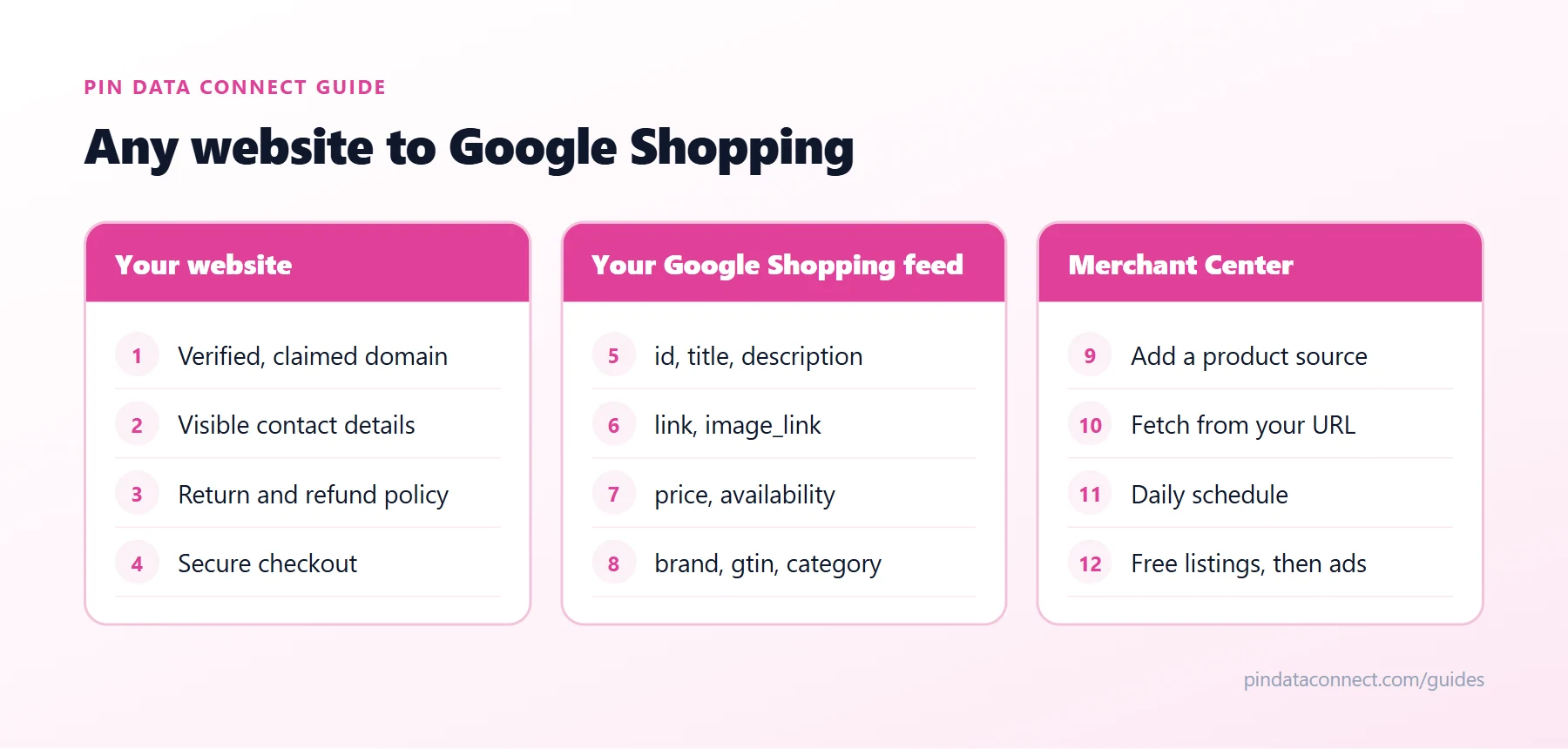
Make your website Merchant Center-ready
Google reviews your website as well as your products. The checklist above covers the essentials:
- Verify and claim your domain in Google Merchant Center. Every product link must be on it.
- Show contact information customers can see, such as an email address, phone number, or address.
- Publish a return and refund policy and your terms.
- Offer a secure checkout with at least one conventional payment method, such as a credit or debit card.
- Sell your own products. Merchant Center is for your store, not a marketplace where other businesses sell.
Build your Google Shopping feed
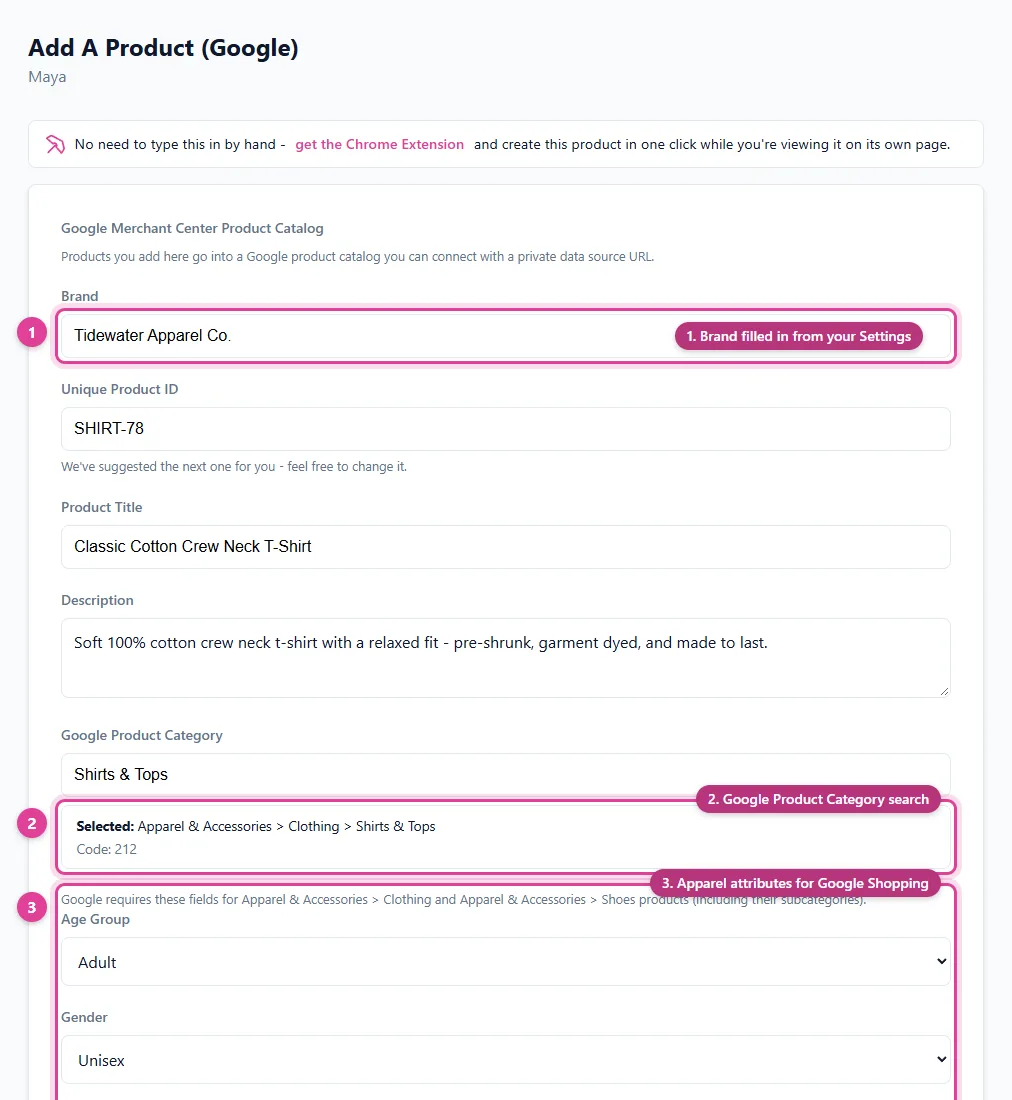
Every product needs id, title, description, link, image_link, availability, and price. Add brand for new products, a gtin where the product has a barcode, and a google_product_category from Google's list - our free Google Product Category Lookup tool finds it fast.
Merchant Center accepts a tab-delimited text file, XML, or Google Sheets. It can also read products straight from your website, if your site builder adds structured product data to each page - easy, but you get less control over each field. To build the file yourself, start from our free Google Catalog TSV Template Generator.
Connect it to Merchant Center
- In Merchant Center, go to Settings > Data sources and add a product source.
- Choose a file, then fetch it from a URL - with a username and password under Add authentication information if it's protected.
- Schedule a daily fetch so prices and availability always match your pages.
Once products are approved, they're eligible for free Google Shopping listings - what Google calls free listings. Shopping ads are an optional, paid next step through Google Ads.
Notes for popular site builders
- Built-in Google channels: some site builders connect to Google directly. If yours does and it covers your products, try it first.
- Prices and tax: make sure the price on the page matches your feed. In the US, Google expects prices without tax.
- Several sales channels: keep one master product list and generate each feed from it, so Google, Bing, and social catalogs always agree.
Next steps
The Google Merchant Center Feed for Small Stores guide covers every field in detail, and Google Product Category: How to Pick the Right One covers categories. Want Bing too? See How to Get Products From Any Website on Bing Shopping.
Frequently asked questions
Can I add products to Google Shopping from any website?
Yes. Any e-commerce website can list products on Google Shopping through Google Merchant Center, as long as the site meets Google's requirements and you submit your products in a Google Shopping feed.
Is Google Shopping free?
Free listings are. Approved products in Google Merchant Center are eligible to appear in free listings across Google. Shopping ads are an optional paid service through Google Ads.
What does Google Merchant Center require from my website?
A verified and claimed domain, visible contact information, a return and refund policy, and a secure checkout with at least one conventional payment method. Product pages must show the same price and availability as your feed.
What is a Google Shopping feed?
It is the product file Google Merchant Center reads, with fields such as id, title, description, link, image_link, price, and availability for every product.
How often should my Google Shopping feed update?
Daily suits most stores. Schedule Merchant Center to fetch your feed from a URL every day so prices and stock always match your website.
Get your website on Google Shopping
Pin Data Connect builds your Google Shopping feed in your browser - every required field, the full Google product category list, and apparel fields when you need them - and hosts it at a private URL Google Merchant Center fetches automatically.
See the Google Product Catalog Builder →
Save this guide for later
Pin it to one of your Pinterest boards so it's easy to find when you're ready to set things up.
Save to Pinterest