Getting started
Getting started with Pin Data Connect
Pin Data Connect builds your product catalog for Pinterest, Facebook, Google, and Bing, and keeps it at a private Data Source URL that each platform reads on its own schedule. You add products once, and every change you make reaches the platform automatically.
How it works
- Add your products one at a time with a form, or import them all at once from a file.
- Connect your catalog to the platform: automatically (Pinterest, Facebook, and Google), or by pasting your Data Source URL into the platform yourself (any platform, including Bing).
- The platform reads your catalog about once a day, so edits, new products, and price changes show up without re-uploading anything.
1. Create your account and start your trial
- Go to Pricing and choose the catalog you need: one platform, a combination, or an Enhanced catalog with variants and extra fields. Not sure? See Which plan should I choose?
- Click Start Your Free 7-Day Trial and create your account. Your password needs at least 12 characters, with an uppercase letter, a lowercase letter, a number, and a special character.
- Enter a payment method to start the trial. You won't be charged until the 7 days are up, and you can cancel any time before then. See Free trial, billing, and cancelling.
- Check your inbox and click the link to verify your email address.
2. Follow the Get Set Up checklist
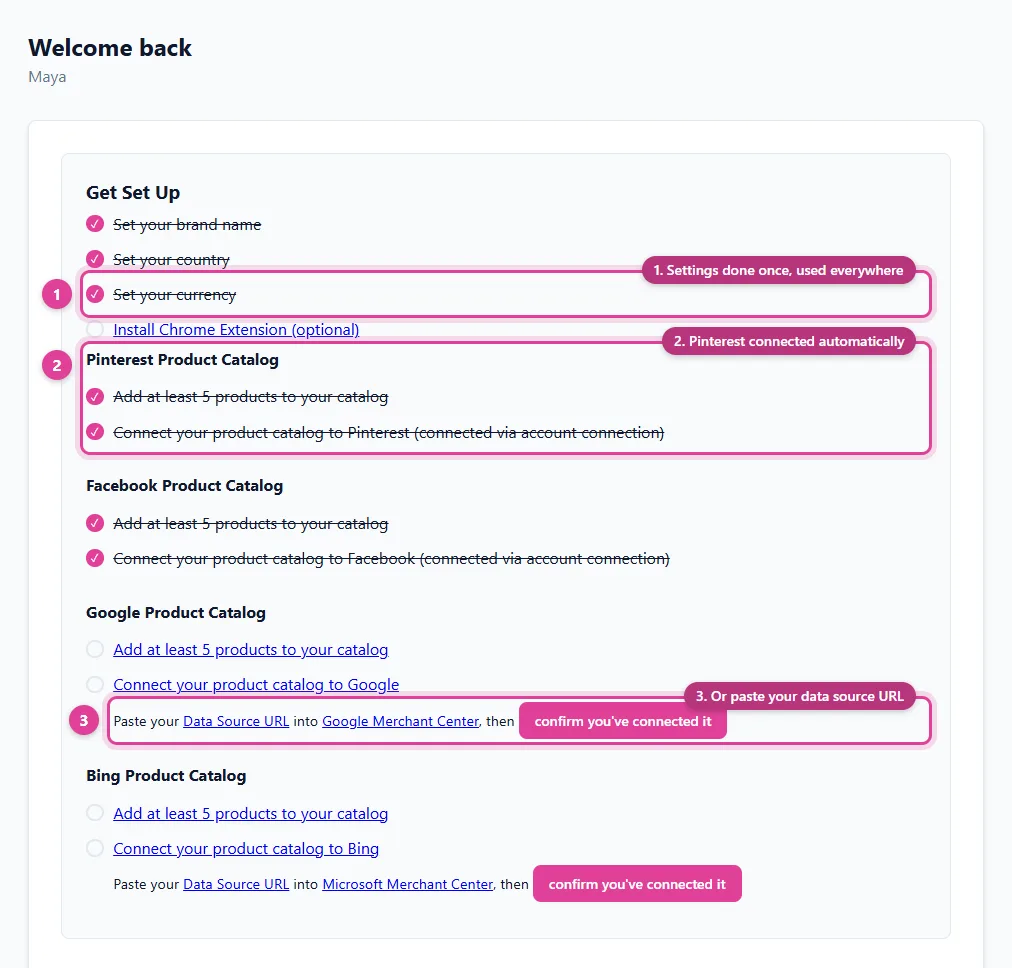
Your Dashboard shows a Get Set Up checklist. Each item links to the page that completes it, and ticks itself off once it's done:
- Set your brand name, country, and currency in Settings. See Set your brand, country, and currency.
- Add at least 5 products to your catalog. Platforms reject near-empty catalogs, so connecting needs at least 5. See Add a product or Import products from a file.
- Connect your product catalog to each platform you subscribed to.
3. Connect your catalog
Pick the article for your platform:
- Connect your catalog to Pinterest
- Connect your catalog to Facebook
- Connect your catalog to Google Merchant Center
- Connect your catalog to Bing (Microsoft Merchant Center)
That's it: from then on, keep your products up to date in Pin Data Connect and the platform picks up the changes on its next read.
Still need help?
Chat with us using the chat button in the corner of this page, or send us a message and we'll reply by email.
Contact Us