Bing Product Catalog Builder
Tired of manually formatting a spreadsheet for Bing/Microsoft Merchant Center? Pin Data Connect's Bing Product Catalog Builder lets you enter each product once in your browser and generates a product catalog ready to connect to Bing/Microsoft Merchant Center.
No spreadsheet software, no manual formatting, and no need to connect a Microsoft account to build it - just add your products, then connect your finished product catalog to Bing/Microsoft Merchant Center with a private data source URL, or Import From File (CSV, XML, TXT, TSV, JSON, or Google Sheets) yourself.
Works with any website or online store - Shopify, WooCommerce, Etsy, Squarespace, a custom-built site, or anywhere else you sell. You enter your product data directly (or capture it with our free Chrome extension), so there's nothing to install or connect on your site itself.
Try it free for 7 days. A valid payment method is required to start your trial - you won't be charged until the trial ends, and you can cancel anytime before then to avoid being billed.
Just the 7 Fields Bing Requires
Unique product ID, title, description, product URL, image link, price, and shipping cost - no category, brand, availability, or condition to fill in (those are part of Bing Enhanced).
The Leanest Feed on the Site
Bing's minimum required fields are the smallest set of any platform Pin Data Connect builds for - fastest to fill in when you don't need the extra Enhanced attributes.
Upload & Keep Building
Already have a product catalog file? Upload it and keep appending new products, or start a fresh one anytime.
Connect Automatically
Every plan includes a private URL with its own username and password that acts as your product catalog's data source - paste it into Bing/Microsoft Merchant Center's scheduled settings and it reads your latest products automatically.
Or Add Products in One Click With Our Chrome Extension
Browsing a product page? The free Pin Data Connect Chrome extension captures the title, description, price, and image straight from the page you're viewing and adds it to your Bing product catalog - no manual typing. See how it works →
Screenshots From the App
Real Pin Data Connect screens, shown with sample products. The numbers point out what to look at - click any screenshot to see it full size.
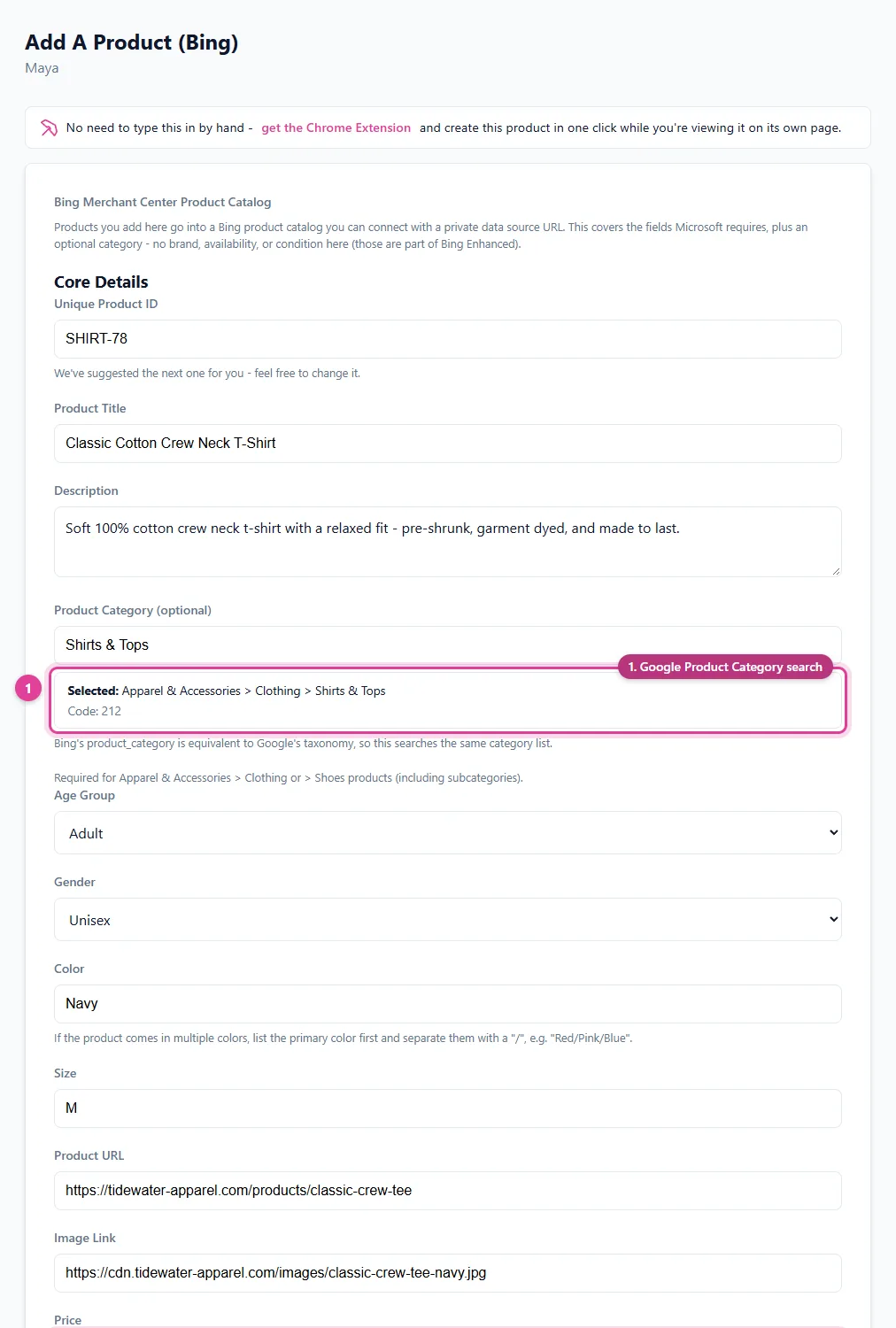
Add a product to your Bing catalog, including the shipping details Microsoft Merchant Center expects.
- Google Product Category search
- Price in your currency
- Shipping for Microsoft Merchant Center
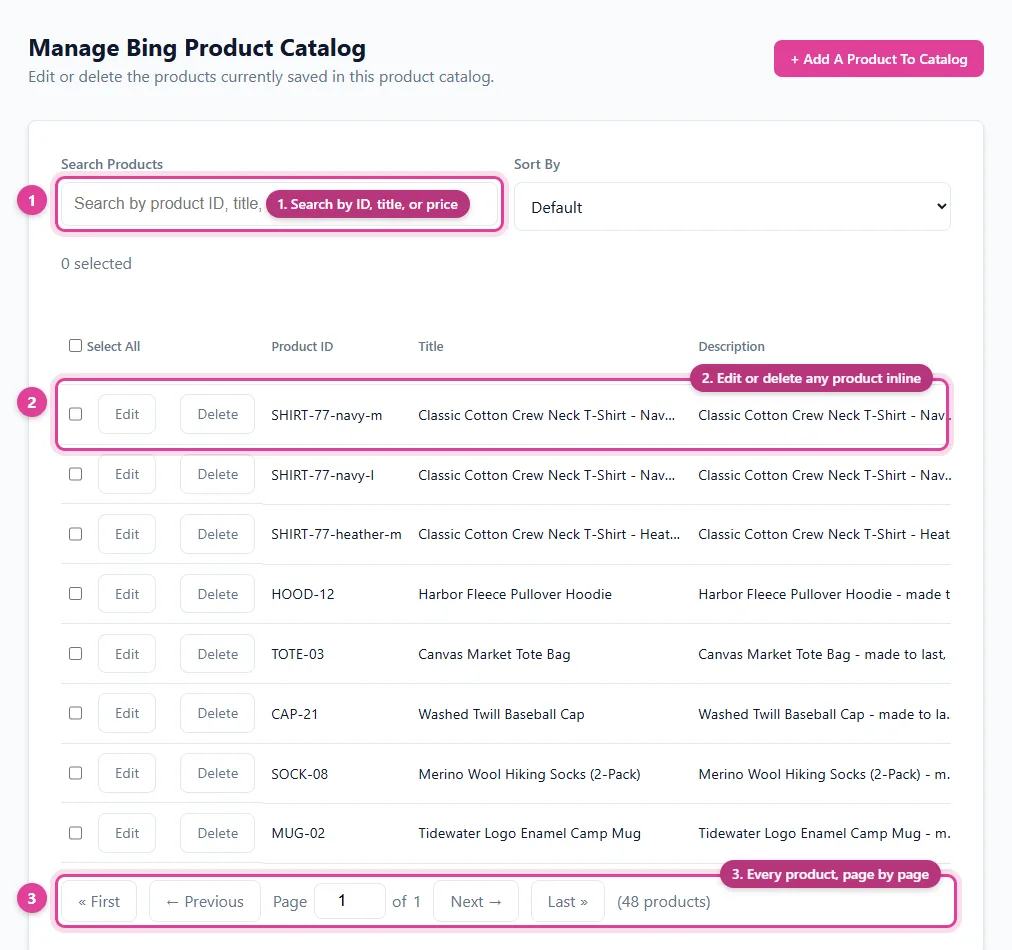
Search, edit, or delete any product in your Bing catalog from one screen.
- Search by ID, title, or price
- Edit or delete any product inline
- Every product, page by page
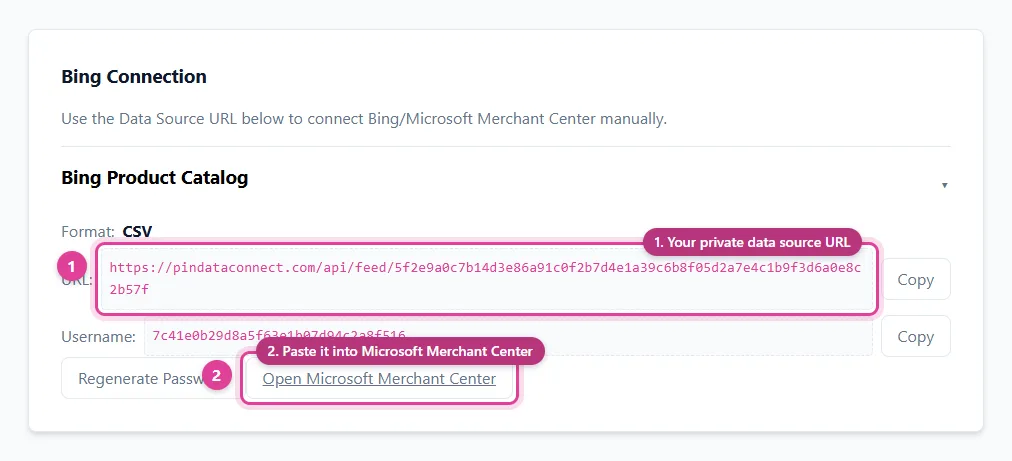
Copy your Bing catalog's private data source URL and paste it into Microsoft Merchant Center - it reads your products from there automatically.
- Your private data source URL
- Paste it into Microsoft Merchant Center
See It In Action
A live preview of the Add Product screen and your product catalog's data source URL.
Add A Product
Fill in these fields to add one product to your Bing product catalog.
Bing Basic covers just the 7 fields Microsoft requires - no category, brand, availability, or condition here (those are part of Bing Enhanced).
Your Product Catalog Data Source for Bing/Microsoft Merchant Center
Once you start adding products, you'll get a private URL of your own - complete with a generated username and password - that acts as your product catalog's data source. Paste it into Bing/Microsoft Merchant Center's scheduled settings and it reads your products from it automatically. Here's an example of what that looks like:
https://pindataconnect.com/api/feed/58feb9fcf22cc790ae29f3e5026ecf7625d0880fc0d408f435cccd59444b2e36
78dedb07f3f97f7d379d14d8f4d6d8e0
8b59bef65d18210850338b513eb29e286c3a35a6e6d0e624091df821ac1a0cee
Search, Edit, or Delete Anytime
Once your product catalog has products in it, manage every one from a single screen - search by product ID/title/price, edit any field inline, or delete - your product catalog's data source reflects the change instantly.
| Product ID | Title | Price | |
|---|---|---|---|
| BLANKET-201 | Woven Cotton Throw Blanket | 34.99 USD | |
The second row above shows what clicking "Edit" looks like - every field becomes editable in place, with Save and Cancel replacing Edit and Delete until you're done.
Free Google & Bing Feed Guides
Frequently Asked Questions
Does this work with my website or online store?
Yes. This works with any website or online store - Shopify, WooCommerce, Etsy, Squarespace, a custom-built site, or anywhere else you sell. You enter your product data directly (or capture it with the free Chrome extension) instead of connecting through a specific platform's API, so there's nothing to install or configure on your site itself.
What is a Bing product catalog?
A CSV file listing your products with the 7 fields Bing/Microsoft Merchant Center requires at minimum - unique product ID, title, description, product URL, image link, price, and shipping cost.
Do I need a Bing/Microsoft Merchant Center account?
You'll need a Bing/Microsoft Merchant Center account to use the finished product catalog. Pin Data Connect doesn't require you to connect a Microsoft account to build the product catalog itself - you build it here, then connect it with a private URL that acts as its data source, for Bing to read automatically, or upload it yourself.
Can I upload an existing product catalog to keep adding products?
Yes. Import From File (CSV, XML, TXT, TSV, JSON, or Google Sheets) and keep appending new products to it, or start a new blank product catalog at any time. See a filled-in sample product catalog above.
Can I add products with the Chrome extension instead of typing them in?
Yes. The free Pin Data Connect Chrome extension captures a product's title, description, price, and image straight from the page you're viewing and adds it to your Bing product catalog in one click.
What if I need more fields than the Basic 7?
Bing Enhanced adds identifiers, apparel attributes, variants, destinations, installments, Bing ad fields, sales/promotions, and UCP-readiness fields on top of these 7 - see the Bing Enhanced Product Catalog Builder.
Save This for Later
Planning your product catalog? Pin this to one of your Pinterest boards so it's easy to find again when you're ready.
Save to Pinterest