Turn Your Fine Art America Store Into a Pinterest Shopping Catalog
Sell on Pixels Pro or Fine Art America? Every artwork you publish becomes dozens of products - canvas prints, coffee mugs, tote bags, framed prints, apparel, and more. Pin Data Connect turns them into a Pinterest product catalog: enter your site's address and we list every artwork you've published, then one click with our PDC Import bookmark adds a Pinterest-ready product for every product type each of your artworks offers - all of them in one go - each with its own live price and image.
No spreadsheets and no retyping prices - and the Google Product Category is chosen for you on every product.
Try it free for 7 days. A valid payment method is required to start your trial - you won't be charged until the trial ends, and you can cancel anytime before then to avoid being billed.
Every Artwork, Found for You
Enter your Pixels Pro or Fine Art America site's address once - we list every artwork you've published, and pick up new ones whenever you search again.
One Click, Every Artwork
Open any one of your artworks and click the PDC Import bookmark - it adds a product for each of the 40+ product types every not-yet-added artwork offers, each with its own live price and image.
Google Product Category, Pre-Chosen
Every product type maps to its own correct Google Product Category automatically - no category searching needed.
Connect Automatically
Every plan includes a private URL with its own username and password that acts as your product catalog's data source - Pinterest Catalogs reads your latest products from it on its own schedule.
Imported From Your Own Browser - No Extension Needed
Pixels and Fine Art America block automated scraping, so your product details and prices are read from your own browser, on your own artwork pages, only when you start an import. Add the PDC Import bookmark once and import every new artwork in one go - it works in Chrome, Edge, Firefox, and Safari on a computer. Prefer one at a time? Our free Chrome extension does that too. Up to a minute per artwork - and Manage Artworks keeps track of which ones you've added.
Screenshots From the App
Real Pin Data Connect screens, shown with sample products. The numbers point out what to look at - click any screenshot to see it full size.
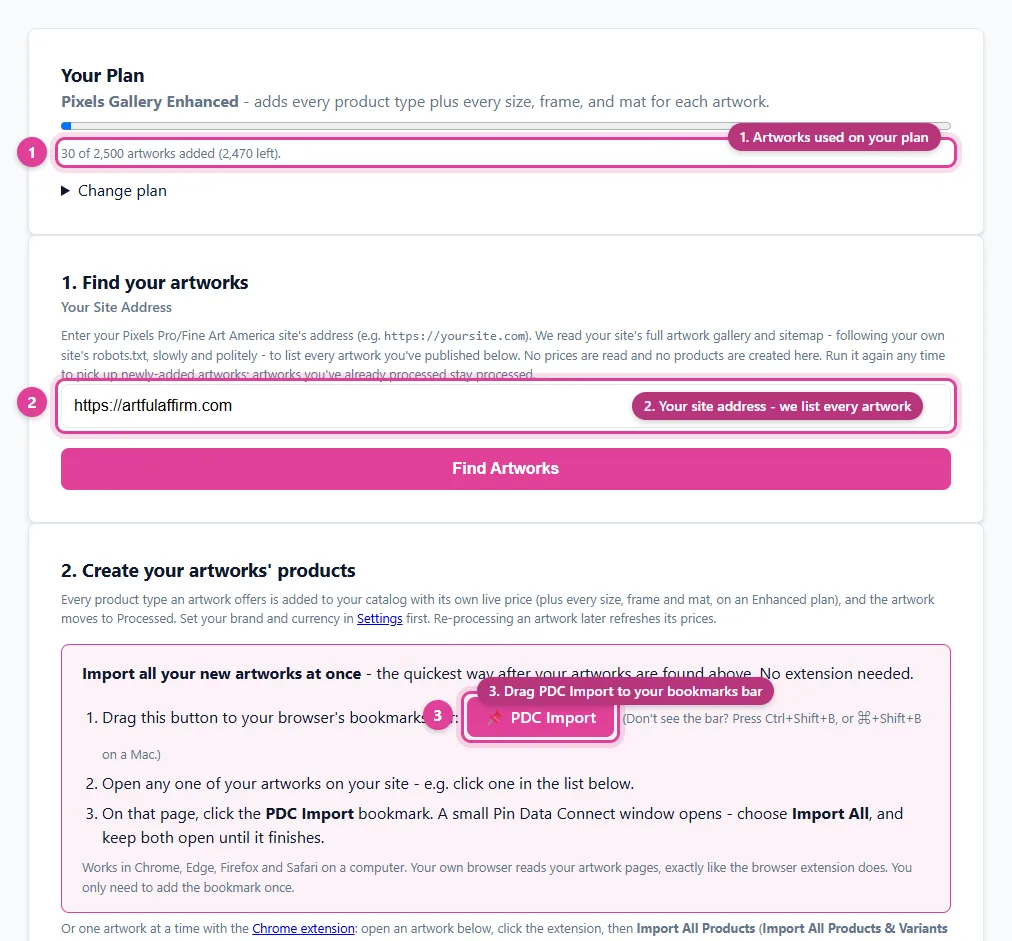
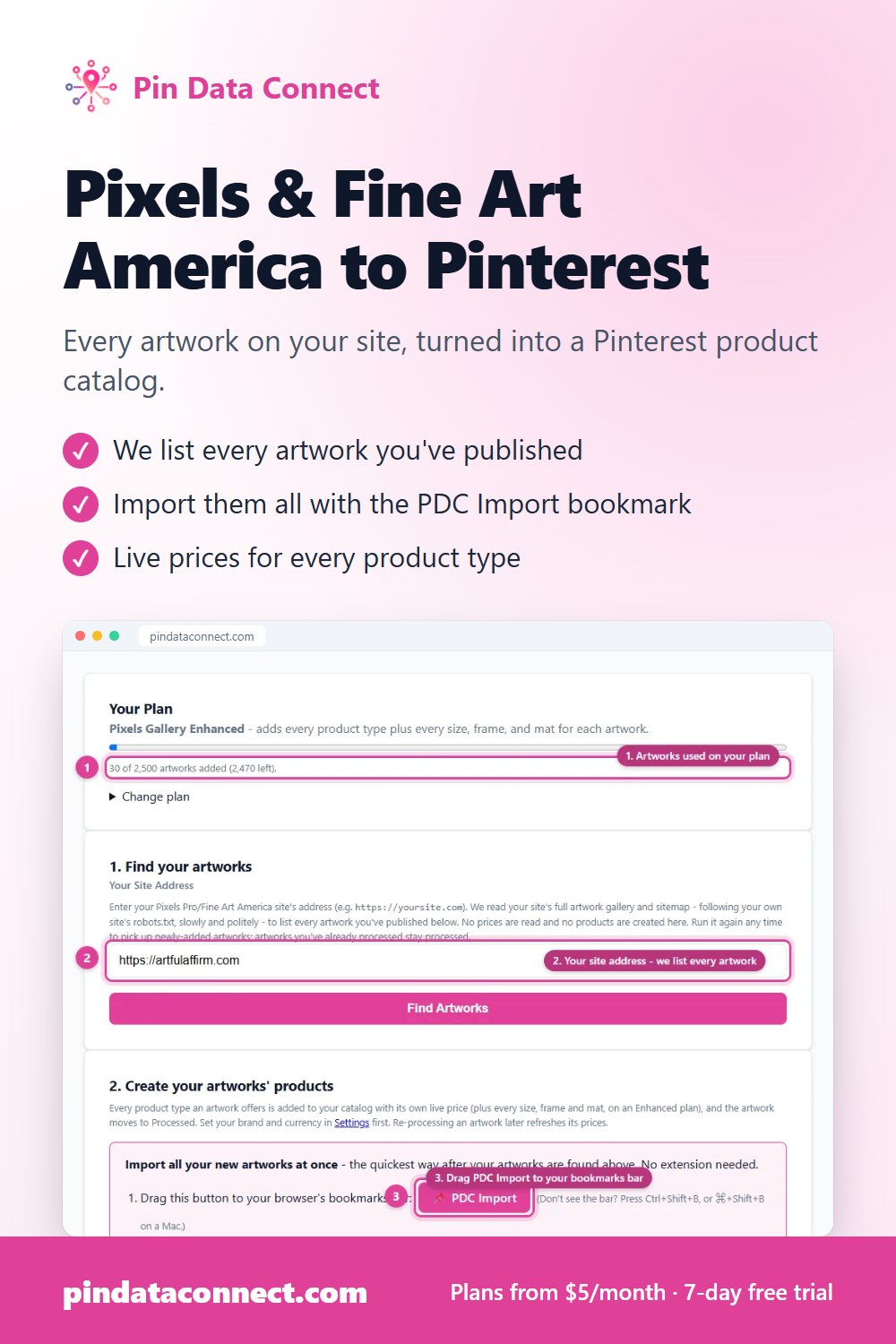
Manage Artworks: enter your site's address once and every artwork you've published is listed - then the PDC Import bookmark imports them all.
- Artworks used on your plan
- Your site address - we list every artwork
- Drag PDC Import to your bookmarks bar
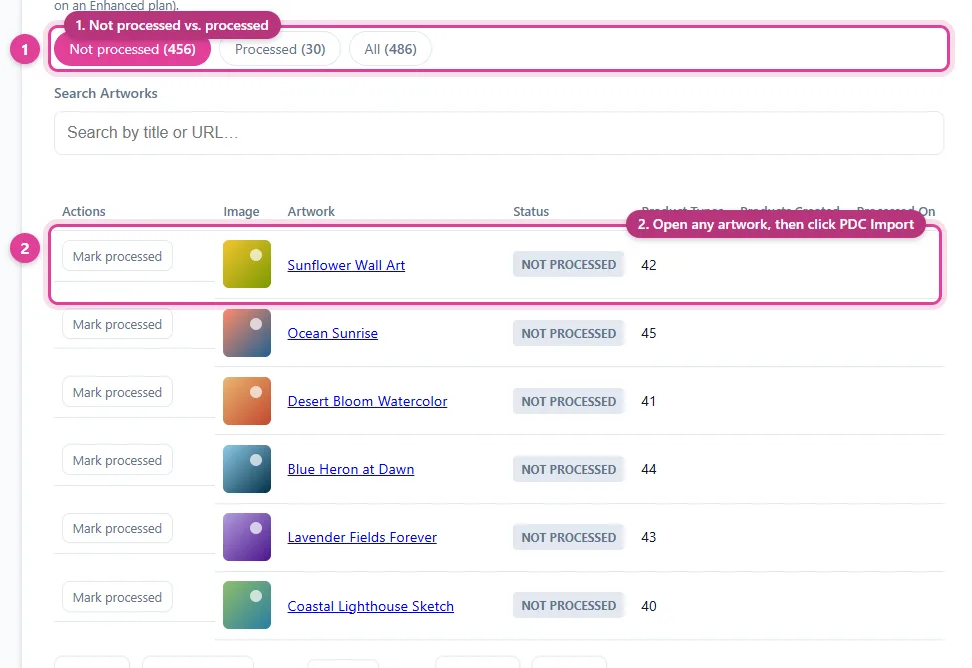
Every artwork found on your site, with how many product types each offers - and which ones you've already added.
- Not processed vs. processed
- Open any artwork, then click PDC Import
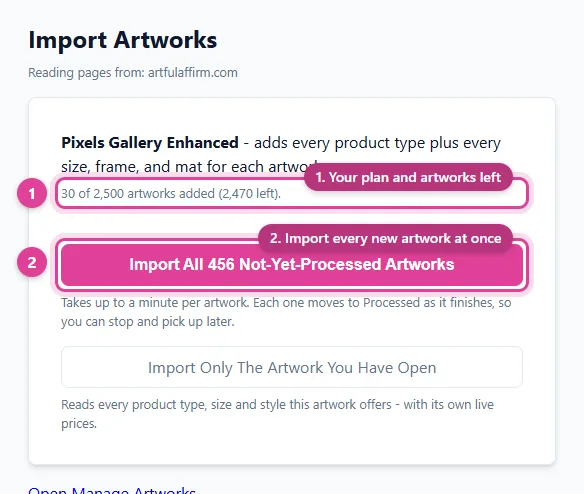
Click the PDC Import bookmark on any of your artworks and choose Import All - every new artwork is imported in one go, from your own browser.
- Your plan and artworks left
- Import every new artwork at once
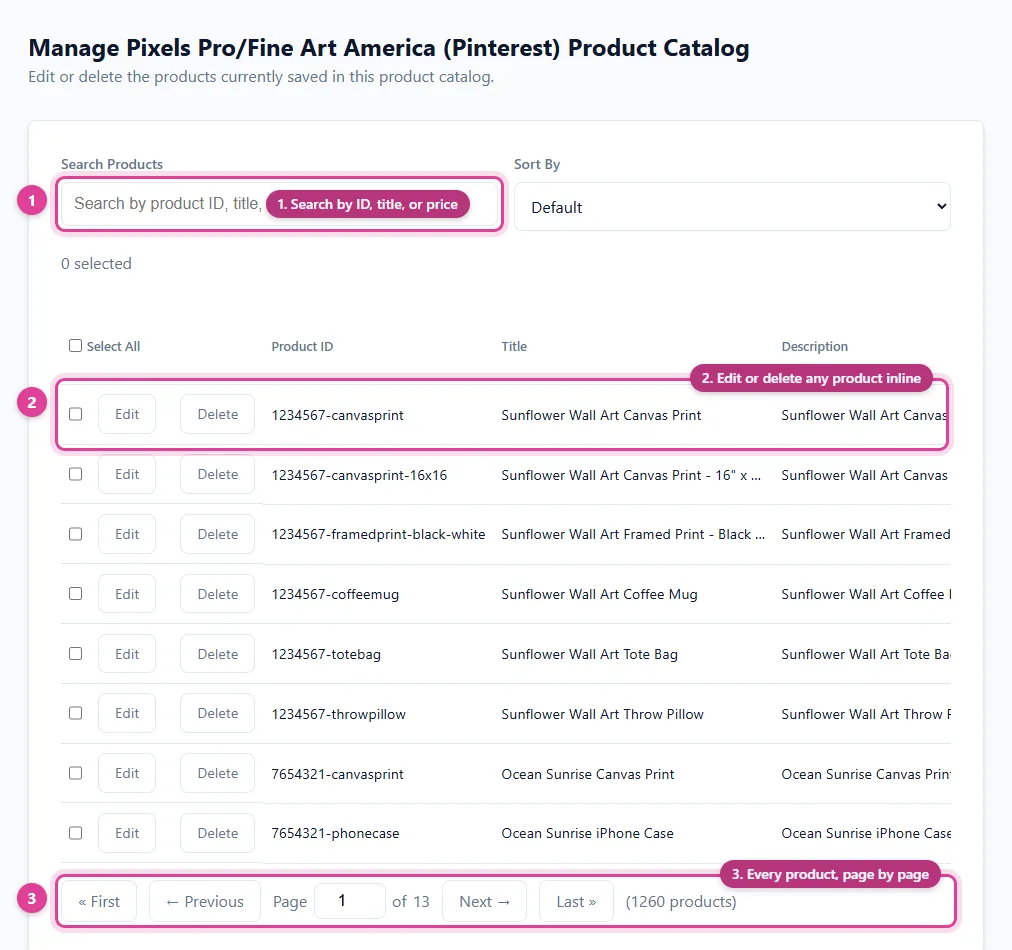
Each artwork becomes a product for every product type it offers - each with its own live price and Google Product Category.
- Search by ID, title, or price
- Edit or delete any product inline
- Every product, page by page
See How It Works
Find your artworks once, add them all with one click, then connect your catalog to Pinterest.
Step 1: Find Your Artworks
Enter your site's address on the Manage Artworks page and we list every artwork you've published. Open any artwork straight from the list - each one moves to Processed once its products are added.
| Artwork | Status | Product Types |
|---|---|---|
| Sunflower Wall Art | Not processed | 42 |
| Ocean Sunrise | Not processed | 45 |
| Autumn Leaves | Processed | 44 |
Step 2: Add Every Artwork's Products With One Click
Drag the PDC Import bookmark from the Manage Artworks page to your bookmarks bar (just once), open any one of your artworks, click the bookmark, and choose "Import All." Every artwork you haven't added yet gets a product for every product type it offers - title, live price, image, link, and Google Product Category all filled in. (Prefer one artwork at a time? Click our Chrome extension on that artwork's page instead.) Here are a few of one artwork's products:
| Product ID | Title | Price |
|---|---|---|
| 1234567-canvasprint | Sunflower Wall Art Canvas Print | 45.00 USD |
| 1234567-coffeemug | Sunflower Wall Art Coffee Mug | 18.00 USD |
| 1234567-totebag | Sunflower Wall Art Tote Bag | 23.50 USD |
Basic plans add one product per product type, at that product type's standard size and price; Enhanced plans also add every size, frame, and mat as its own product. Need to change a price? Edit it on your Manage Product Catalog page - or re-import the artwork to refresh all of its prices from your artwork's pages.
Your Product Catalog Data Source for Pinterest
Once you start adding products, you'll get a private URL of your own - complete with a generated username and password - that acts as your product catalog's data source. Paste it into Pinterest Catalogs' scheduled settings and it reads your products from it automatically. Here's an example of what that looks like:
Catalog Health: connect Pinterest with the Connect button on the Connections page instead of pasting the URL, and we check every day which of your products Pinterest accepted or rejected - and why - and show you the fix for each.
https://pindataconnect.com/api/feed/43cddc6621b5ee9666486ece5fcbb4e040aba33ede3116529434fa60258ad0eb
8a834bfd8964bb9bc4de14aca7aca8d9
a991d3943b7d34d6aab0d2e1084b3ca92db65db2153728f709d7878d758fa899
Search, Edit, or Delete Anytime
Once your product catalog has products in it, manage every one from a single screen - search by product ID/title/price, edit any field inline, or delete - your product catalog's data source reflects the change instantly.
| Product ID | Title | Price | |
|---|---|---|---|
| 1234567-canvasprint | Sunflower Wall Art Canvas Print | 45.00 USD | |
The second row above shows what clicking "Edit" looks like - every field becomes editable in place, with Save and Cancel replacing Edit and Delete until you're done.
Free Guides for Fine Art America & Pixels Artists
Real Results From Real Art Stores
Two Pixels Pro stores, Artful Affirm and Scottish Squares, turned their art into Pinterest shopping catalogs with Pin Data Connect:
Frequently Asked Questions
What is the Pixels Pro/Fine Art America Pinterest Product Catalog Builder?
A Pinterest product catalog built specifically for Pixels Pro and Fine Art America sellers. Enter your site's address and Pin Data Connect lists every artwork you've published. Then open any one of your artworks, click the PDC Import bookmark, and it adds a Pinterest-ready product for every product type each of your artworks offers - canvas print, coffee mug, tote bag, and 40+ more - each with its own live price, image, and Google Product Category. You can also add artworks one at a time with our free Chrome extension.
How are products added from my artworks?
Pixels and Fine Art America block automated scraping, so product details and prices are read from your own browser, on your own artwork pages, only when you start an import. Add the PDC Import bookmark from the Manage Artworks page once (no extension needed - it works in Chrome, Edge, Firefox, and Safari on a computer), then click it on any of your artworks to import every artwork you haven't added yet in one go. Or use the Pin Data Connect Chrome extension to add one artwork at a time. It takes up to a minute per artwork, and the Manage Artworks page keeps track of which artworks you've already added.
Do I need to connect my Pixels Pro or Fine Art America account?
No. Pin Data Connect doesn't need your Pixels Pro or Fine Art America login - it reads your site's public artwork list and pages, then you connect the finished product catalog to Pinterest Catalogs with a private data source URL.
How do I keep my prices up to date?
Edit any product's price directly on your Manage Product Catalog page - search for the product, click Edit, change the price, and save. Your Pinterest data source picks up the change on its next read. If you've changed many prices on Pixels or Fine Art America, you can instead re-import that artwork with the PDC Import bookmark or the extension to refresh all of its products at once - note that this replaces their prices with the ones currently on your artwork's pages.
Save This for Later
Planning your product catalog? Pin this to one of your Pinterest boards so it's easy to find again when you're ready.
Save to Pinterest