Complete guide · For Fine Art America & Pixels artists
How to Sell Fine Art America Art on Pinterest
Pinterest is where people go to plan - a new living room, a gift, a gallery wall. That makes it one of the best places for Fine Art America and Pixels artists to be found. Someone searching for "coastal wall art" or "botanical prints for the kitchen" is already in a buying mindset, and a pin can send them straight to your product page.
This guide walks through the whole path: from a single artwork on your Pixels Pro site to a set of shoppable Pinterest product pins - one for every canvas print, framed print, mug, tote bag, and pillow that artwork comes on - that keep working for you long after you post them.
Why Pinterest works for selling art
Most social platforms are built for scrolling. Pinterest is built for searching and saving - which is exactly why so many artists choose to sell art on Pinterest. People type what they want into Pinterest search, save ideas to boards, and come back to them when they're ready to buy. A few things make that especially good for artists:
- Pins last. A post on most social apps fades in a day or two. A pin can keep turning up in Pinterest search and recommendations for months.
- Search is visual and specific. Buyers search by subject, style, color, and room - exactly the way art is described.
- Product pins link straight to the sale. With a Pinterest catalog, each product becomes a pin that shows its price and availability and links directly to the page where it can be bought.
- One artwork, many products. Print-on-demand means the same image is a canvas print, a framed print, a throw pillow, and a phone case. Each of those can reach a different shopper.
What you need before you start
Pinterest is strict about one thing for shopping: every product link in a catalog must be on a website you have claimed on Pinterest. You can't claim fineartamerica.com or pixels.com - they belong to Fine Art America - so the products you send to Pinterest need to live on a website you control.
For Fine Art America artists, that's a Pixels Pro website on your own domain - the foundation of any Fine Art America Pinterest setup. Here's the full list:
- A Pixels Pro website with a custom domain (for example, yourartstudio.com). Pixels Pro is Fine Art America's paid artist membership - it gives you a branded website that stays in sync with your Fine Art America and Pixels profiles. Our Pixels Pro vs. Standard guide covers what it includes.
- A Pinterest business account. It's free, and you can convert a personal account in your settings.
- Your website claimed on Pinterest. With a custom domain, the simplest way is a DNS TXT record from Pinterest - it works no matter which platform hosts the site.
- A product catalog. A file or URL that lists every product - title, description, price, image, link, availability, and category - in the format Pinterest reads.
Step by step: from artwork to product pins
1. Set up your Pixels Pro site on your own domain
In your Pixels Pro settings, add a custom domain and point your domain's DNS to it by following Pixels' instructions. Give it a little time to go live, then confirm your artwork pages load on your domain - for example, yourartstudio.com/featured/sunflower-wall-art.html.
2. Create or convert to a Pinterest business account
Use a business name buyers will recognize - your studio name or your artist name - and write a profile bio that says what you make in plain words people search for: "Original botanical and coastal art prints, canvas, and home decor."
3. Claim your website on Pinterest
In your Pinterest business settings, go to claimed accounts and choose to claim a website. Pinterest offers an HTML tag, an HTML file, a Google Merchant Center connection, or a DNS TXT record. With a custom domain, the TXT record is usually easiest: copy the value Pinterest gives you into your domain's DNS settings. It can take up to 72 hours to take effect.
4. Build your product catalog
This is the step that stops most artists. Every artwork comes on dozens of product types, so a catalog for even 50 artworks can mean thousands of rows - each with the right title, live price, image, link, and Google Product Category. Typing that into a spreadsheet by hand isn't realistic, and prices drift the moment you change a markup.
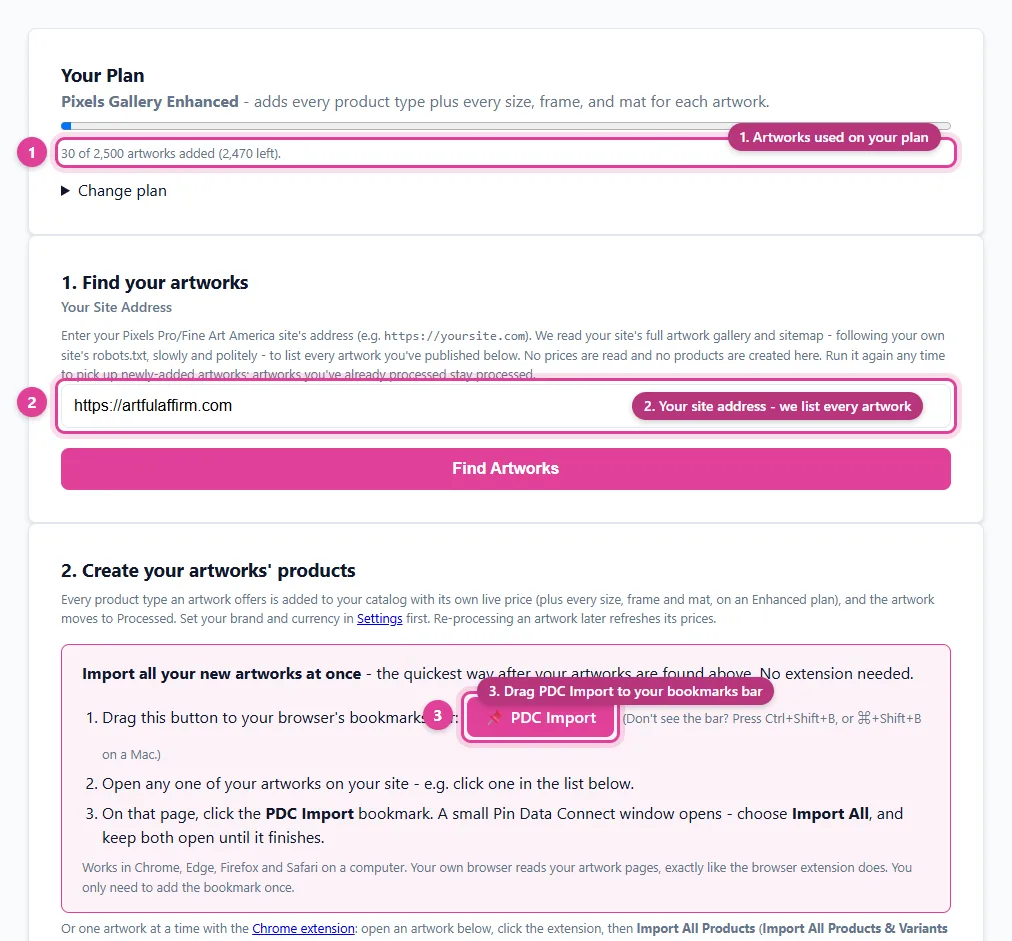
A catalog builder made for Pixels Pro sites solves this: it lists every artwork on your site, reads each artwork's own product pages from your browser, and creates one catalog product per product type with its current price - categorized and ready for Pinterest. The screenshot below shows what that looks like in Pin Data Connect.
5. Connect the catalog to Pinterest
In Pinterest, open Catalogs and add a data source. You can paste in a catalog URL - Pinterest then reads it on a regular schedule - or connect your catalog tool directly so it registers the data source for you. Pinterest processes the products and turns each one into a product pin.
6. Organize and promote
Once your products are ingested, create product groups (for example, "Canvas Prints" or "Coastal Collection") to keep things organized and to use later in ads. Then keep publishing fresh pins of your artwork to keyword-rich boards - the day-to-day side of Pixels Pinterest marketing. Our Pinterest SEO for artists guide covers exactly how.
7. Keep prices and products current
When you add new artworks or change your markup on Pixels Pro, update your catalog so Pinterest shows the right price. A catalog that's refreshed from your live artwork pages stays accurate without retyping anything.
How it all fits together
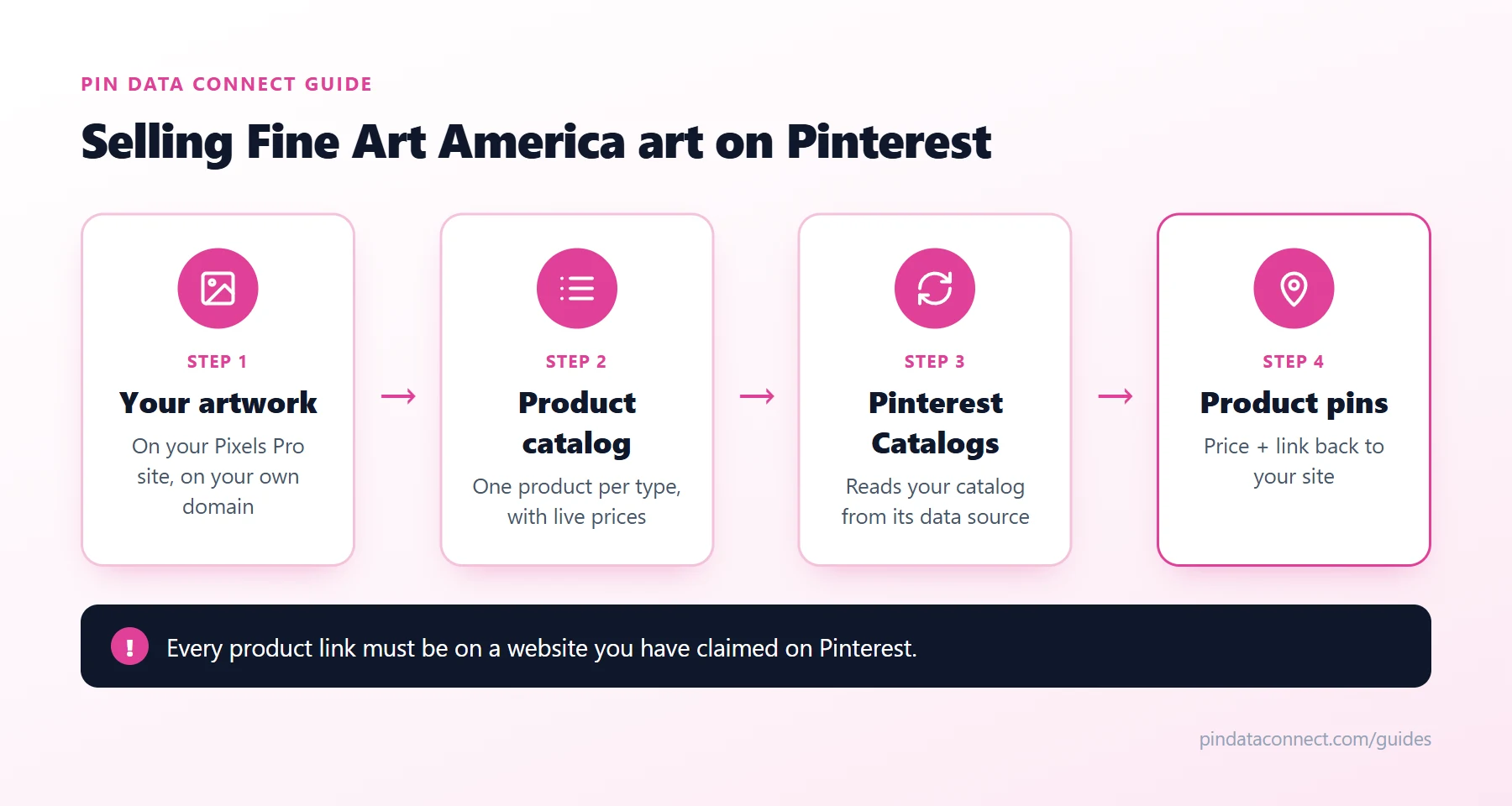
The diagram at the top of this guide shows the flow: your artwork on your Pixels Pro site becomes a set of catalog products, Pinterest reads the catalog from its data source, and each product becomes a pin with its price and a link back to your site. For a deeper look at product pins themselves, see How to Create Shoppable Pins for Print-on-Demand Art.
Beyond Pinterest
Pinterest works best as one part of a wider plan to promote Fine Art America art. Pair it with an email list, a few well-chosen social channels, and well-written artwork titles and keywords on Fine Art America itself. Fine Art America Marketing: 15 Ways to Get Traffic lays out the full set.
Frequently asked questions
Can I sell my Fine Art America art on Pinterest?
Yes. You can pin your artwork from anywhere, but to sell with shoppable product pins you need a Pinterest catalog, and Pinterest requires every product link in it to be on a website you have claimed. For Fine Art America artists, that means a Pixels Pro website on your own domain.
Do I need Pixels Pro to sell on Pinterest?
For shoppable product pins, practically yes. Product pins need product links on a website you have claimed on Pinterest, and you cannot claim fineartamerica.com or pixels.com. A Pixels Pro website on a custom domain gives you a site you can claim.
How long does it take for products to appear on Pinterest?
After you add a catalog data source, Pinterest needs time to process it - often a day or two for a first catalog, longer for very large ones. Claiming your website with a DNS TXT record can also take up to 72 hours to take effect.
Do product pins cost money?
No. Product pins created from a Pinterest catalog are free and can show up organically in Pinterest search and recommendations. Promoting them as shopping ads is optional and paid.
What happens to the Pinterest price when I change my Fine Art America markup?
Pinterest shows whatever price your catalog lists, so update the catalog when your prices change. A catalog that is rebuilt from your live artwork pages picks up the new prices automatically.
Turn every artwork into Pinterest product pins
Pin Data Connect lists every artwork on your Pixels Pro site and builds your Pinterest product catalog for you - every product type, live prices, and Google Product Category filled in - then connects it to Pinterest.
See How It Works for Pixels & FAA Artists →
Save this guide for later
Pin it to one of your Pinterest boards so it's easy to find when you're ready to set things up.
Save to Pinterest