Guide · For Fine Art America & Pixels artists
Pinterest SEO for Artists
Pinterest works like a search engine with pictures. When someone searches "abstract wall art blue", Pinterest decides which pins to show based on the words around each pin, the image itself, and how people have responded to it. Pinterest SEO is simply making sure your art gives Pinterest the right signals.
The good news for artists: your work is already the kind of thing people search for. To sell art on Pinterest, you just need to describe it the way buyers do.
How Pinterest decides what to show
Pinterest looks at a mix of signals to match pins to searches:
- Text: your pin title, description, board name, and profile.
- The image: Pinterest's visual recognition understands subjects, colors, and styles, and checks that your words match what's in the picture.
- The link: the page your pin points to - and whether it's on a website you've claimed.
- Engagement: saves, clicks, and close-ups tell Pinterest a pin is useful.
- Freshness: new images are favored over re-saving the same pin again and again.
Find the keywords buyers use
Start with Pinterest itself. Type a broad phrase like "botanical wall art" into Pinterest search and look at the suggestions that drop down and the colored keyword bubbles under the search bar - those are real searches. Pinterest Trends shows what's rising and when seasonal searches peak.
Think in the four ways people search for art:
- Subject: heron, sunflower, lighthouse, mountains
- Style and medium: watercolor, abstract, minimalist line art, vintage
- Color and mood: sage green, blue and white, calming, moody
- Room and use: living room wall art, nursery decor, kitchen prints, gift for a gardener
The best keyword phrases combine two or three: "sage green botanical prints for the kitchen".
Where your keywords go
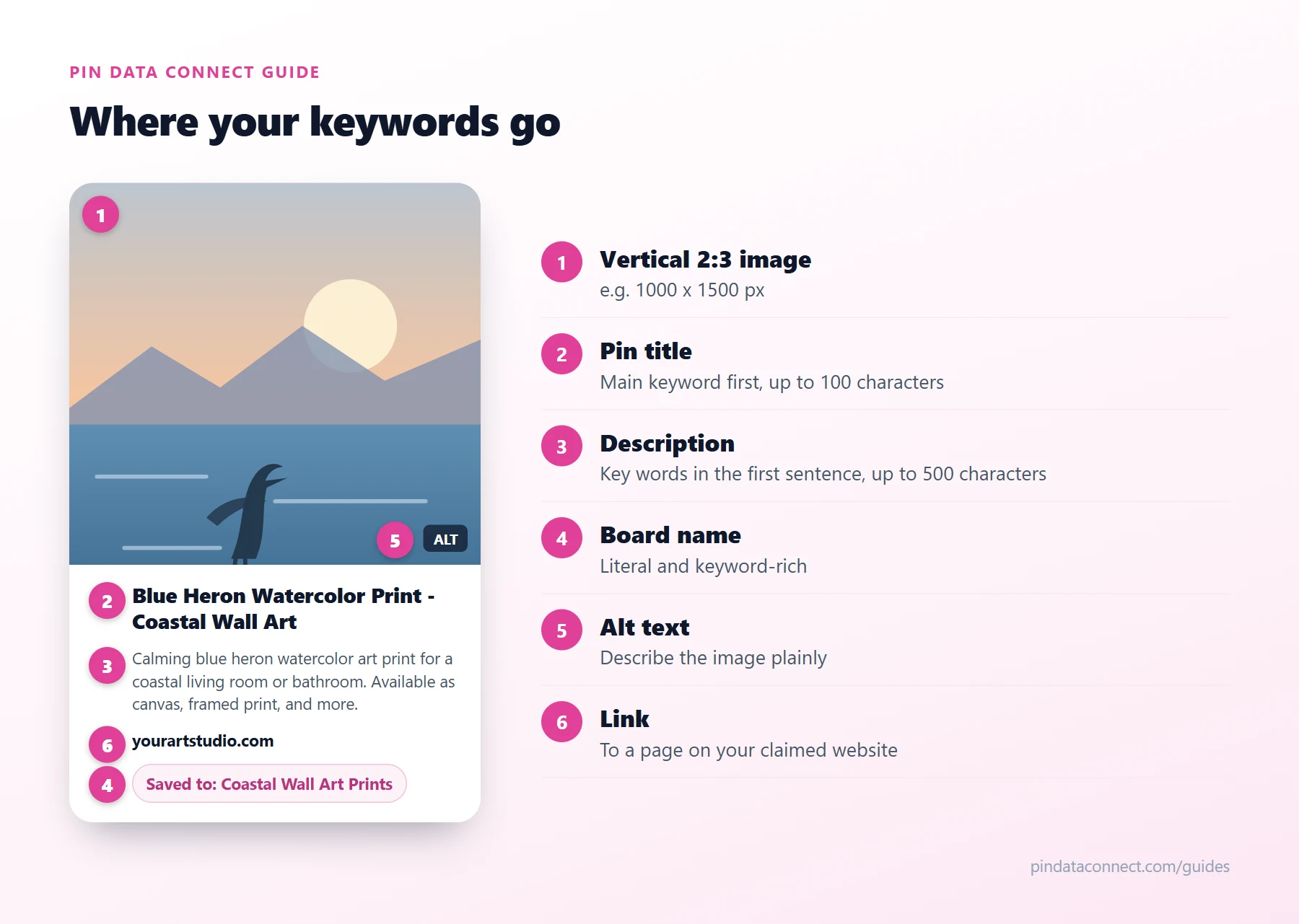
The diagram above shows the anatomy of a well-optimized pin. In order of importance:
- Pin title (up to 100 characters). Lead with the main phrase: "Blue Heron Watercolor Print - Coastal Wall Art".
- Pin description (up to 500 characters). Put the most important words in the first sentence, then describe the subject, style, colors, and where it fits, in natural language. Add a short reason to click.
- Board name and description. Use literal names like "Coastal Wall Art Prints" rather than "Ocean Vibes".
- Profile name and bio. Add what you make to your display name, for example "Maya Chen | Botanical Art Prints".
- Alt text. Describe the image plainly - it helps accessibility and gives Pinterest one more accurate signal.
Write for people first. A description that reads naturally and matches the image beats a pile of keywords - mismatched or stuffed text can hurt rather than help.
Make pins people want to save
- Use a vertical 2:3 image, such as 1000 x 1500 pixels - the shape Pinterest recommends.
- Show the art in context: on a wall, on a pillow, framed in a room. Buyers picture it in their own home.
- Add a short text overlay on some pins ("Coastal Watercolor Prints") to make the topic obvious at a glance.
- Create several pins per artwork - a detail shot, a room scene, a product close-up. Each fresh image is a new chance to be found.
Every fresh pin is a free way to promote Fine Art America art to buyers who are already searching.
Claim your website and add product pins
Claiming your website tells Pinterest you're the owner, so pins linking to it are attributed to you. If your artwork is on a Pixels Pro website on your own domain, you can claim it - the first step in any Fine Art America Pinterest strategy - and then send Pinterest a product catalog, so every product becomes a pin with its price and a direct link to buy. That's covered step by step in How to Sell Fine Art America Art on Pinterest.
A simple weekly routine
Consistency matters more than volume in Pixels Pinterest marketing. A routine you can keep up every week:
- Publish a few fresh pins of new or best-selling artwork, each with a keyword-led title and description.
- Save them to the most relevant keyword-named board first.
- Pin seasonal work well ahead of the season - people start planning early.
- Check Pinterest Analytics monthly and make more pins like your top performers.
Frequently asked questions
How do artists use Pinterest SEO?
By describing their art the way buyers search for it: putting keyword phrases about subject, style, color, and room in pin titles, descriptions, board names, and their profile, using vertical 2:3 images, and publishing fresh pins regularly.
How do I find Pinterest keywords for my art?
Type a broad phrase into Pinterest search and note the autocomplete suggestions and the keyword bubbles under the search bar. Pinterest Trends shows rising and seasonal searches. Combine subject, style, color, and room into phrases such as sage green botanical prints for the kitchen.
How long should a Pinterest pin description be?
Pinterest allows up to 500 characters. Use enough to describe the artwork naturally and put the most important keywords in the first sentence, since that is what most people see first.
Should artists use hashtags on Pinterest?
They are optional. Keywords in your title, description, and board names do most of the work. If you use hashtags, keep them few and specific.
What size should Pinterest pins be for art?
Pinterest recommends a vertical 2:3 ratio, such as 1000 x 1500 pixels. Vertical pins take up more space in the feed and are easier to see on phones.
Let your whole catalog rank on Pinterest
Pin Data Connect turns every artwork on your Pixels Pro site into Pinterest product pins - with keyword-rich product titles, live prices, and the right Google Product Category - so every product has a chance to be found.
See How It Works for Pixels & FAA Artists →
Save this guide for later
Pin it to one of your Pinterest boards so it's easy to find when you're ready to set things up.
Save to Pinterest