Guide · For Fine Art America & Pixels artists
How to Create Shoppable Pins for Print-on-Demand Art
A regular pin is a picture with a link. A shoppable pin - Pinterest calls it a product pin - is a product: it shows the price and whether it's in stock, and it links straight to the page where it can be bought. For print-on-demand artists, where one artwork can be a dozen products, product pins turn a single image into a dozen chances to sell art on Pinterest.
This guide explains how they work and how to create them for your art.
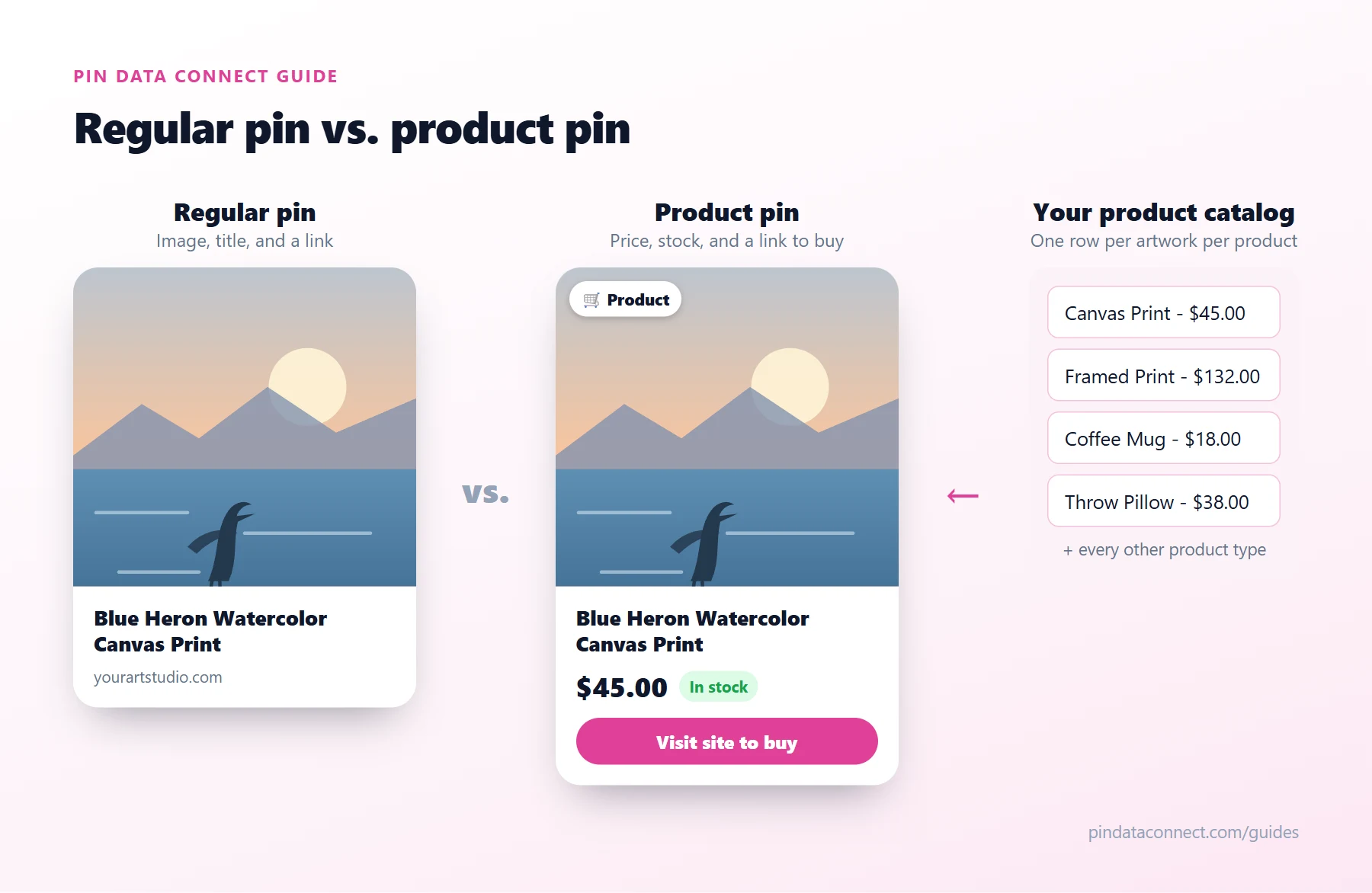
Regular pins vs. product pins
Both can appear in search and on boards. The difference is what Pinterest knows about them:
- A regular pin is an image, a title, a description, and a link. It's great for inspiration and traffic.
- A product pin comes from a product catalog, so Pinterest also knows its price, availability, brand, and category. That information is shown on the pin, kept up to date from your catalog, and makes the pin eligible for shopping surfaces and shopping ads.
You don't create product pins one by one. You give Pinterest a catalog, and Pinterest turns each product in it into a product pin.
What Pinterest requires
- A Pinterest business account. Free, and you can convert a personal account.
- A claimed website. You claim it with an HTML tag, an HTML file, a Google Merchant Center connection, or a DNS TXT record.
- Product links on that claimed website. Every link in your catalog must be on a domain you've claimed. This is the big one for print-on-demand: you can't claim a marketplace like fineartamerica.com, so you need your products on your own domain - for Fine Art America artists, a Pixels Pro website with a custom domain. It's the step most Fine Art America Pinterest setups miss.
- A product catalog - also called a data source - with a row for every product.
- A website that meets Pinterest's merchant guidelines, with clear shipping and return information and a way to contact you.
What goes in a product catalog
Each row in the catalog is one product. For print-on-demand art, that means one row per artwork per product type - "Blue Heron Watercolor Canvas Print", "Blue Heron Watercolor Coffee Mug", and so on. Each row needs:
- A unique ID for the product
- A title that names the artwork and the product type
- A description
- The product page link on your claimed website
- An image link
- The price with its currency
- Availability (in stock, out of stock)
- A Google Product Category, such as Home & Garden > Decor > Artwork for prints
With 40 or more product types per artwork, a portfolio of 50 artworks can mean 2,000 rows. That's why most artists use a tool to build the catalog from their artwork pages instead of a spreadsheet.
Step by step
- Put your products on your own domain. Set up a Pixels Pro website with a custom domain.
- Claim the domain on Pinterest. A DNS TXT record is the most reliable option for a custom domain; allow up to 72 hours.
- Build your catalog. Create one row per artwork and product type, with live prices from your artwork pages and the right Google Product Category.
- Add it as a data source. In Pinterest Catalogs, add your catalog's URL - or connect your catalog tool directly - and Pinterest reads it on a regular schedule.
- Wait for processing. Pinterest checks each product. Fix any errors it reports, such as missing prices or links on an unclaimed domain.
- Organize product groups. Group products by collection or type to keep things tidy and ready for ads.
Keep your product pins accurate
Product pins show the price from your catalog, so when you add artworks or change your markup, refresh the catalog. A catalog rebuilt from your live artwork pages always matches what's on your website - no retyping.
Then help them get found
Product pins can show up in Pinterest search on their own, and they work even better alongside fresh regular pins on keyword-named boards - the two halves of Pixels Pinterest marketing. Pinterest SEO for Artists covers the keywords side, and the pillar guide, How to Sell Fine Art America Art on Pinterest, ties the whole process together. For more ways to promote Fine Art America art beyond Pinterest, see Fine Art America Marketing: 15 Ways to Get Traffic.
Frequently asked questions
What are shoppable pins on Pinterest?
Shoppable pins, which Pinterest calls product pins, are pins created from a product catalog. They show the product price and availability and link directly to the page where the product can be bought.
Can I create shoppable pins for print-on-demand products?
Yes, as long as the product links are on a website you have claimed on Pinterest. For print-on-demand artists that usually means selling from your own domain, such as a Pixels Pro website with a custom domain, rather than a marketplace URL you cannot claim.
Are product pins free?
Yes. Product pins created from a catalog are free and can appear organically. Shopping ads that promote them are optional and paid.
Why was my Pinterest catalog rejected?
Common reasons are product links on a domain you have not claimed, missing or invalid prices, broken image links, or a website that does not meet Pinterest merchant guidelines, such as missing shipping, return, or contact information. Pinterest reports the specific errors in Catalogs.
How many product pins can one artwork create?
One for every product type you list it on. An artwork offered as a canvas print, framed print, metal print, mug, pillow, tote bag, and phone case becomes seven product pins, each with its own price.
Create product pins for every artwork
Pin Data Connect builds the Pinterest catalog for your Pixels Pro site for you - one product per artwork and product type, with live prices and Google Product Categories - and connects it to Pinterest.
See How It Works for Pixels & FAA Artists →
Save this guide for later
Pin it to one of your Pinterest boards so it's easy to find when you're ready to set things up.
Save to Pinterest