Guide · For Fine Art America & Pixels artists
Pixels Pro vs. Standard: What Artists Get
Every Fine Art America artist starts on the free Standard membership. Pixels Pro is the paid upgrade - Fine Art America also calls it Premium. The difference matters more than the price suggests, especially once you want to sell beyond the marketplace.
Here's what each one includes, side by side, and how to decide.
Plan details and prices were checked on Fine Art America's membership page and pro.pixels.com in October 2026. They can change - always confirm the current terms before you upgrade.
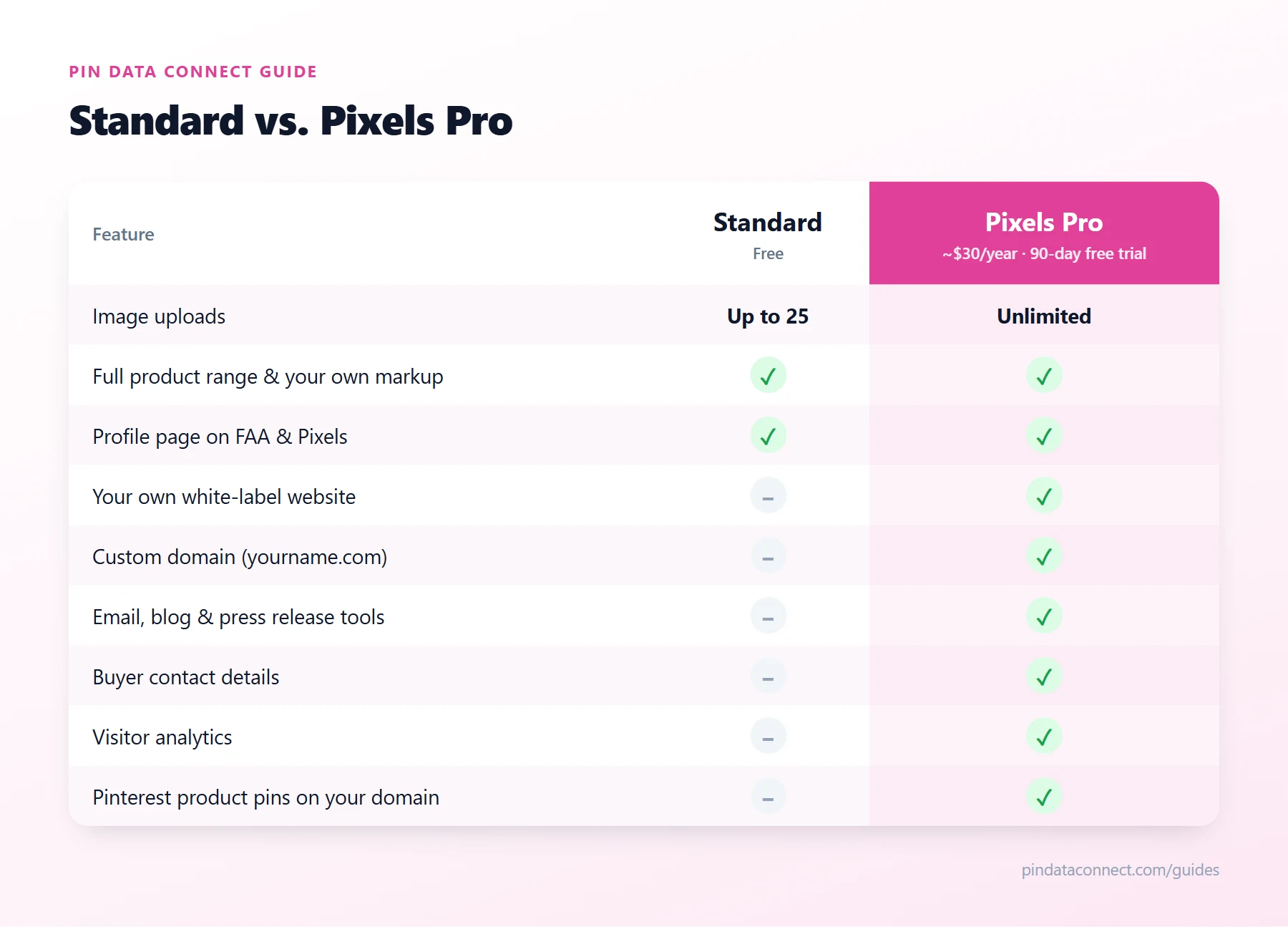
What the free Standard membership includes
- Up to 25 images. Each upload can be offered across the full product range - prints, canvas, framed, metal, acrylic, cards, phone cases, home decor, apparel, and more.
- A profile page on Fine Art America and Pixels, with a URL you can customize.
- Your own prices. You set your markup on top of the base price of each product.
- Worldwide fulfillment. Orders are printed, packed, and shipped for you.
- Community features such as groups, contests, and forums.
It's a genuinely useful way to test print-on-demand with a small portfolio.
What Pixels Pro adds
Pixels Pro costs about $30 a year - shown as $2.50 a month on pro.pixels.com - after a free 90-day trial. It includes everything in Standard, plus the tools you need to promote Fine Art America art beyond the marketplace:
- Unlimited uploads. No 25-image cap.
- Your own white-label website at yourname.pixels.com, kept in sync with your Fine Art America and Pixels profiles.
- A custom domain such as yourartstudio.com for that website.
- Marketing tools: customized HTML emails (up to 10,000 recipients at a time), unlimited blog posts and press releases, PDF ordering catalogs, event listings, and social auto-promotion.
- Buyer contact details for building your own email list.
- Collections - unlimited, including password-protected ones.
- Analytics on your visitors, plus Google Analytics support.
- Integrations such as Shopify, and a shopping cart widget you can embed elsewhere.
The difference that matters most: your own domain
For selling beyond the marketplace, the custom domain is the feature that changes what's possible. Shopping platforms like Pinterest require your product links to be on a website you've claimed - and you can't claim fineartamerica.com or pixels.com.
With Pixels Pro on your own domain, you can claim your site on Pinterest and send it a product catalog, so every artwork-and-product combination can appear as a shoppable product pin - the foundation of any Fine Art America Pinterest strategy. Our guide to shoppable pins for print-on-demand art explains how that works.
Who should upgrade?
Stay on Standard if you have a handful of pieces, you're testing whether print-on-demand fits your work, and you're happy relying on marketplace search.
Upgrade to Pixels Pro if you have, or plan to have, more than 25 artworks; you want a branded website on your own domain; you want to sell art on Pinterest with shoppable product pins; or you want to build an email list of your buyers. At about $30 a year, one or two extra sales typically cover it.
Making the most of Pixels Pro
Once you've upgraded, put the website to work: connect your domain, then follow How to Sell Fine Art America Art on Pinterest to turn your portfolio into product pins - the backbone of Pixels Pinterest marketing - and pick a few tactics from 15 Ways to Get Traffic.
Frequently asked questions
What is the difference between Pixels Pro and a standard Fine Art America account?
The Standard membership is free and allows up to 25 images with a profile page on Fine Art America and Pixels. Pixels Pro is the paid membership: unlimited images, your own white-label website with an optional custom domain, marketing tools such as email and blogging, buyer contact details, and analytics.
How much does Pixels Pro cost?
As of October 2026, Pixels Pro is about $30 a year, shown as $2.50 a month on pro.pixels.com, with a free 90-day trial. Check the current price before upgrading, as plans can change.
Is Pixels Pro the same as Fine Art America Premium?
Fine Art America describes its paid membership as Premium, and the artist website it includes is the Pixels Pro website. The paid membership is what unlocks unlimited uploads, the white-label website, a custom domain, and the marketing tools.
Can I use my own domain name with Pixels Pro?
Yes. Your Pixels Pro website starts at a yourname.pixels.com address, and you can add a custom domain such as yourartstudio.com by following the instructions in your website settings.
Do I need Pixels Pro to sell on Pinterest?
To sell with shoppable Pinterest product pins, practically yes: Pinterest requires product links on a website you have claimed, and you cannot claim fineartamerica.com or pixels.com. A Pixels Pro website on your own domain is a site you can claim.
Already on Pixels Pro? Put it on Pinterest.
Pin Data Connect turns every artwork on your Pixels Pro site into a Pinterest product catalog - every product type, with live prices - and connects it to Pinterest so your art shows up as shoppable product pins.
See How It Works for Pixels Pro Artists →
Save this guide for later
Pin it to one of your Pinterest boards so it's easy to find when you're ready to set things up.
Save to Pinterest