Guide · For Fine Art America & Pixels artists
Fine Art America Marketing: 15 Ways to Get Traffic
Uploading your art to Fine Art America puts it in front of a huge marketplace - which is also the challenge. Millions of images compete for the same searches. The artists who sell steadily don't rely on being found by chance; they promote Fine Art America work themselves and send their own traffic.
Here are 15 ways to do that, grouped into three areas: getting more out of Fine Art America itself, getting found in search, and building an audience you own.
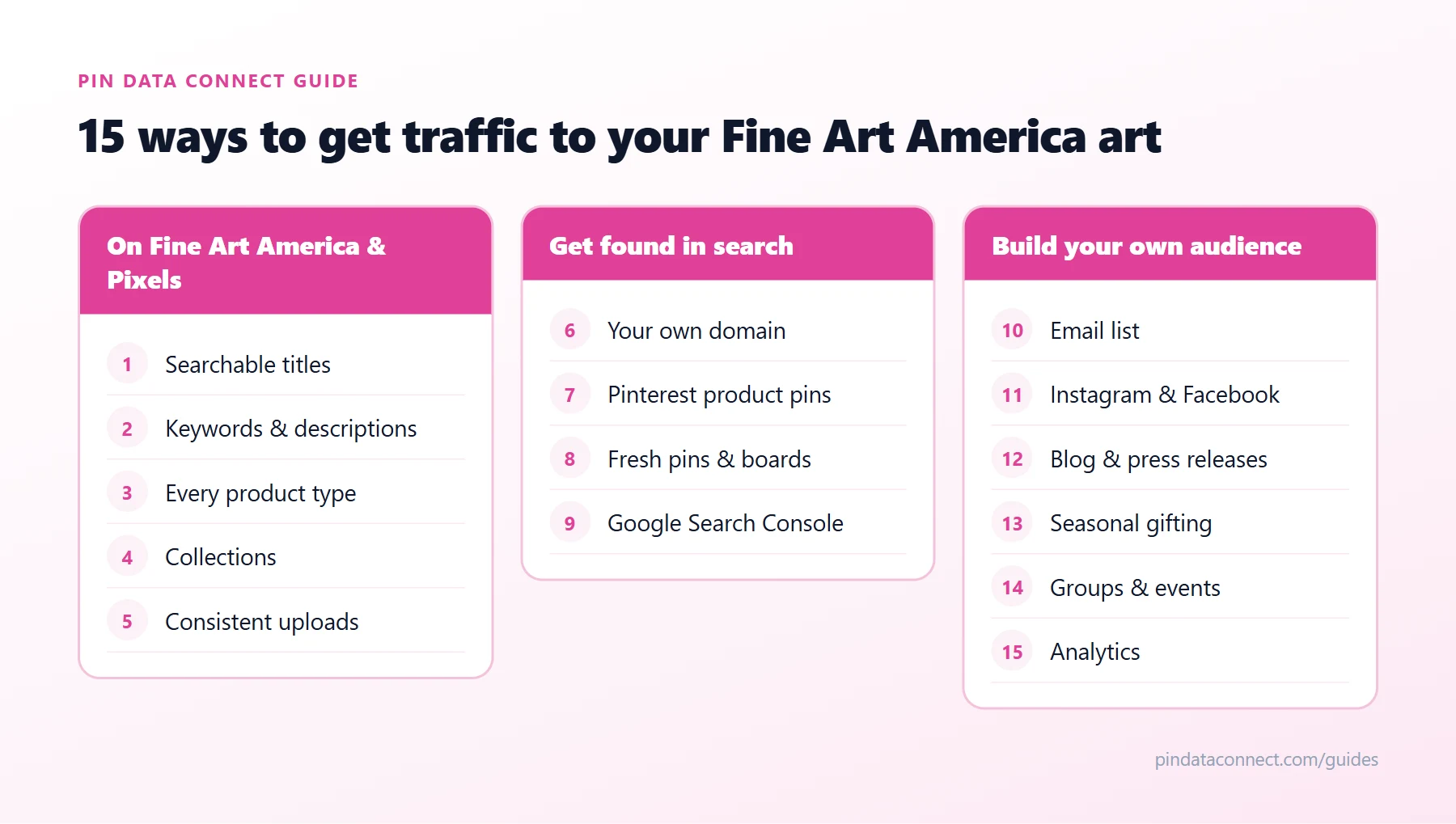
On Fine Art America and Pixels
1. Write titles buyers actually search for
"Untitled 14" doesn't get found. "Blue Heron at Dawn - Coastal Marsh Watercolor" does. Lead with the subject, then add the style, medium, or place. Think about what a buyer would type, not what you call the piece in your studio.
2. Use every keyword and description field
Describe the subject, colors, mood, style, and the rooms or occasions it suits. "Calming sage green botanical print for a kitchen or bathroom" carries far more search intent than a one-line description.
3. Offer every product type
Each product - canvas, framed print, metal, acrylic, mug, pillow, tote, phone case, apparel - is another way to be found and another price point. Check that your artwork is enabled on all the products where it looks good, and crop or position it well for each.
4. Organize work into collections
Group art by theme - "Coastal", "Botanical", "Night Skies". Collections make your profile easier to browse, give buyers more to look at once they arrive, and give you clean links to share.
5. Upload consistently
Every new artwork is a new chance to show up in search. A Standard (free) account is limited to 25 images; Pixels Pro removes the limit, which matters once your portfolio grows. See Pixels Pro vs. Standard for the full comparison.
Get found in search
6. Get your own Pixels Pro website on a custom domain
A website at yourartstudio.com is easier to remember, easier to share, and puts your name - not the marketplace's - in front of buyers. It's also what makes Pinterest shopping possible (more on that below).
7. Turn every product into a Pinterest product pin
Pinterest is a search engine for ideas, and buyers there are planning purchases. To sell art on Pinterest, use a Pinterest catalog: every artwork-and-product combination becomes a pin that shows its price and links straight to your product page. Our pillar guide, How to Sell Fine Art America Art on Pinterest, walks through the full Fine Art America Pinterest setup.
8. Pin fresh images to keyword-rich boards
Alongside product pins, keep publishing new pins - detail shots, room mockups, process photos - to boards with literal names like "Coastal Wall Art Prints" - the core of Pixels Pinterest marketing. Pinterest SEO for Artists covers keywords, titles, and descriptions in depth.
9. Help Google find your website
Add your custom domain to Google Search Console, write descriptive artwork titles and descriptions, and link to your site from your social profiles. Every quality link back to your site helps it get discovered.
Build an audience you own
10. Build an email list
Followers on a social app can disappear with an algorithm change; an email list is yours. Pixels Pro includes tools to send customized HTML emails and gives you buyers' contact details, so past customers can hear about new work first.
11. Share work on Instagram and Facebook - with links
Post finished pieces, works in progress, and the art shown on products and in rooms. Always point people to a specific product or collection page rather than just your profile.
12. Blog and publish press releases
Pixels Pro members can publish unlimited blog posts and press releases. Write about the story behind a series, a new collection, or an exhibition - each post is another page that can bring in search traffic.
13. Plan around seasons and gifting
Holiday, Mother's Day, and graduation shoppers search early. Promote giftable products - mugs, pillows, greeting cards, framed prints - well ahead of each season, and pin seasonal work early so it has time to be found.
14. Use groups, contests, and events
Fine Art America groups and contests put your work in front of other members, and Pixels Pro lets you advertise events in its newsletter. Local shows, open studios, and markets are great moments to point people to your website.
15. Measure what sells - and do more of it
Pixels Pro includes visitor analytics and works with Google Analytics. Look at which artworks, products, and traffic sources lead to sales, then create more of what works and put more promotion behind your best sellers.
Where to start
You don't need all 15 at once. If you're starting from zero, do three: fix your titles and keywords (1 and 2), get your Pixels Pro site on your own domain (6), and turn your catalog into Pinterest product pins (7). Together they make the rest work harder.
Frequently asked questions
How do I get more views on Fine Art America?
Write titles and descriptions with the words buyers search for, offer your art on every product type it suits, organize work into collections, and send your own traffic from Pinterest, email, and social media rather than waiting to be found in the marketplace.
Does Fine Art America promote my art?
Your artwork is listed in the Fine Art America and Pixels marketplaces, where buyers can find it in search. Beyond that, most steady sellers bring in their own traffic with Pinterest, email, social media, and their own website.
Is Pinterest good for selling art?
Yes. People use Pinterest to plan purchases, pins keep getting found for months, and with a Pinterest catalog each product can become a pin that shows its price and links straight to the page where it can be bought.
How many images can I upload to Fine Art America?
A Standard (free) account can upload up to 25 images. Pixels Pro, the paid membership, allows an unlimited number of images.
What is the fastest way to get traffic to Fine Art America art?
Start with three things: searchable titles and keywords, a Pixels Pro website on your own domain, and a Pinterest product catalog so every artwork-and-product combination can show up as a shoppable pin.
Put your whole catalog on Pinterest
Pin Data Connect turns every artwork on your Pixels Pro site into Pinterest product pins - every product type, with live prices - so tactic #7 takes minutes, not weeks.
See How It Works for Pixels & FAA Artists →
Save this guide for later
Pin it to one of your Pinterest boards so it's easy to find when you're ready to set things up.
Save to Pinterest