Pixels Pro & Fine Art America
Import artworks with the PDC Import bookmark
The PDC Import bookmark imports all your new artworks in one go. It's the quickest way after finding your artworks, and it needs no extension. It works in Chrome, Edge, Firefox, and Safari on a computer.
1. Add the bookmark (once)
- On Manage Artworks, find step 2. Create your artworks' products.
- Drag the PDC Import button to your browser's bookmarks bar. Don't click it: it only works when clicked from one of your artwork pages.
Can't see a bookmarks bar? Turn it on in your browser's settings or View menu (in Chrome and Edge, press Ctrl+Shift+B, or Cmd+Shift+B on a Mac).
2. Import
- Open any one of your artworks on your site, for example by clicking one in the Manage Artworks list.
- On that page, click the PDC Import bookmark. A small Pin Data Connect window opens.
- Click Import All … Not-Yet-Processed Artworks to import every artwork from that site you haven't processed yet, or Import Only The Artwork You Have Open.
- Keep both the small window and your artwork tab open until it finishes. You can use other windows meanwhile.
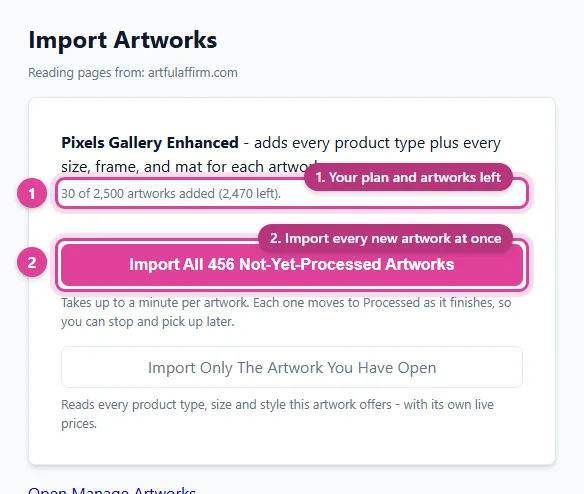
Each artwork takes up to about a minute. As each one finishes, its products are added to your catalog and it moves to Processed. To stop early, click Stop after this artwork. The ones already done stay done, and you can carry on later.
Good to know
- Log in first. If the window asks you to log in, click Log in, sign in, then click I've logged in - continue.
- It uses your own browser. Your browser reads your artwork pages, exactly as you'd see them, so prices and images match your site.
- Large sites take time. Each artwork has many product pages to read, and pages are read at a steady pace. Leave it running.
- Your plan's artwork limit applies. If you reach it, the import stops and tells you. See Pixels plans and artwork limits.
Still need help?
Chat with us using the chat button in the corner of this page, or send us a message and we'll reply by email.
Contact Us