Pinterest Product Catalog Builder for Dashery
Sell print-on-demand merch on Dashery? One design usually becomes dozens of individual product listings - T-shirts, hoodies, mugs, totes, and more. Pin Data Connect builds a Pinterest product catalog from all of them at once: enter a base title, description, and T-Shirt product URL for the design, pick which product types you sell it as, and it generates one Pinterest-ready catalog row per product type - with the Google Product Category already chosen for you.
Dashery blocks automated scraping, so this isn't a fully automatic import - you fill in each selected product type's price and image link yourself, which only takes a minute since the title, description, brand, and category are already handled.
Try it free for 7 days. A valid payment method is required to start your trial - you won't be charged until the trial ends, and you can cancel anytime before then to avoid being billed.
One Design, Every Product Type
Check off T-shirt, hoodie, mug, and 20 total product types - one base entry becomes a full set of Pinterest catalog rows.
Google Product Category, Pre-Chosen
Every product type maps to its own correct Google Product Category automatically - no manual category search needed for this feed.
Review Before You Add
See every generated row - title, price, image - before anything is added, so you can fill in or fix each one first.
Connect Automatically
Every plan includes a private URL with its own username and password that acts as your product catalog's data source - paste it into Pinterest Catalogs' scheduled settings and it reads your latest products automatically.
Or Add Products in One Click With Our Chrome Extension
Browsing the exact product page for one of your listed variants? The free Pin Data Connect Chrome extension detects which product type it matches from the page URL and auto-selects its Google Product Category, so you just review and submit. See how it works →
Screenshots From the App
Real Pin Data Connect screens, shown with sample products. The numbers point out what to look at - click any screenshot to see it full size.
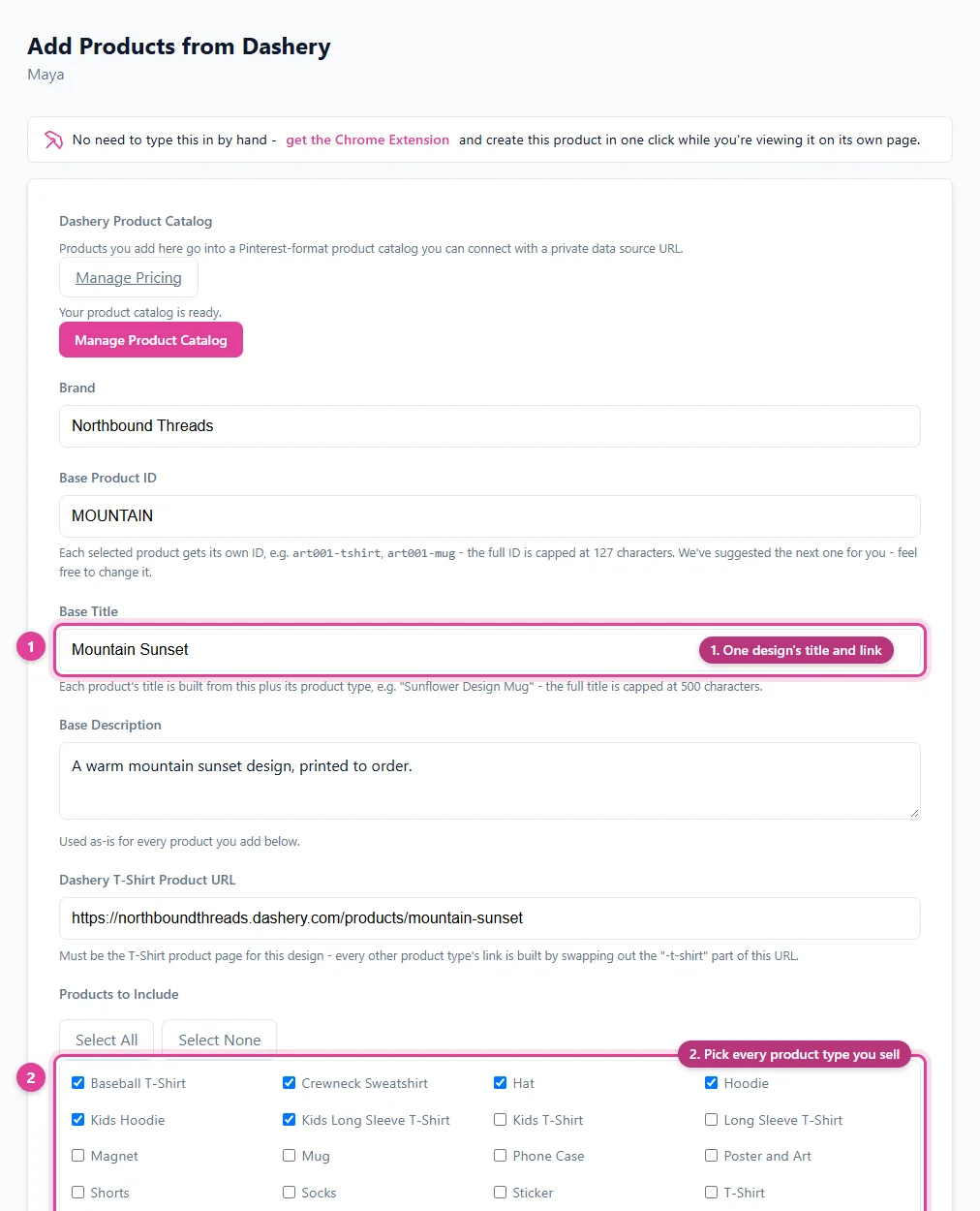
Enter one Dashery design and tick the product types you sell - a product is built for each one.
- One design's title and link
- Pick every product type you sell
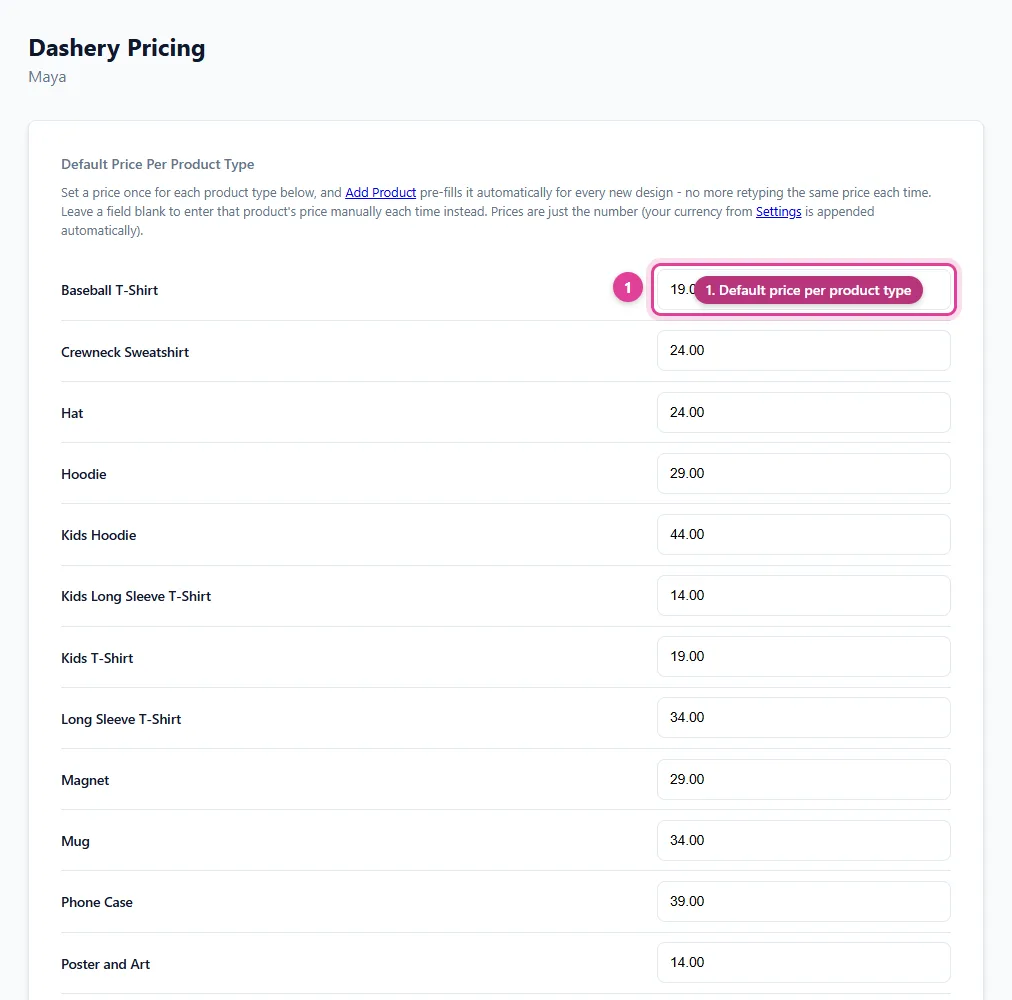
Save a default price for each product type once - every new Dashery design uses them automatically.
- Default price per product type
- Save once, used every time
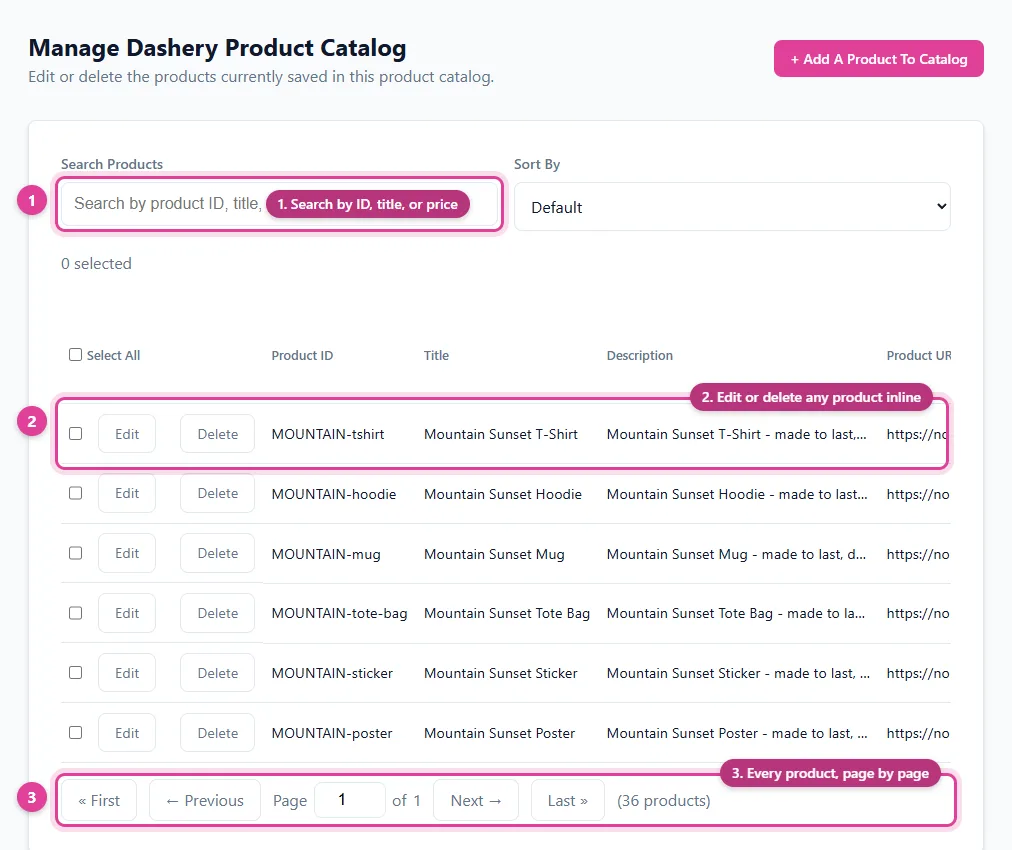
One design, every product type - each its own product in your Pinterest catalog.
- Search by ID, title, or price
- Edit or delete any product inline
- Every product, page by page
See It In Action
Dashery has no automated scraping (Dashery blocks automated requests) - instead you fill in a few base fields once, pick which product types to include, then enter each one's price and image link yourself.
Step 1: Base Details
Step 2: Review Before Adding
Clicking "Build Product List" creates one row per product checked above - the title is built from the base title plus that product's type, ready for you to fill in price and image.
Your Product Catalog Data Source for Pinterest
Once you start adding products, you'll get a private URL of your own - complete with a generated username and password - that acts as your product catalog's data source. Paste it into Pinterest Catalogs' scheduled settings and it reads your products from it automatically. Here's an example of what that looks like:
Catalog Health: connect Pinterest with the Connect button on the Connections page instead of pasting the URL, and we check every day which of your products Pinterest accepted or rejected - and why - and show you the fix for each.
https://pindataconnect.com/api/feed/3a8c382cbcc4e7b3ea8b98ae3950f182329a2289904cdd7c047fbb089975a686
3bfa9d5686b34ac1dd54e59e521d96ec
5f93d399b381bc5330ca402cae94be0902d3724cdeac4aa38fb0f389930b8c34
Search, Edit, or Delete Anytime
Once your product catalog has products in it, manage every one from a single screen - search by product ID/title/price, edit any field inline, or delete - your product catalog's data source reflects the change instantly.
| Product ID | Title | Price | |
|---|---|---|---|
| art001-tshirt | Sunflower Design T-Shirt | 22.00 USD | |
The second row above shows what clicking "Edit" looks like - every field becomes editable in place, with Save and Cancel replacing Edit and Delete until you're done.
Free Print-on-Demand Pinterest Guides
Frequently Asked Questions
What is the Dashery Pinterest Product Catalog Builder?
A Pinterest product catalog built specifically for Dashery print-on-demand sellers - enter your design's base title, description, and T-Shirt product URL once, pick which of 20 product types you sell it as (T-shirt, hoodie, mug, and more), and it generates one Pinterest-ready catalog row per product type.
Why isn't this automated the way other platforms are?
Dashery blocks automated scraping requests, so instead of pulling your product data automatically, you fill in a few base fields once and enter each selected product type's price and image link yourself. The Google Product Category is still chosen for you automatically for every product type.
Do I need to connect my Dashery account?
No. Pin Data Connect doesn't require you to connect a Dashery account - you build the product catalog here, then connect it to Pinterest Catalogs with a private data source URL.
Can I add products with the Chrome extension instead of typing them in?
Yes. Open the exact product page for one of your listed variants and the free Pin Data Connect Chrome extension detects which product type it matches, auto-selecting its Google Product Category too.
Save This for Later
Planning your product catalog? Pin this to one of your Pinterest boards so it's easy to find again when you're ready.
Save to Pinterest