WooCommerce & PrestaShop store connector
Store connector plans, limits, and disconnecting
Product limits
- Store Product Catalog Connect: up to 1,000 products
- Plus: up to 5,000 products
- Pro: up to 25,000 products
Each synced product and each variant counts as one. Your store's connection card (WooCommerce Connection or PrestaShop Connection) shows Products synced against your limit.
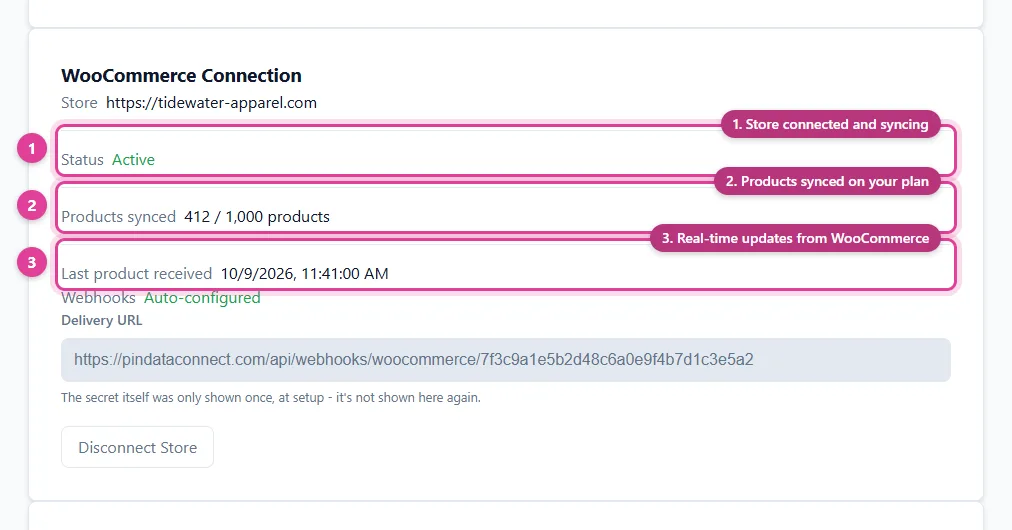
When you reach the limit, new products stop syncing, but products already synced keep updating normally. Upgrade to bring the rest in.
Change your plan
- On the Source tab of Connections, find Your Plan.
- Click Upgrade or Switch to this plan next to the plan you want.
Your store connection and synced products stay as they are; only the limit changes. You can't move to a plan whose limit is below the number of products you've already synced.
Disconnect your store
Click Disconnect Store on your store's connection card. Products already synced stay in your catalogs, but nothing new syncs until you connect again. To remove the synced products too, delete them from each catalog.
Cancelling the plan works the same way as any subscription. See Cancel your subscription.
Still need help?
Chat with us using the chat button in the corner of this page, or send us a message and we'll reply by email.
Contact Us