All-Platform Combo Product Catalog Builder
Want to be everywhere at once? Instead of subscribing to Pinterest, Facebook, Google, and Bing separately and entering every product four times, the All-Platform combo gives you one Add Product form - fill it out once and it appends to all four product catalogs at the same time.
Each product catalog still gets its own private data source URL, connected to Pinterest Catalogs, Facebook Commerce Manager, Google Merchant Center, and Bing/Microsoft Merchant Center exactly as if you'd built them separately - the only difference is you never fill in the same product information four times.
Works with any website or online store - Shopify, WooCommerce, Etsy, Squarespace, a custom-built site, or anywhere else you sell. You enter your product data directly (or capture it with our free Chrome extension), so there's nothing to install or connect on your site itself.
Try it free for 7 days. A valid payment method is required to start your trial - you won't be charged until the trial ends, and you can cancel anytime before then to avoid being billed.
One Form, Four Catalogs
Every field all four platforms need in a single Add Product screen - submit once, and it's added to Pinterest, Facebook, Google, and Bing together.
Independent Success/Failure
Each product catalog is updated separately - a problem with one never blocks or breaks the other three.
Four Data Source URLs
Every product catalog keeps its own private data source URL, connected exactly as it would be standalone.
One Subscription, Lower Cost
Priced below subscribing to all four standalone platform plans separately - see current pricing.
Or Add Products in One Click With Our Chrome Extension
Browsing a product page? The free Pin Data Connect Chrome extension supports this combo directly - one submission writes to all four of your product catalogs at once, no manual typing. See how it works →
Screenshots From the App
Real Pin Data Connect screens, shown with sample products. The numbers point out what to look at - click any screenshot to see it full size.
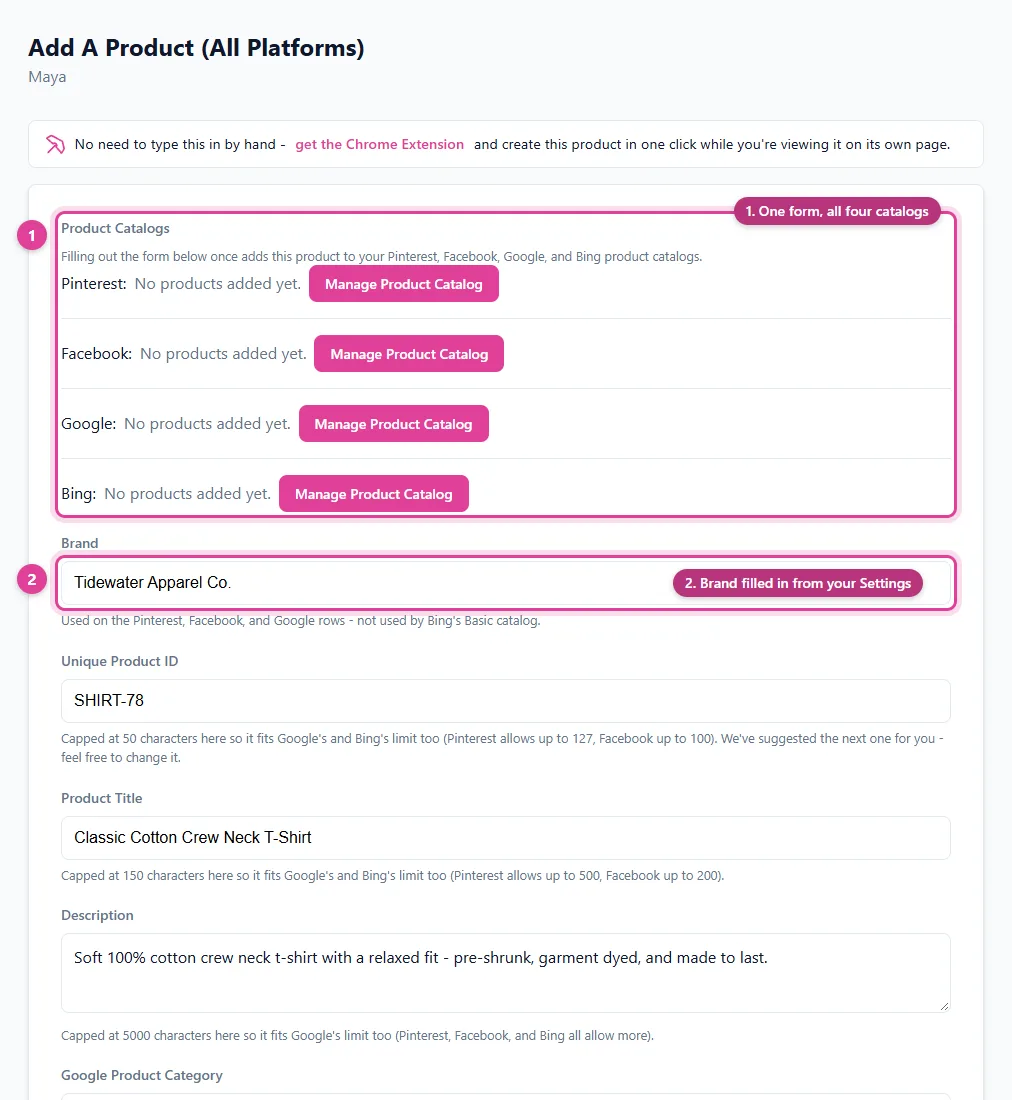
Fill out one form and the product goes into your Pinterest, Facebook, Google, and Bing catalogs together.
- One form, all four catalogs
- Brand filled in from your Settings
- Google Product Category search
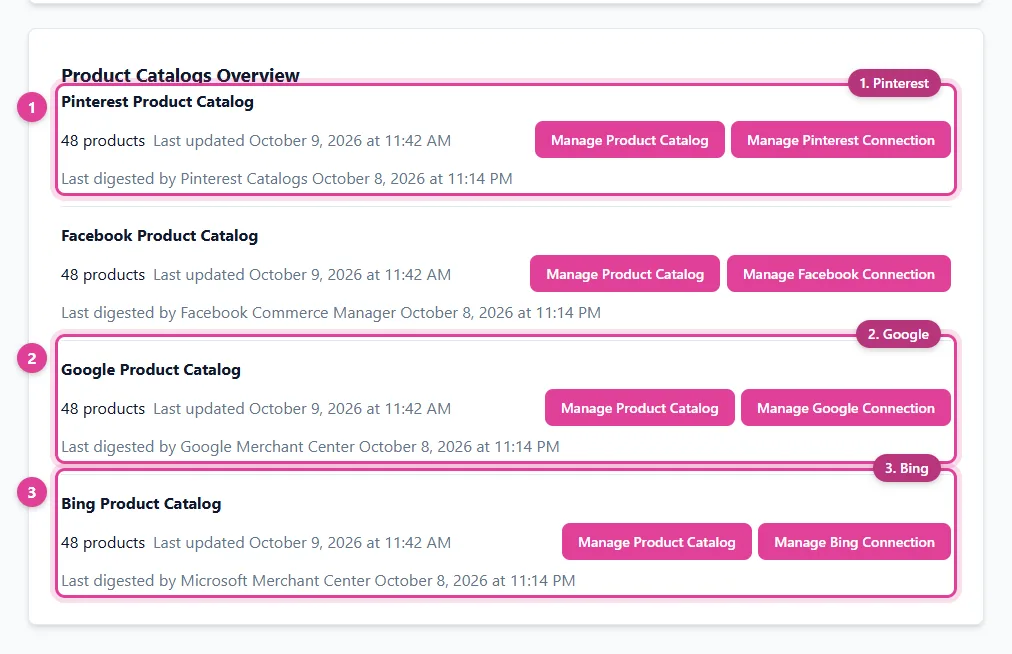
All four catalogs on your dashboard - one product added once, everywhere.
- Bing
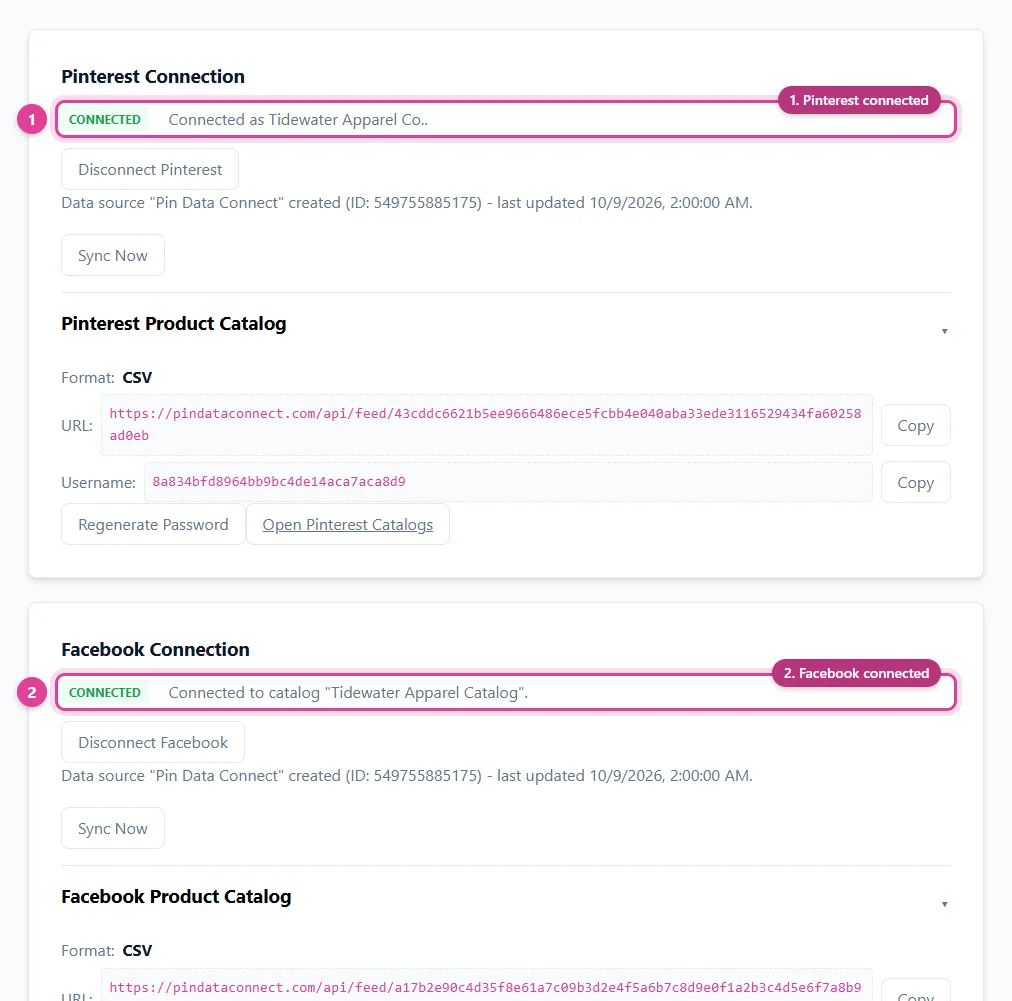
Connect each platform from one Connections page - by linking your account or with each catalog's private URL.
- Pinterest connected
- Facebook connected
See It In Action
One Add Product form, submitted to all four catalogs at once. Try the Google Product Category search below - it's real (searches a small preview sample; the live app searches Google's full taxonomy).
Add A Product
Fill in these fields once to add one product to your Pinterest, Facebook, Google, and Bing product catalogs.
Your Product Catalog Data Sources
Once you start adding products, you'll get a private URL for each product catalog - complete with its own generated username and password. Paste each one into that platform's scheduled settings and it reads your products automatically. Here's an example of what that looks like:
Catalog Health: connect Pinterest, Facebook, or Google with the Connect button on the Connections page instead of pasting the URL, and we check every day which of your products each platform accepted or rejected - and why - and show you the fix for each.
Pinterest:
https://pindataconnect.com/api/feed/21fa2ff18c18482ff79999b7a75a03e3ff2201a1137b7ab824208549fdc4b364
Facebook:
https://pindataconnect.com/api/feed/c9052156e5399170e2ec71a28257a47fc0b469d70d7d221d8fc9e62c52f3a253
Google Merchant Center:
https://pindataconnect.com/api/feed/46a3be201facbaf695527b24b37f103b213e73585c754c0750ed44c47c4a153d
Bing/Microsoft Merchant Center:
https://pindataconnect.com/api/feed/58feb9fcf22cc790ae29f3e5026ecf7625d0880fc0d408f435cccd59444b2e36
Each URL also comes with its own generated username and password, just like the single-platform examples elsewhere on this site.
Search, Edit, or Delete Anytime
Once your product catalogs have products in them, manage each one from a single screen - search by product ID/title/price, edit any field inline, or delete - each data source reflects the change instantly.
| Product ID | Title | Price | |
|---|---|---|---|
| SKU-1042 | Sunflower Ceramic Coffee Mug | 18.99 USD | |
The second row above shows what clicking "Edit" looks like - every field becomes editable in place, with Save and Cancel replacing Edit and Delete until you're done. Each platform is managed from its own separate Manage Feed screen.
Frequently Asked Questions
Does this work with my website or online store?
Yes. This works with any website or online store - Shopify, WooCommerce, Etsy, Squarespace, a custom-built site, or anywhere else you sell. You enter your product data directly (or capture it with the free Chrome extension) instead of connecting through a specific platform's API, so there's nothing to install or configure on your site itself.
How does the All-Platform combo work?
Fill out one Add Product form and it submits to your Pinterest, Facebook, Google, and Bing product catalogs all at once - no separate subscriptions and no entering the same product four times. Each catalog still gets its own data source URL to connect to its platform.
What if some catalogs succeed and others fail?
Each product catalog is updated independently - you're told exactly which platform(s) succeeded and which failed and why, so you can fix just the ones that need it without losing what already worked.
Is this cheaper than subscribing to all four platforms separately?
Yes - the All-Platform combo plan is priced below what the four individual Pinterest, Facebook, Google, and Bing plans would cost together. See current pricing on the Pricing page.
Can I add products with the Chrome extension instead of typing them in?
Yes. The free Pin Data Connect Chrome extension supports this combo directly - one submission writes to all four product catalogs at once, the same as the website's combo form.
Save This for Later
Planning your product catalog? Pin this to one of your Pinterest boards so it's easy to find again when you're ready.
Save to Pinterest